

 v1.3.0
cupertino_onboarding
提供 iOS 風格引導體驗的 Flutter 套件。
195喜歡 928近 30 天下載150Pub 分數
AndroidiOSWebmacOSWindowsLinux
提供美觀、類似 iOS 的簡易引導體驗的 Flutter 套件,程式碼極少。

以下為英文專案原文快照,最新內容請造訪 GitHub。



Flutter package that provides a beautiful, iOS-like, easy onboarding experience with minimal code.
It's designed to easily showcase your app's features and provide a simple way for users to learn about your app.


Add the package to your pubspec.yaml file:
cupertino_onboarding: ^1.2.0
Import the library:
import 'package:cupertino_onboarding/cupertino_onboarding.dart';
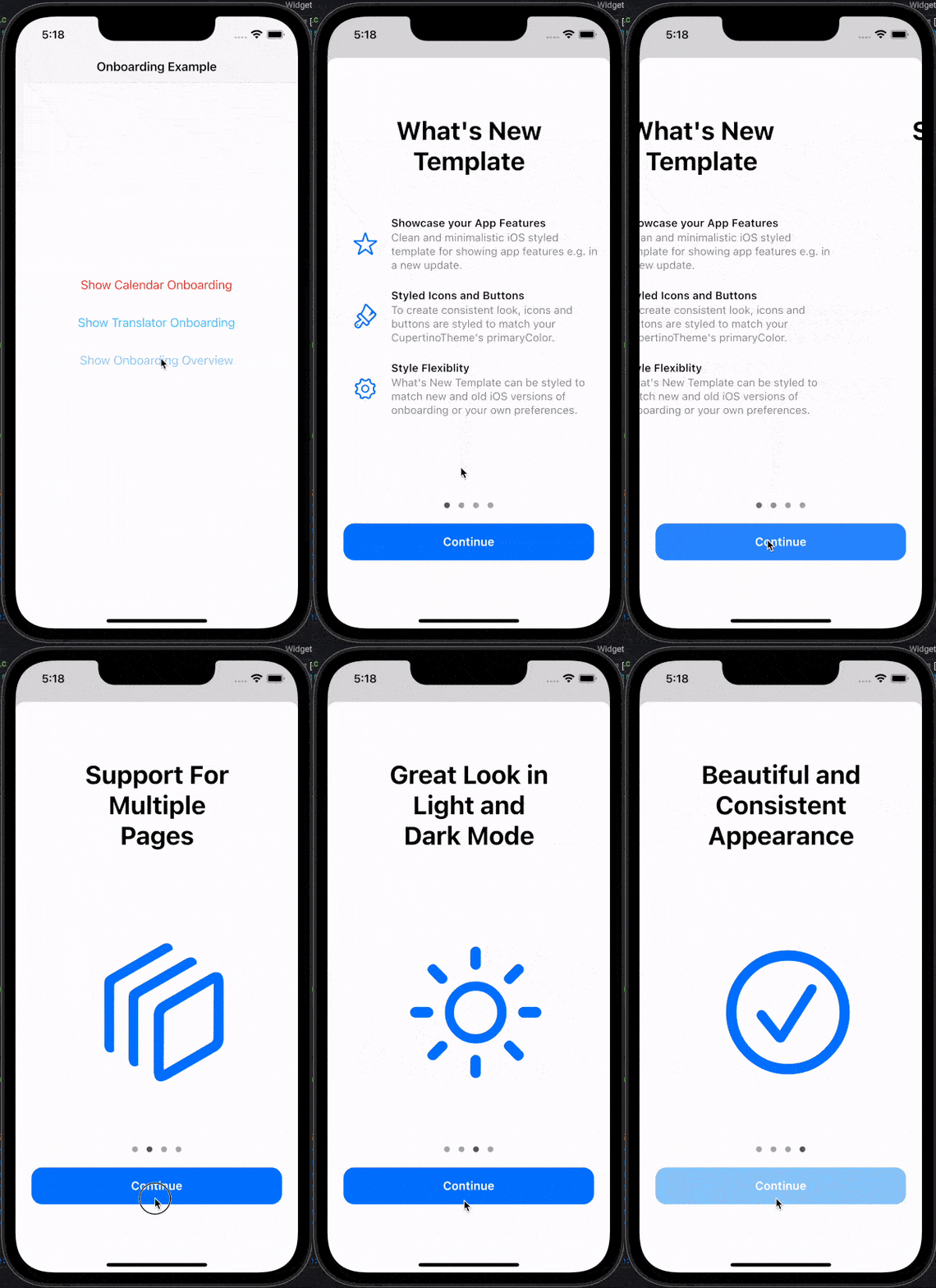
Create CupertinoOnboarding widget and pass your pages as parameter:
@override
Widget build(BuildContext context) {
  return CupertinoOnboarding(
    onPressedOnLastPage: () => Navigator.pop(context),
    pages: [
      // To create What's New page like Calendar or Translator
      // examples in the readme, use `WhatsNewPage` widget:

      // Actual code from the Calendar example:
      WhatsNewPage(
        title: const Text("What's New in Calendar"),
        features: [
          // Feature's type must be `WhatsNewFeature`
          WhatsNewFeature(
            icon: Icon(
              CupertinoIcons.mail,
              color: CupertinoColors.systemRed.resolveFrom(context),
            ),
            title: const Text('Found Events'),
            description: const Text(
              'Siri suggests events found in Mail, Messages, and Safari, so you can add them easily, such as flight reservations and hotel bookings.',
            ),
          ),
          WhatsNewFeature(
            icon: Icon(
              CupertinoIcons.time,
              color: CupertinoColors.systemRed.resolveFrom(context),
            ),
            title: const Text('Time to Leave'),
            description: const Text(
              "Calendar uses Apple Maps to look up locations, traffic conditions, and transit options to tell you when it's time to leave.",
            ),
          ),
        ],
      ),

      // To create custom onboarding page, use
      // `CupertinoOnboardingPage` widget:

      // Actual code from the GIF example:
      const CupertinoOnboardingPage(
        title: Text('Support For Multiple Pages'),
        body: Icon(
          CupertinoIcons.square_stack_3d_down_right,
          size: 200,
        ),
      ),
      const CupertinoOnboardingPage(
        title: Text('Great Look in Light and Dark Mode'),
        body: Icon(
          CupertinoIcons.sun_max,
          size: 200,
        ),
      ),
    ],
  );
}
CupertinoOnboarding can be shown as any other widget, but to match native feel, consider using modal_bottom_sheet package or other modal view.
See API reference for more information about customizing look and feel of the onboarding.
Feel free to contribute to this project.
Please file feature requests and bugs at the issue tracker.
If you fixed a bug or implemented a feature by yourself, feel free to send a pull request.
I am working on my packages in my free time.
If this package is helping you, please consider buying me a coffee, so I can keep updating and maintaining this package.
依賴清單 5 項
^2.1.0{"sdk":"flutter"}{"sdk":"flutter"}^4.6.0^6.0.0先依使用情境篩選,再比較專案活躍情況,最後到原始儲存庫確認使用要求。
“A repository is the most basic element of GitHub.”
GitHub Docs — About repositories ↗