

v0.1.2
future_button
可自訂的 Material 和 Cupertino 按鈕,帶有進度條。如果您希望在使用者按壓某個動作時顯示載入指示器,並在之後顯示結果,這將非常有用。
39喜歡 36近 30 天下載40Pub 分數
平台暫無資料
可自訂的 Material 和 Cupertino 按鈕,帶有進度指示器等
以下為英文專案原文快照,最新內容請造訪 GitHub。


Customizable Material and Cupertino buttons with progress indicators and more.
Useful if you want to run some background tasks when user presses on the button, and then show the result of the task.
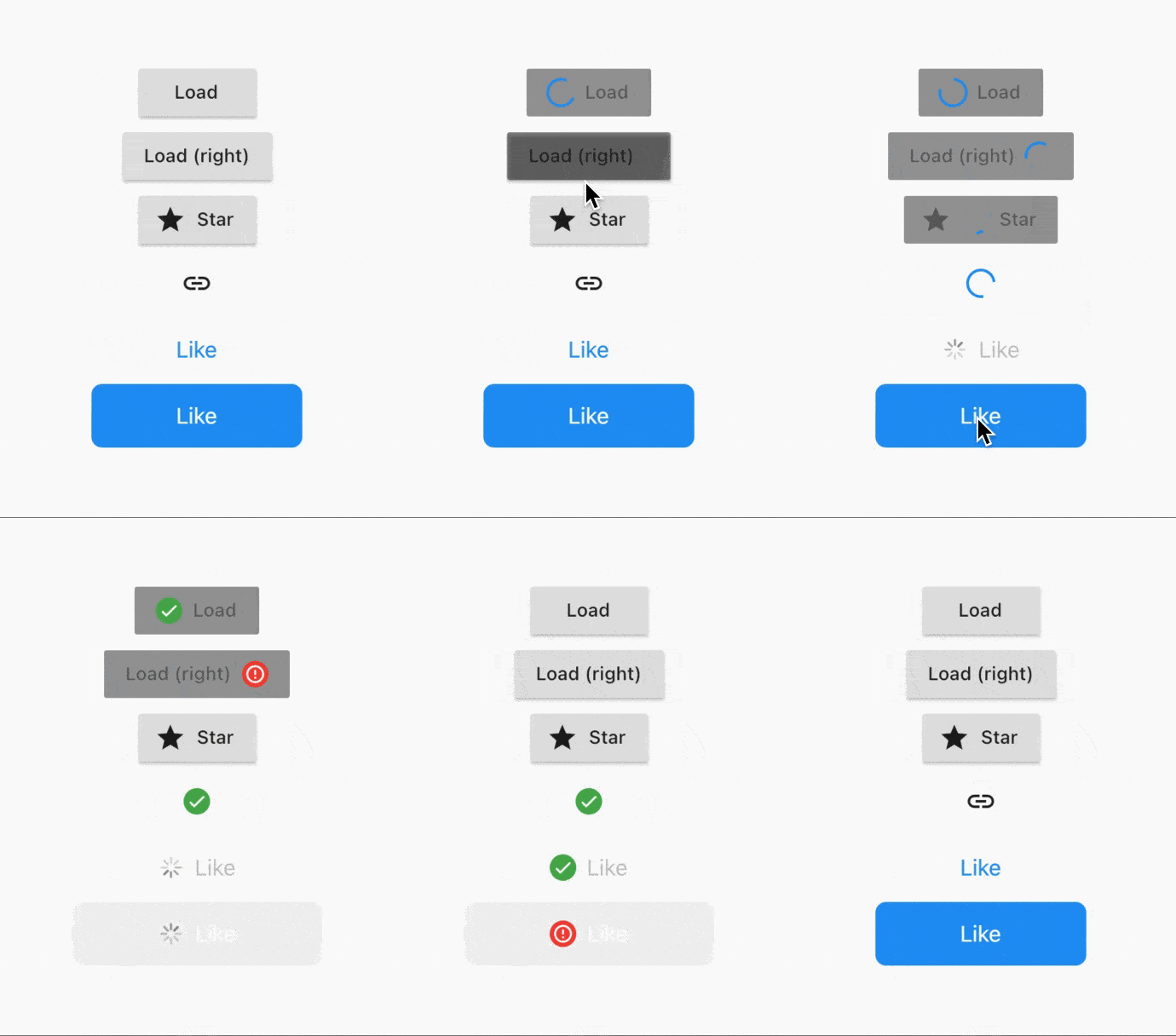
Usage is extremely simple - right now 5 types of buttons are supported:
CupertinoButton (normal + filled)FlatButton (normal + icon)IconButtonOutlineButton (normal + icon)RaisedButton (normal + icon)To convert a button to a FutureButton, just add a Future prefix and make sure that your onPressed callback is of type Future<void> Function(), instead of usual void Function().
Everything that the package does can be customized. Below is the list of all parameters:
/// The widget that's used as the progress indicator.
/// You can substitute it with your own progress indicator if necessary.
/// See [defaultMaterialProgressIndicatorBuilder] and[defaultCupertinoProgressIndicatorBuilder] for more info.
final WidgetBuilder progressIndicatorBuilder;

/// The location of progress indicator.
/// See [ProgressIndicatorLocation] for more info.
final ProgressIndicatorLocation progressIndicatorLocation;

/// Whether to show the result of the Future.
/// Will show [successIndicatorBuilder] if Future completes without errors.
/// Otherwise, will show [failureIndicatorBuilder].
final bool showResult;

/// Whether to animate the transitions using [AnimatedSwitcher].
/// Defaults to [true].
final bool animateTransitions;

/// Indicator to show when the Future is completed successfully.
/// Defaults to [defaultSuccessResultIndicatorBuilder].
final WidgetBuilder successIndicatorBuilder;

/// Indicator to show when the Future fails.
/// Defaults to [defaultFailureResultIndicatorBuilder].
final WidgetBuilder failureIndicatorBuilder;

/// For how long should the result be shown for.
/// Default to `Duration(seconds: 2)`.
final Duration resultIndicatorDuration;

/// Curve that's used to animate the button size.
/// Defaults to [Curves.easeInOut].
final Curve animationCurve;

/// Duration that's used to animate the button size.
/// Defaults to `Duration(milliseconds: 150)`.
final Duration animationDuration;
FutureRaisedButton.icon(
  icon: Icon(Icons.star),
  label: Text('Star'),
  onPressed: () async {
    // Do some background task
    await Future.delayed(Duration(seconds: 5));
  },
);
See example project for more details.
Add this to your package's pubspec.yaml file:
dependencies:
  future_button: ^0.1.1
You can install packages from the command line:
$ flutter pub get
Now in your Dart code, you can use:
import 'package:future_button/future_button.dart';
E-mail: kk.erzhan@gmail.com

依賴清單 3 項
{"sdk":"flutter"}^1.9.0{"sdk":"flutter"}先依使用情境篩選,再比較專案活躍情況,最後到原始儲存庫確認使用要求。
“A repository is the most basic element of GitHub.”
GitHub Docs — About repositories ↗