

v1.0.2+1
extended_navbar_scaffold
一個可擴展且帶浮動導航列的自訂 Scaffold
88喜歡 12近 30 天下載40Pub 分數
平台暫無資料
一個可擴展且帶浮動導航列的自訂 Scaffold

以下為英文專案原文快照,最新內容請造訪 GitHub。


Custom Extended Scaffold
Custom Flutter widgets that makes Bottom Navigation Floating and can be expanded with much cleaner and easier way.
Add the following to your pubspec.yaml file:
dependencies:
  extended_navbar_scaffold: any
ExtendedNavigationBarScaffold(
  body: Container(
    color: Colors.deepOrange,
  ),
  elevation: 0,
  floatingAppBar: true,
  appBar: AppBar(
    shape: kAppbarShape,
    leading: IconButton(
      icon: Icon(
        EvaIcons.person,
        color: Colors.black,
      ),
      onPressed: () {},
    ),
    title: Text(
      'Extended Scaffold Example',
      style: TextStyle(color: Colors.black),
    ),
    centerTitle: true,
    backgroundColor: Colors.white,
  ),
  navBarColor: Colors.white,
  navBarIconColor: Colors.black,
  moreButtons: [
    MoreButtonModel(
      icon: MaterialCommunityIcons.wallet,
      label: 'Wallet',
      onTap: () {},
    ),
    MoreButtonModel(
      icon: MaterialCommunityIcons.parking,
      label: 'My Bookings',
      onTap: () {},
    ),
    MoreButtonModel(
      icon: MaterialCommunityIcons.car_multiple,
      label: 'My Cars',
      onTap: () {},
    ),
    MoreButtonModel(
      icon: FontAwesome.book,
      label: 'Transactions',
      onTap: () {},
    ),
    MoreButtonModel(
      icon: MaterialCommunityIcons.home_map_marker,
      label: 'Offer Parking',
      onTap: () {},
    ),
    MoreButtonModel(
      icon: FontAwesome5Regular.user_circle,
      label: 'Profile',
      onTap: () {},
    ),
    null,
    MoreButtonModel(
      icon: EvaIcons.settings,
      label: 'Settings',
      onTap: () {},
    ),
    null,
  ],
  searchWidget: Container(
    height: 50,
    color: Colors.redAccent,
  ),
  // onTap: (button) {},
  // currentBottomBarCenterPercent: (currentBottomBarParallexPercent) {},
  // currentBottomBarMorePercent: (currentBottomBarMorePercent) {},
  // currentBottomBarSearchPercent: (currentBottomBarSearchPercent) {},
  parallexCardPageTransformer: PageTransformer(
    pageViewBuilder: (context, visibilityResolver) {
      return PageView.builder(
        controller: PageController(viewportFraction: 0.85),
        itemCount: parallaxCardItemsList.length,
        itemBuilder: (context, index) {
          final item = parallaxCardItemsList[index];
          final pageVisibility =
              visibilityResolver.resolvePageVisibility(index);
          return ParallaxCardsWidget(
            item: item,
            pageVisibility: pageVisibility,
          );
        },
      );
    },
  ),
);

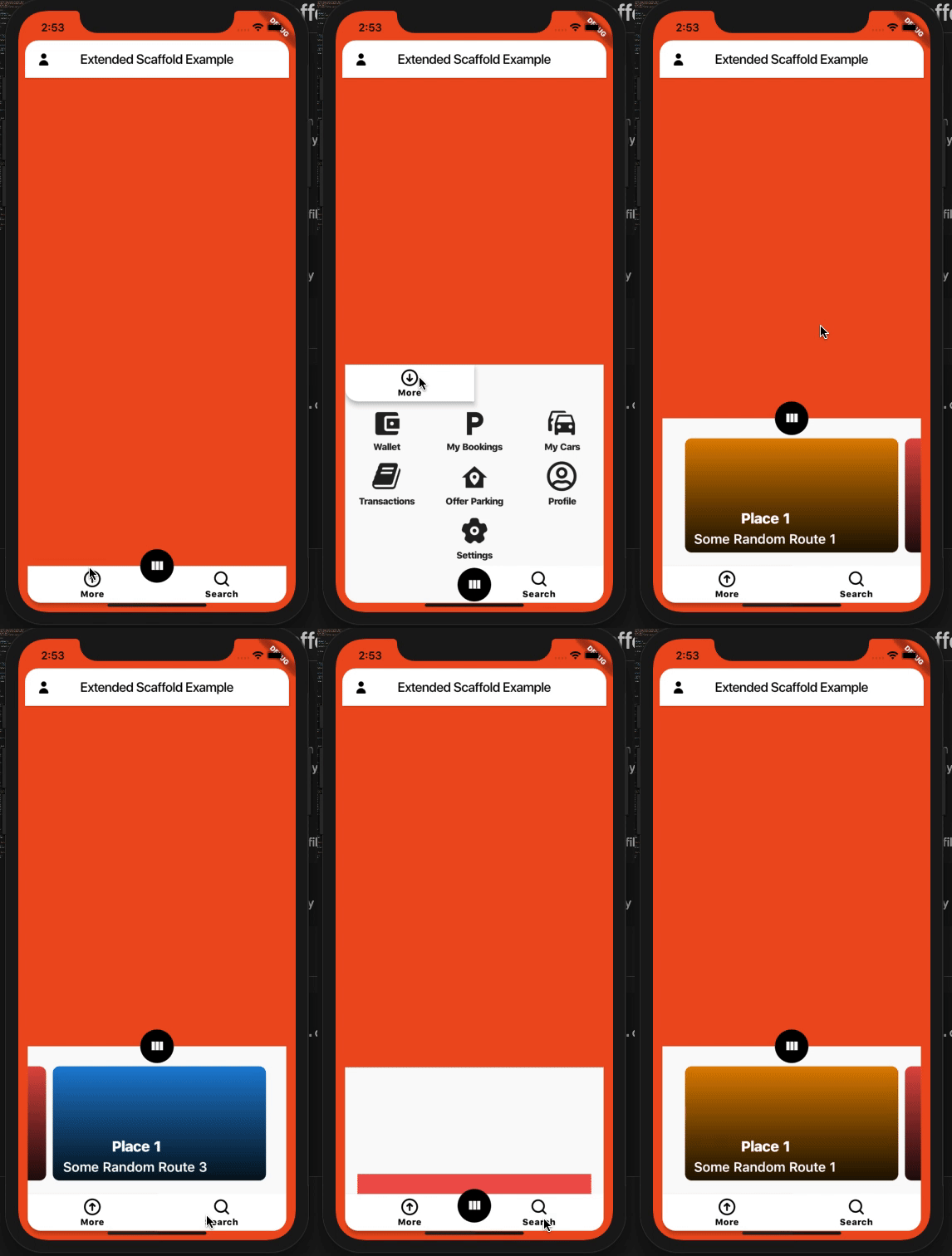
依賴清單 3 項
{"sdk":"flutter"}^2.0.0{"sdk":"flutter"}先依使用情境篩選,再比較專案活躍情況,最後到原始儲存庫確認使用要求。
“A repository is the most basic element of GitHub.”
GitHub Docs — About repositories ↗