
 v0.1.0
media_query_preview
此套件可於各種裝置與條件下進行UI預覽,支援自訂裝置、亮度與文字縮放。適合開發使用,不適用於生產環境。
3喜歡 9近 30 天下載140Pub 分數
AndroidiOSWebmacOSWindowsLinux
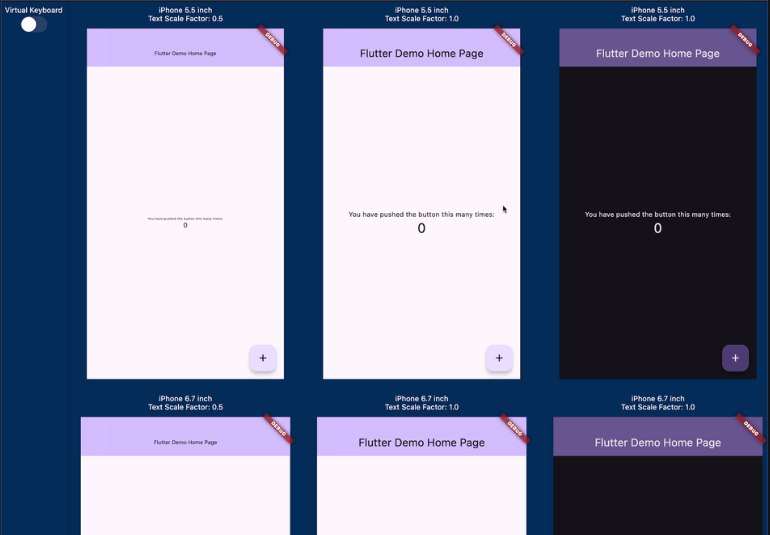
此套件可讓您預覽在不同螢幕尺寸、文字縮放和亮度設定下,各種裝置上的實作UI外觀。

{"sdk":"flutter"}^0.3.1^0.6.4{"sdk":"flutter"}^5.1.0以下為英文專案原文快照,最新內容請造訪 GitHub。
pub package GitHub deployments
Have you ever experienced your UI breaking when the font size is too large or the screen size of the device is small? Checking for these issues can be a hassle.
This package allows you to preview how your implemented UI will appear on various devices with different screen sizes, text scales, and brightness.
It was inspired by device_preview.
Media Query Preview
This package provides the following features:
PreviewDevice.iPhone5_5inch and PreviewDevice.android6_7inch, you can create custom PreviewDevice instances.Check out the demo at https://kingu-dev.github.io/media_query_preview.
If you are using riverpod, you can do the following.
// Initialize Provider
final container = ProviderContainer();

final previewDevices = [
  [
    PreviewDevice.iPhone5_5inch(
      textScaleFactor: 0.5,
    ),
    PreviewDevice.iPhone5_5inch(),
    PreviewDevice.iPhone5_5inch(
      brightness: Brightness.dark,
    ),
    PreviewDevice.iPhone5_5inch(
      textScaleFactor: 1.5,
    ),
  ],
  [
    PreviewDevice.iPhone6_7inch(
      textScaleFactor: 0.5,
    ),
    PreviewDevice.iPhone6_7inch(),
    PreviewDevice.iPhone6_7inch(
      brightness: Brightness.dark,
    ),
    PreviewDevice.iPhone6_7inch(
      textScaleFactor: 1.5,
    ),
  ],
  [
    PreviewDevice.android6_7inch(
      textScaleFactor: 0.5,
    ),
    PreviewDevice.android6_7inch(),
    PreviewDevice.android6_7inch(
      brightness: Brightness.dark,
    ),
    PreviewDevice.android6_7inch(
      textScaleFactor: 1.5,
    ),
  ]
];

runApp(
  MediaQueryPreview(
    previewDevices: previewDevices,
    builder: (_, previewDevice) {
      // If you want to change the theme based on the targetPlatform,
      // you can get the targetPlatform from [previewDevice.targetPlatform].
      return UncontrolledProviderScope(
        container: container,
        child: const MyApp(),
      );
    },
  ),
);
If you are not using riverpod, it is even simpler.
runApp(
  MediaQueryPreview(
    previewDevices: previewDevices,
    builder: (_, previewDevice) {
      // If you want to change the theme based on the targetPlatform,
      // you can get the targetPlatform from [previewDevice.targetPlatform].
      return const MyApp();
    },
  ),
);
GlobalKey with global variables, they will be shared across each preview, which can lead to errors or unintended behavior. Since the widget trees of each preview are independent, it is recommended to generate a separate GlobalKey for each tree.If you have Apple Vision Pro, you can use it as a "Designed for iPad" app. This is the future!
Vision Pro