
 v0.5.0
overflow_view
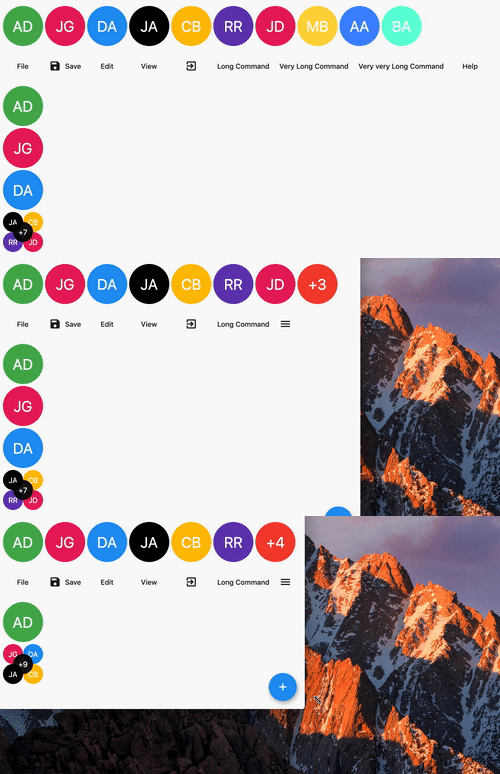
一個將子項顯示為一行的組件,如果空間不足,則在末尾顯示溢出指示器。
227喜歡 7.3萬近 30 天下載150Pub 分數
AndroidiOSWebmacOSWindowsLinux
一個顯示子項為一列的組件,直到空間不足時停止,並顯示未渲染的子項數量。

{"sdk":"flutter"}^0.5.0{"sdk":"flutter"}以下為英文專案原文快照,最新內容請造訪 GitHub。
A widget displaying children in a line with an overflow indicator at the end if there is not enough space.
Overview
In the pubspec.yaml of your flutter project, add the following dependency:
dependencies:
  ...
  overflow_view:
In your library add the following import:
import 'package:overflow_view/overflow_view.dart';
OverflowView(
  // Either layout the children horizontally (the default)
  // or vertically.
  direction: Axis.horizontal,
  // The amount of space between children.
  spacing: 4,
  // The widgets to display until there is not enough space.
  children: <Widget>[
    for (int i = 0; i < _counter; i++)
      AvatarWidget(
        text: avatars[i].initials,
        color: avatars[i].color,
      )
  ],
  // The overview indicator showed if there is not enough space for
  // all chidren.
  builder: (context, remaining) {
    // You can return any widget here.
    // You can either show a +n widget or a more complex widget
    // which can show a thumbnail of not rendered widgets.
    return AvatarWidget(
      text: '+$remaining',
      color: Colors.red,
    );
  },
)
There are two constuctors depending on what you want to do.
The OverflowView constructor will constrain all children to have the same size as the first one. This can be used for an avatar list for example.
The OverflowView.flexible constructor will let all children to determine their own size. This is less performant than the default one, but it's more flexible. This can be used for a menu bar for example.
I'm working on my packages on my free-time, but I don't have as much time as I would. If this package or any other package I created is helping you, please consider to sponsor me. By doing so, I will prioritize your issues or your pull-requests before the others.
Please see the Changelog page to know what's recently changed.
Feel free to contribute to this project.
If you find a bug or want a feature, but don't know how to fix/implement it, please fill an issue.
If you fixed a bug or implemented a feature, please send a pull request.