
 v3.3.0
country_codes
國家代碼是個輔助套件,可根據特定地區設定提供國家詳細資料,例如撥號代碼、ISO 3166代碼(alpha-2、alpha-3)和國家名稱。
134喜歡 2.4萬近 30 天下載150Pub 分數
AndroidiOSmacOS
國家代碼是個輔助套件,可根據特定地區設定提供國家詳細資料,例如撥號代碼、ISO 3166代碼(alpha-2、alpha-3)和國家名稱。

{"sdk":"flutter"}{"sdk":"flutter"}以下為英文專案原文快照,最新內容請造訪 GitHub。
Country codes package provides an easy to way to access country codes based on a provided Locale.
There are two main ways to use this package.
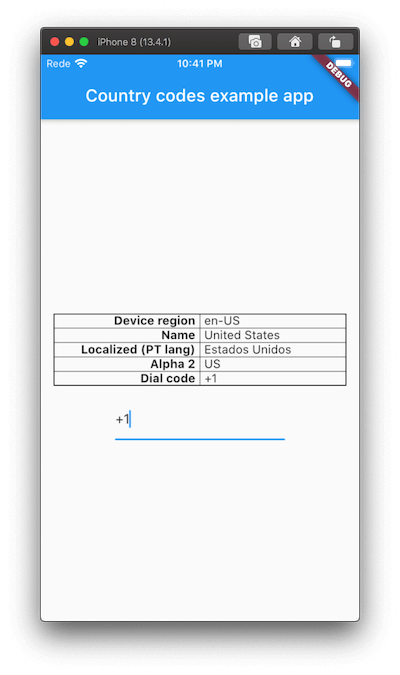
This will allow you to fetch the region of the underlying platform and display the data accordingly. Very handy if you use along with the DialCodeFormatter to provide integration with dial codes formatter, on phone TextFormFields in a Form, for example.
Assuming an en-US region based revice.
await CountryCodes.init(); // Optionally, you may provide a `Locale` to get countrie's localizadName

final Locale deviceLocale = CountryCodes.getDeviceLocale();
print(deviceLocale.languageCode); // Displays en
print(deviceLocale.countryCode); // Displays US

final CountryDetails details = CountryCodes.detailsForLocale();
print(details.alpha2Code); // Displays alpha2Code, for example US.
print(details.dialCode); // Displays the dial code, for example +1.
print(details.name); // Displays the extended name, for example United States.
print(details.localizedName); // Displays the extended name based on device's language (or other, if provided on init)
LocaleThis will use the provided Locale, which may not be related to the device's region but instead to the app supported languages.
For example, if your device is on US region but the app only supports PT, you'll get the following:
final CountryDetails details = CountryCodes.detailsForLocale(Localization.localeOf(context));

print(details.alpha2Code); // Displays alpha2Code, displays PT.
print(details.dialCode); // Displays the dial code for PT, +351.
print(details.name); // Displays the extended name, Portugal.
DialCodeFormatterCurrently there's only available TextInputFormatter which allows you to dynamically set the dial code dynamically on a TextFormField.
TextFormField(
  keyboardType: TextInputType.phone,
  inputFormatters: [DialCodeFormatter()],
);
Example
This project is a starting point for a Dart package, a library module containing code that can be shared easily across multiple Flutter or Dart projects.
For help getting started with Flutter, view our online documentation, which offers tutorials, samples, guidance on mobile development, and a full API reference.