
 v1.1.1
sliver_app_bar_builder
一個真正可自定義的滑動條,適用於應用欄,並可利用建構器來實現。
120喜歡 5760近 30 天下載160Pub 分數
AndroidiOSWebmacOSWindowsLinux
一個真正可自定義的滑動條,適用於應用欄,並可利用建構器來實現。

{"sdk":"flutter"}{"sdk":"flutter"}^8.5.0^7.0.0以下為英文專案原文快照,最新內容請造訪 GitHub。
Developed with 💚 by netglade
ci pub package license: MIT style: netglade analysis Discord
A truly customizable sliver for app bars with the benefit of using builders. Check the storybook demo and play with it yourself.
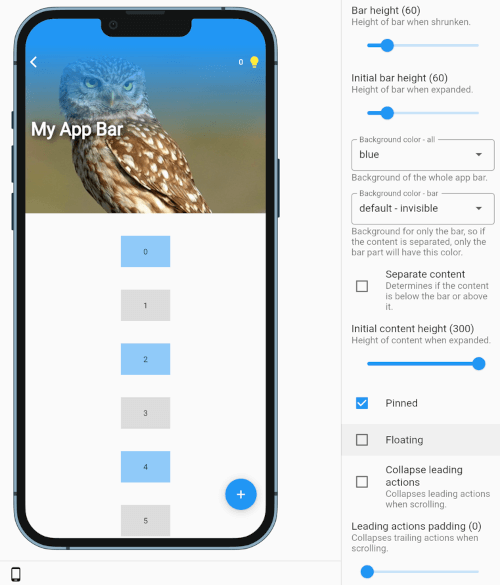
SliverAppBarBuilder supports various configurations:
https://github.com/netglade/sliver_app_bar_builder/raw/main/screenshots/storybook.png
Using the package is simple.
Just use the sliver SliverAppBarBuilder in place of SliverAppBar,
configure all the properties,
and enjoy.
Each builder, for content or leading/trailing actions, provides expand ratio and content/bar height, so you can easily use these values to customize your headers.
expandRatio is a value between 1.0 when expanded and 0.0 when shrunkencontentHeight/barHeight are current heights of corresponding partsContent builder has additional property:
centerPadding, when contentBelowBar is false, is a value used to offset content to center it with barAn example of a header with title moving from under back button to its right might look like this:
CustomScrollView(
  slivers: [
    SliverAppBarBuilder(
      barHeight: 60,
      pinned: true,
      leadingActions: [
        (context, expandRatio, barHeight, overlapsContent) {
          return SizedBox(
            height: barHeight,
            child: const BackButton(),
          );
        }
      ],
      initialContentHeight: 150,
      contentBuilder: (context, expandRatio, contentHeight, centerPadding, overlapsContent) {
        return Container(
          alignment: Alignment.centerLeft,
          height: 60,
          transform: Matrix4.translationValues(10 + (1 - expandRatio) * 40, 0, 0),
          child: Text(
            'My Title',
            style: TextStyle(
              fontSize: 22 + expandRatio * 10,
              color: Colors.white,
              fontWeight: FontWeight.bold,
            ),
          ),
        );
      },
    ),
  ],
);
Flutter is pinned with FVM in .fvmrc (currently 3.41.5):
fvm install
fvm flutter pub get
The repository uses Melos as a task runner (the published package lives in the repository root,
so the root itself is the only Melos package). Melos is configured with sdkPath: .fvm/flutter_sdk,
so scripts always run against the pinned SDK:
fvm dart run melos run lint:all      # format check + flutter analyze + DCM
fvm dart run melos run lint:format   # dart format --set-exit-if-changed
fvm dart run melos run lint:dart     # flutter analyze
fvm dart run melos run lint:dcm      # dcm analyze
fvm dart run melos run format        # write formatting
fvm dart run melos run test          # flutter test
Run fvm dart run melos run --list to see all scripts. CI runs the very same commands; where FVM
is not available, set MELOS_SDK_PATH=auto to run the scripts against the SDK on the PATH.
lint:dcm needs the DCM CLI on the PATH; the version used by CI is pinned in dcm_global.yaml.