
 v2.0.4
add_to_cart_animation
一個提供加入購物車動畫的 Flutter 插件。我特別為購物應用準備了它,但您也可以在其他應用中使用。
324喜歡 2310近 30 天下載150Pub 分數
AndroidiOSWebmacOSWindowsLinux
提供加入購物車動畫的 Flutter 插件。

{"sdk":"flutter"}{"sdk":"flutter"}^2.0.0以下為英文專案原文快照,最新內容請造訪 GitHub。
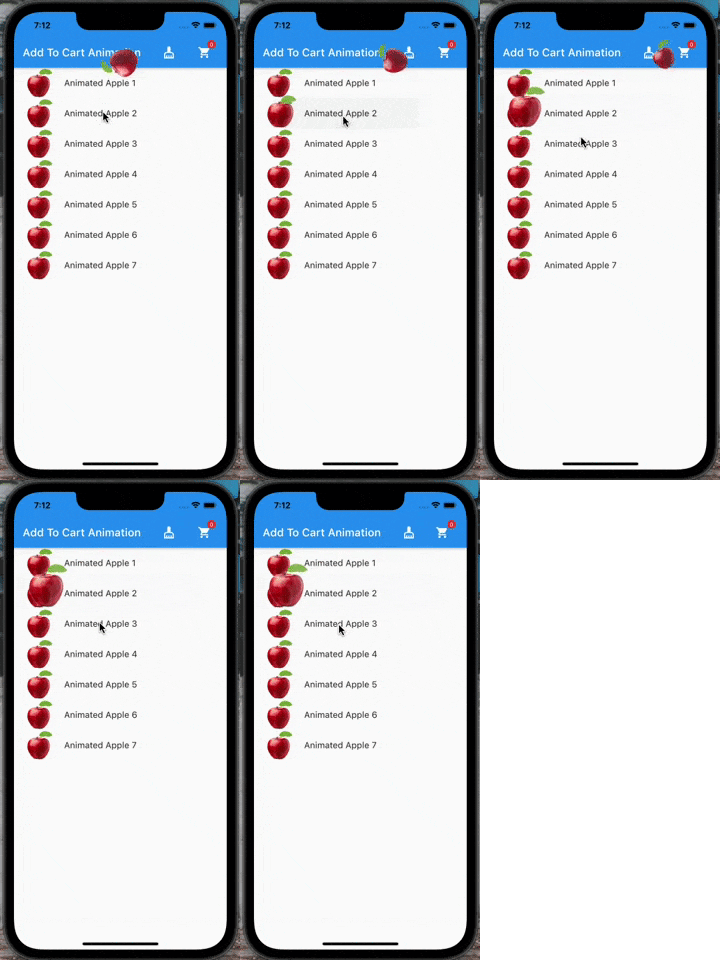
A flutter plugin which provide you add to cart animation. I have prepared it to special to shopping apps however you can use it on the others apps too, becasue it accept every widget to drag as in the gif. So It can be useful at shopping, game, news and other category apps.
Icon Preview Gif | Image Preview Gif | Text Preview Gif
If you need it, you can add it to your project easily. It is easy to use
Add the dependency to your pubspec.yaml:
add_to_cart_animation: ^2.0.4
And check the example code to solve how it works.
import 'package:add_to_cart_animation/add_to_cart_animation.dart';
import 'package:flutter/material.dart';

void main() {
  runApp(const MyApp());
}

class MyApp extends StatelessWidget {
  const MyApp({super.key});

  // This widget is the root of your application.
  @override
  Widget build(BuildContext context) {
    return MaterialApp(
      title: 'Add To Cart Animation Example',
      theme: ThemeData(
        primarySwatch: Colors.blue,
      ),
      home: const MyHomePage(title: 'Add To Cart Animation Example'),
      debugShowCheckedModeBanner: false,
    );
  }
}

class MyHomePage extends StatefulWidget {
  const MyHomePage({Key? key, required this.title}) : super(key: key);
  final String title;

  @override
  MyHomePageState createState() => MyHomePageState();
}

class MyHomePageState extends State<MyHomePage> {
  // We can detect the location of the cart by this  GlobalKey<CartIconKey>
  GlobalKey<CartIconKey> cartKey = GlobalKey<CartIconKey>();
  late Function(GlobalKey) runAddToCartAnimation;
  var _cartQuantityItems = 0;

  @override
  Widget build(BuildContext context) {
    return AddToCartAnimation(
      // To send the library the location of the Cart icon
      cartKey: cartKey,
      height: 30,
      width: 30,
      opacity: 0.85,
      dragAnimation: const DragToCartAnimationOptions(
        rotation: true,
      ),
      jumpAnimation: const JumpAnimationOptions(),
      createAddToCartAnimation: (runAddToCartAnimation) {
        // You can run the animation by addToCartAnimationMethod, just pass trough the the global key of  the image as parameter
        this.runAddToCartAnimation = runAddToCartAnimation;
      },
      child: Scaffold(
        appBar: AppBar(
          title: Text(widget.title),
          centerTitle: false,
          actions: [
            //  Adding 'clear-cart-button'
            IconButton(
              icon: const Icon(Icons.cleaning_services),
              onPressed: () {
                _cartQuantityItems = 0;
                cartKey.currentState!.runClearCartAnimation();
              },
            ),
            const SizedBox(width: 16),
            AddToCartIcon(
              key: cartKey,
              icon: const Icon(Icons.shopping_cart),
              badgeOptions: const BadgeOptions(
                active: true,
                backgroundColor: Colors.red,
              ),
            ),
            const SizedBox(
              width: 16,
            )
          ],
        ),
        body: ListView(
          children: List.generate(
            15,
            (index) => AppListItem(
              onClick: listClick,
              index: index,
            ),
          ),
        ),
      ),
    );
  }

  void listClick(GlobalKey widgetKey) async {
    await runAddToCartAnimation(widgetKey);
    await cartKey.currentState!
        .runCartAnimation((++_cartQuantityItems).toString());
  }
}

class AppListItem extends StatelessWidget {
  final GlobalKey widgetKey = GlobalKey();
  final int index;
  final void Function(GlobalKey) onClick;

  AppListItem({super.key, required this.onClick, required this.index});
  @override
  Widget build(BuildContext context) {
    //  Container is mandatory. It can hold images or whatever you want
    Container mandatoryContainer = Container(
      key: widgetKey,
      width: 60,
      height: 60,
      color: Colors.transparent,
      child: Image.network(
        "https://cdn.jsdelivr.net/gh/omerbyrk/add_to_cart_animation/example/assets/apple.png",
        width: 60,
        height: 60,
      ),
    );

    return ListTile(
      onTap: () => onClick(widgetKey),
      leading: mandatoryContainer,
      title: Text(
        "Animated Apple Product Image $index",
      ),
    );
  }
}
By the way, you can run the example project in the plugin to check it deeply.
Have a good days.
Did you find this plugin useful? Please consider to buy me a coffe!