


 v1.10.1
chat_bubbles
Flutter 聊天氣泡元件,類似於 WhatsApp 和更多形狀。輕鬆使用和實作聊天氣泡。
578喜歡 2.2萬近 30 天下載160Pub 分數
AndroidiOSWebmacOSWindowsLinux
Flutter 聊天氣泡/語音氣泡元件。

以下為英文專案原文快照,最新內容請造訪 GitHub。





Flutter chat bubble widgets, similar to the Whatsapp and more shapes. Audio and Image chat bubble widgets are also included. Easy to use and implement chat bubbles.
Add this to your package's pubspec.yaml file:
dependencies:
  chat_bubbles: ^1.10.1
Then you just have to import the package with
import 'package:chat_bubbles/chat_bubbles.dart'
Now you can use this plugin to implement various types of Chat Bubbles, Audio Chat Bubbles and Date chips.

BubbleSpecialThree(
  text: 'Added iMessage shape bubbles',
  color: Color(0xFF1B97F3),
  tail: false,
  textStyle: TextStyle(
      color: Colors.white,
      fontSize: 16
  ),
),
BubbleSpecialThree(
  text: 'Please try and give some feedback on it!',
  color: Color(0xFF1B97F3),
  tail: true,
  textStyle: TextStyle(
    color: Colors.white,
    fontSize: 16
  ),
),
BubbleSpecialThree(
  text: 'Sure',
  color: Color(0xFFE8E8EE),
  tail: false,
  isSender: false,
),
BubbleSpecialThree(
  text: "I tried. It's awesome!!!",
  color: Color(0xFFE8E8EE),
  tail: false,
  isSender: false,
),
BubbleSpecialThree(
  text: "Thanks",
  color: Color(0xFFE8E8EE),
  tail: true,
  isSender: false,
)

  BubbleSpecialOne(
    text: 'Hi, How are you? ',
    isSender: false,
    color: Colors.purple.shade100,
    textStyle: TextStyle(
      fontSize: 20,
      color: Colors.purple,
      fontStyle: FontStyle.italic,
      fontWeight: FontWeight.bold,
    ),
  ),

  Duration duration = new Duration();
  Duration position = new Duration();
  bool isPlaying = false;
  bool isLoading = false;
  bool isPause = false;

  BubbleNormalAudio(
    color: Color(0xFFE8E8EE),
    duration: duration.inSeconds.toDouble(),
    position: position.inSeconds.toDouble(),
    isPlaying: isPlaying,
    isLoading: isLoading,
    isPause: isPause,
    onSeekChanged: _changeSeek,
    onPlayPauseButtonClick: _playAudio,
    sent: true,
  ),

  BubbleNormalImage(
    id: 'id001',
    image: _image(),
    color: Colors.purpleAccent,
    tail: true,
    delivered: true,
  ),

  DateChip(
    date: new DateTime(2021, 5, 7),
    color: Color(0x558AD3D5),
  ),

MessageBar(
    onSend: (_) => print(_),
    actions: [
      InkWell(
        child: Icon(
          Icons.add,
          color: Colors.black,
          size: 24,
        ),
        onTap: () {},
      ),
      Padding(
        padding: EdgeInsets.only(left: 8, right: 8),
        child: InkWell(
          child: Icon(
            Icons.camera_alt,
            color: Colors.green,
            size: 24,
          ),
          onTap: () {},
        ),
      ),
    ],
  ),
BubbleReply(
  repliedMessage: 'This is the original message',
  repliedMessageSender: 'John Doe',
  text: 'This is my reply!',
  isSender: false,
  color: Color(0xFF1B97F3),
  replyBorderColor: Colors.white,
  textStyle: TextStyle(color: Colors.white, fontSize: 16),
  sent: true,
),
TypingIndicator(
  showIndicator: true,
  bubbleColor: Color(0xFFE8E8EE),
  dotColor: Colors.black54,
),

// Alternative wave animation style
TypingIndicatorWave(
  showIndicator: true,
  bubbleColor: Color(0xFFE8E8EE),
  dotColor: Colors.black54,
),
BubbleLinkPreview(
  url: 'https://flutter.dev',
  title: 'Flutter - Build apps for any screen',
  description: 'Flutter transforms the app development process.',
  imageUrl: 'https://storage.googleapis.com/cms-storage-bucket/70760bf1e88b184bb1bc.png',
  text: 'Check out this awesome framework!',
  isSender: false,
  color: Color(0xFF1B97F3),
  textStyle: TextStyle(color: Colors.white, fontSize: 16),
),
Column(
  crossAxisAlignment: CrossAxisAlignment.start,
  children: [
    BubbleNormal(
      text: 'Great work! 🎉',
      isSender: false,
      color: Color(0xFF1B97F3),
    ),
    BubbleReaction(
      reactions: [
        Reaction(emoji: '👍', count: 3, isUserReacted: true),
        Reaction(emoji: '❤️', count: 2),
        Reaction(emoji: '🎉', count: 1),
      ],
      onReactionTap: (reaction) {
        print('Tapped on ${reaction.emoji}');
      },
      onAddReactionTap: () {
        print('Add reaction tapped');
      },
    ),
  ],
),
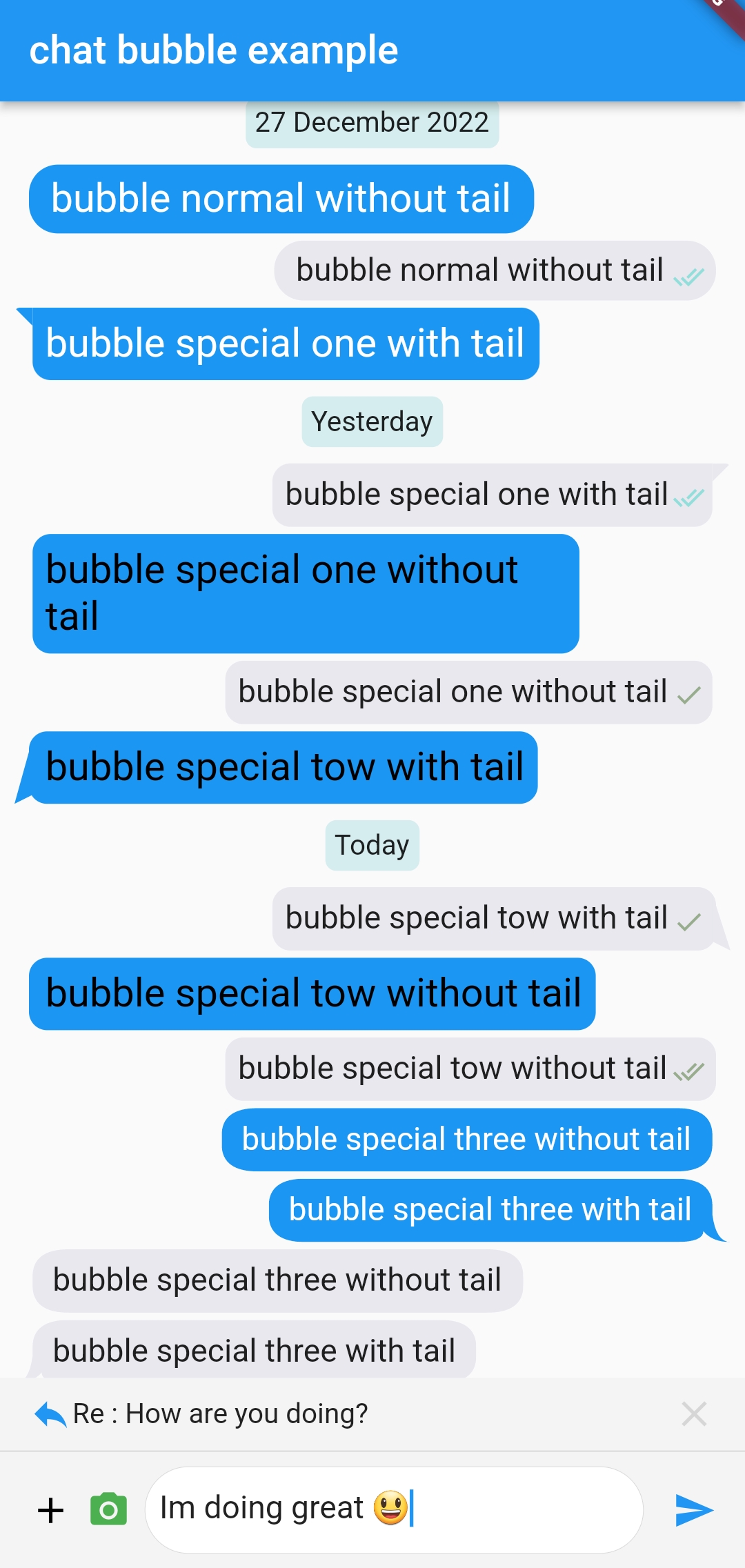

Checkout the plugin example to figure out more.
Duration duration = new Duration();
Duration position = new Duration();
bool isPlaying = false;
bool isLoading = false;
bool isPause = false;

@override
Widget build(BuildContext context) {
  final now = new DateTime.now();
  return Scaffold(
    appBar: AppBar(
      title: Text(widget.title),
    ),
    body: Stack(
      children: [
        SingleChildScrollView(
          child: Column(
            children: <Widget>[
              BubbleNormalImage(
                  id: 'id001',
                  image: _image(),
                  color: Colors.purpleAccent,
                  tail: true,
                  delivered: true,
              ),
              BubbleNormalAudio(
                color: Color(0xFFE8E8EE),
                duration: duration.inSeconds.toDouble(),
                position: position.inSeconds.toDouble(),
                isPlaying: isPlaying,
                isLoading: isLoading,
                isPause: isPause,
                onSeekChanged: _changeSeek,
                onPlayPauseButtonClick: _playAudio,
                sent: true,
              ),
              BubbleNormal(
                text: 'bubble normal with tail',
                isSender: false,
                color: Color(0xFF1B97F3),
                tail: true,
                textStyle: TextStyle(
                  fontSize: 20,
                  color: Colors.white,
                ),
              ),
              BubbleNormal(
                text: 'bubble normal with tail',
                isSender: true,
                color: Color(0xFFE8E8EE),
                tail: true,
                sent: true,
              ),
              DateChip(
                date: new DateTime(now.year, now.month, now.day - 2),
              ),
              BubbleNormal(
                text: 'bubble normal without tail',
                isSender: false,
                color: Color(0xFF1B97F3),
                tail: false,
                textStyle: TextStyle(
                  fontSize: 20,
                  color: Colors.white,
                ),
              ),
              BubbleNormal(
                text: 'bubble normal without tail',
                color: Color(0xFFE8E8EE),
                tail: false,
                sent: true,
                seen: true,
                delivered: true,
              ),
              BubbleSpecialOne(
                text: 'bubble special one with tail',
                isSender: false,
                color: Color(0xFF1B97F3),
                textStyle: TextStyle(
                  fontSize: 20,
                  color: Colors.white,
                ),
              ),
              DateChip(
                date: new DateTime(now.year, now.month, now.day - 1),
              ),
              BubbleSpecialOne(
                text: 'bubble special one with tail',
                color: Color(0xFFE8E8EE),
                seen: true,
              ),
              BubbleSpecialOne(
                text: 'bubble special one without tail',
                isSender: false,
                tail: false,
                color: Color(0xFF1B97F3),
                textStyle: TextStyle(
                  fontSize: 20,
                  color: Colors.black,
                ),
              ),
              BubbleSpecialOne(
                text: 'bubble special one without tail',
                tail: false,
                color: Color(0xFFE8E8EE),
                sent: true,
              ),
              BubbleSpecialTwo(
                text: 'bubble special tow with tail',
                isSender: false,
                color: Color(0xFF1B97F3),
                textStyle: TextStyle(
                  fontSize: 20,
                  color: Colors.black,
                ),
              ),
              DateChip(
                date: now,
              ),
              BubbleSpecialTwo(
                text: 'bubble special tow with tail',
                isSender: true,
                color: Color(0xFFE8E8EE),
                sent: true,
              ),
              BubbleSpecialTwo(
                text: 'bubble special tow without tail',
                isSender: false,
                tail: false,
                color: Color(0xFF1B97F3),
                textStyle: TextStyle(
                  fontSize: 20,
                  color: Colors.black,
                ),
              ),
              BubbleSpecialTwo(
                text: 'bubble special tow without tail',
                tail: false,
                color: Color(0xFFE8E8EE),
                delivered: true,
              ),
              BubbleSpecialThree(
                text: 'bubble special three without tail',
                color: Color(0xFF1B97F3),
                tail: false,
                textStyle: TextStyle(color: Colors.white, fontSize: 16),
              ),
              BubbleSpecialThree(
                text: 'bubble special three with tail',
                color: Color(0xFF1B97F3),
                tail: true,
                textStyle: TextStyle(color: Colors.white, fontSize: 16),
              ),
              BubbleSpecialThree(
                text: "bubble special three without tail",
                color: Color(0xFFE8E8EE),
                tail: false,
                isSender: false,
              ),
              BubbleSpecialThree(
                text: "bubble special three with tail",
                color: Color(0xFFE8E8EE),
                tail: true,
                isSender: false,
              ),
              SizedBox(
                height: 100,
              )
            ],
          ),
        ),
        MessageBar(
          onSend: (_) => print(_),
          actions: [
            InkWell(
              child: Icon(
                Icons.add,
                color: Colors.black,
                size: 24,
              ),
              onTap: () {},
            ),
            Padding(
              padding: EdgeInsets.only(left: 8, right: 8),
              child: InkWell(
                child: Icon(
                  Icons.camera_alt,
                  color: Colors.green,
                  size: 24,
                ),
                onTap: () {},
              ),
            ),
          ],
        ),
      ],
    ),
    // This trailing comma makes auto-formatting nicer for build methods.
  );
}
All bubble widgets now accept timestamp, isEdited, isForwarded, and messageId parameters.
BubbleNormal(
  text: 'This message was edited',
  isSender: true,
  color: Color(0xFFE8E8EE),
  tail: true,
  seen: true,
  timestamp: '12:34 PM',
  isEdited: true,
),

BubbleNormal(
  text: 'Forwarded from another chat',
  isSender: false,
  color: Color(0xFF1B97F3),
  tail: true,
  textStyle: TextStyle(color: Colors.white, fontSize: 16),
  isForwarded: true,
  timestamp: '12:35 PM',
),
Wrap any bubble with SwipeableBubble to add swipe-to-reply and swipe-to-delete gestures.
SwipeableBubble(
  onSwipeRight: () => print('Reply triggered'),
  onSwipeLeft: () => print('Delete triggered'),
  swipeThreshold: 64.0,
  enableHaptics: true,
  child: BubbleNormal(
    text: 'Swipe me!',
    isSender: false,
    color: Color(0xFF1B97F3),
    tail: true,
    textStyle: TextStyle(color: Colors.white, fontSize: 16),
  ),
),
| Parameter | Type | Default | Description |
|---|---|---|---|
child |
Widget |
required | The bubble to wrap |
onSwipeRight |
VoidCallback? |
null | Called on swipe-right (reply) |
onSwipeLeft |
VoidCallback? |
null | Called on swipe-left (delete) |
swipeThreshold |
double |
64.0 | Drag distance to trigger |
enableHaptics |
bool |
true | Haptic feedback on threshold |
rightActionColor |
Color |
Colors.blue | Background for right swipe |
leftActionColor |
Color |
Colors.red | Background for left swipe |
rightActionIcon |
Icon |
Icons.reply | Icon for right swipe |
leftActionIcon |
Icon |
Icons.delete | Icon for left swipe |
Use BubbleGroupBuilder to automatically group consecutive messages from the same sender. Only the last message in each group shows a tail.
final messages = ['Hello!', 'How are you?', 'Good, thanks!'];
final senders  = ['alice', 'alice', 'bob'];

BubbleGroupBuilder(
  itemCount: messages.length,
  senderIdOf: (i) => senders[i],
  itemBuilder: (context, i, info) => BubbleNormal(
    text: messages[i],
    isSender: senders[i] == 'bob',
    tail: info.showTail,
    color: senders[i] == 'bob'
        ? const Color(0xFFE8E8EE)
        : const Color(0xFF1B97F3),
  ),
)
For advanced control, use MessageGroupHelper.compute() directly to get GroupInfo for each message:
final List<GroupInfo> groups = MessageGroupHelper.compute(
  senderIds: senders,
  timestamps: timestamps,  // optional
  threshold: const Duration(minutes: 2),
);

// groups[i].showTail  — whether to show the tail
// groups[i].showAvatar — whether to show the avatar
// groups[i].isGroupStart — first message in group (add extra top spacing)
BubbleNormalAudio now supports waveform visualization and playback speed control.
BubbleNormalAudio(
  color: Color(0xFFE8E8EE),
  duration: duration.inSeconds.toDouble(),
  position: position.inSeconds.toDouble(),
  isPlaying: isPlaying,
  isLoading: isLoading,
  isPause: isPause,
  onSeekChanged: _changeSeek,
  onPlayPauseButtonClick: _playAudio,
  sent: true,
  // Waveform visualization
  waveformData: [0.2, 0.8, 0.5, 0.9, 0.4, 0.7, 0.6, 0.3, 0.8, 0.5],
  waveformActiveColor: Color(0xFF1B97F3),
  waveformInactiveColor: Colors.grey,
  // Playback speed
  showPlaybackSpeed: true,
  playbackSpeed: _playbackSpeed,
  onPlaybackSpeedChanged: (speed) => setState(() => _playbackSpeed = speed),
),
waveformData is a List<double> of normalized bar heights (0.0–1.0). Tapping or dragging on the waveform seeks to that position. The speed button cycles 1x → 1.5x → 2x → 1x.
Please feel free to let me know any issue regarding to this plugin.
依賴清單 4 項
{"sdk":"flutter"}^0.20.1{"sdk":"flutter"}^5.0.0先依使用情境篩選,再比較專案活躍情況,最後到原始儲存庫確認使用要求。
“A repository is the most basic element of GitHub.”
GitHub Docs — About repositories ↗