

v1.0.33
substring_highlight
在字元級別突出顯示Flutter文字,以實現簡單且可自訂的搜尋詞高亮。
200喜歡 7.5萬近 30 天下載150Pub 分數
AndroidiOSWebmacOSWindowsLinux
簡單的 Flutter 字元級文字強調。

以下為英文專案原文快照,最新內容請造訪 GitHub。
Highlight Flutter text at the character-level.
Designed for case-insensitive search-term highlighting, a single search term sub-string is highlighted (perhaps multiple times) within a longer string.
Inspired by the existing Flutter package "highlight_text" which supports word matches ('Peter''), but substring_highlight has more granular character-by-character matches (e.g., 't' in 'Peter').
Limitations:
The substrings being searched for highlighting don't have to match at the beginning of the longer strings (can be anywhere inside).
Even space characters will match, but not be highlighted, obviously.
Ancestor MUST have textDirection set (required by internal RichText widget), either through MaterialApp widget or explicitly wrapped by a Directionality widget:
Directionality(
    child: SubstringHighlight(text: 'Peter', term: 't'),
    textDirection: TextDirection.ltr)
Pull requests are welcome and I try to merge them within a few days.
As an example, the following code snippet uses this package to highlight matching characters in each search result:
import 'package:substring_highlight/substring_highlight.dart';

...

  @override
  Widget build(BuildContext context) (
    return Container(
      padding: const EdgeInsets.all(12),
      child: SubstringHighlight(
        text: dropDownItem,     // search result string from database or something
        term: searchTerm,       // user typed "et"
      ),
    );
  )
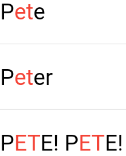
This example adds 'textStyle' and 'textStyleHighlight' to change the colors of the text:
import 'package:substring_highlight/substring_highlight.dart';

...

  @override
  Widget build(BuildContext context) (
    return Container(
      padding: const EdgeInsets.all(12),
      child: SubstringHighlight(
        text: dropDownItem,                         // each string needing highlighting
        term: searchTerm,                           // user typed "m4a"
        textStyle: TextStyle(                       // non-highlight style
          color: Colors.grey,
        ),
        textStyleHighlight: TextStyle(              // highlight style
          color: Colors.black,
          decoration: TextDecoration.underline,
        ),
      ),
    );
  )
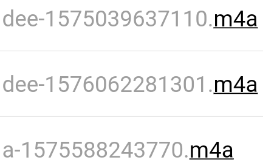
依賴清單 2 項
{"sdk":"flutter"}{"sdk":"flutter"}先依使用情境篩選,再比較專案活躍情況,最後到原始儲存庫確認使用要求。
“A repository is the most basic element of GitHub.”
GitHub Docs — About repositories ↗