

 v0.0.4
speech_balloon
這是一個產生簡單語氣泡泡的 Flutter 小部件。此小部件可顯示簡單的語氣泡泡,並呈現帶有邊框的語氣泡泡。
43喜歡 6060近 30 天下載155Pub 分數
AndroidiOSWebmacOSWindowsLinux
s-tyd/speech_balloon open-source repository details.

以下為英文專案原文快照,最新內容請造訪 GitHub。
A flutter widget that emulates a speech balloon.
This widget is a copy of https://pub.dev/packages/speech_balloon
I created this because the previous creator doesn't seem to have updated it.
Changes from speech_balloon include the ability to display a border.
Dart Pub: https://pub.dartlang.org/packages/speech_balloon#-installing-tab-
Depend on it
Add this to your package's pubspec.yaml file:
speech_balloon: ^0.0.4
Install it
You can install packages from the command line:
$ flutter packages get
Alternatively, your editor might support flutter packages get. Check the docs for your editor to learn more.
Now in your Dart code, you can use:
import 'package:speech_balloon/speech_balloon.dart';
Creates a widget that emulates a speech balloon. Could be used for a tooltip, or as a pop-up notification, etc.
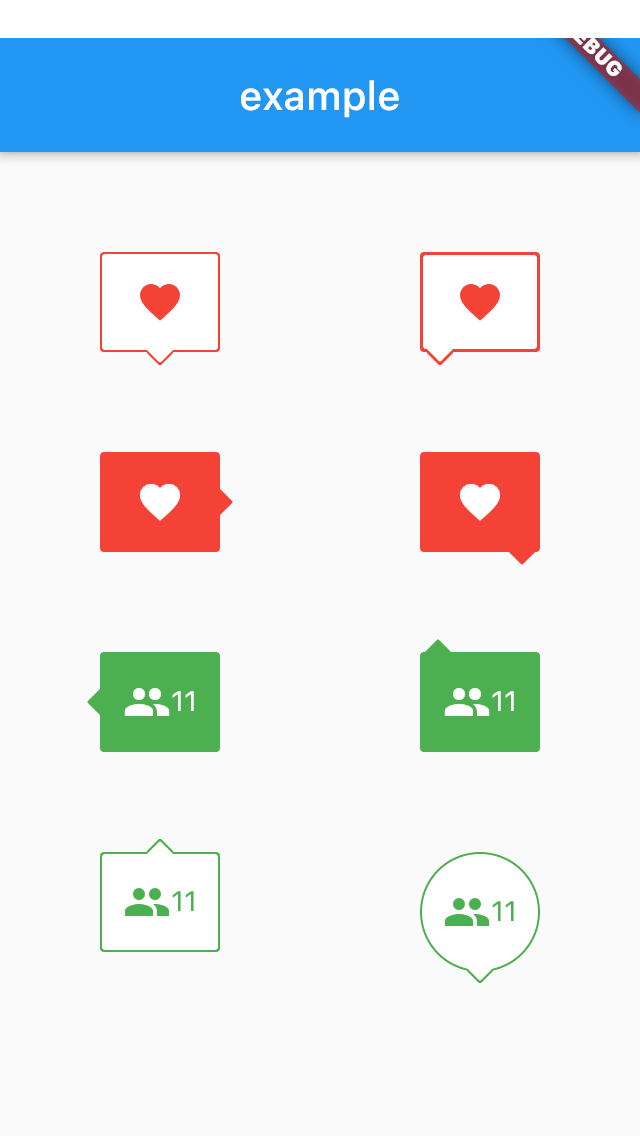
import 'package:flutter/material.dart';
import 'package:speech_balloon/speech_balloon.dart';

void main() => runApp(MyApp());

class MyApp extends StatefulWidget {
  @override
  _MyAppState createState() => _MyAppState();
}

class _MyAppState extends State<MyApp> {
  @override
  Widget build(BuildContext context) {
    return MaterialApp(
      home: Scaffold(
        appBar: AppBar(
          title: const Text('example'),
        ),
        body: Center(
          child: Row(
            mainAxisAlignment: MainAxisAlignment.spaceAround,
            children: [
              Column(
                children: [
                  SizedBox(height: 50),
                  SpeechBalloon(
                    nipLocation: NipLocation.bottom,
                    borderColor: Colors.red,
                    color: Colors.white,
                    child: Icon(
                      Icons.favorite,
                      color: Colors.red,
                    ),
                  ),
                  SizedBox(height: 50),
                  SpeechBalloon(
                    nipLocation: NipLocation.right,
                    color: Colors.red,
                    child: Icon(
                      Icons.favorite,
                      color: Colors.white,
                    ),
                  ),
                  SizedBox(height: 50),
                  SpeechBalloon(
                    nipLocation: NipLocation.left,
                    color: Colors.green,
                    child: Row(
                      mainAxisAlignment: MainAxisAlignment.center,
                      children: [
                        Icon(
                          Icons.people,
                          color: Colors.white,
                        ),
                        Text(
                          '11',
                          style: TextStyle(color: Colors.white),
                        ),
                      ],
                    ),
                  ),
                  SizedBox(height: 50),
                  SpeechBalloon(
                    nipLocation: NipLocation.top,
                    borderColor: Colors.green,
                    child: Row(
                      mainAxisAlignment: MainAxisAlignment.center,
                      children: [
                        Icon(
                          Icons.people,
                          color: Colors.green,
                        ),
                        Text(
                          '11',
                          style: TextStyle(color: Colors.green),
                        ),
                      ],
                    ),
                  ),
                ],
              ),
              Column(
                children: [
                  SizedBox(height: 50),
                  SpeechBalloon(
                    nipLocation: NipLocation.bottomLeft,
                    borderColor: Colors.red,
                    color: Colors.white,
                    borderWidth: 3,
                    child: Icon(
                      Icons.favorite,
                      color: Colors.red,
                    ),
                  ),
                  SizedBox(height: 50),
                  SpeechBalloon(
                    nipLocation: NipLocation.bottomRight,
                    color: Colors.red,
                    child: Icon(
                      Icons.favorite,
                      color: Colors.white,
                    ),
                  ),
                  SizedBox(height: 50),
                  SpeechBalloon(
                    nipLocation: NipLocation.topLeft,
                    color: Colors.green,
                    child: Row(
                      mainAxisAlignment: MainAxisAlignment.center,
                      children: [
                        Icon(
                          Icons.people,
                          color: Colors.white,
                        ),
                        Text(
                          '11',
                          style: TextStyle(color: Colors.white),
                        ),
                      ],
                    ),
                  ),
                  SizedBox(height: 50),
                  SpeechBalloon(
                    nipLocation: NipLocation.bottom,
                    borderColor: Colors.green,
                    height: 60,
                    width: 60,
                    borderRadius: 40,
                    offset: Offset(0, -1),
                    child: Row(
                      mainAxisAlignment: MainAxisAlignment.center,
                      children: [
                        Icon(
                          Icons.people,
                          color: Colors.green,
                        ),
                        Text(
                          '11',
                          style: TextStyle(color: Colors.green),
                        ),
                      ],
                    ),
                  ),
                ],
              ),
            ],
          ),
        ),
      ),
    );
  }
}
依賴清單 2 項
{"sdk":"flutter"}{"sdk":"flutter"}先依使用情境篩選,再比較專案活躍情況,最後到原始儲存庫確認使用要求。
“A repository is the most basic element of GitHub.”
GitHub Docs — About repositories ↗