
 v0.9.0
cell_calendar
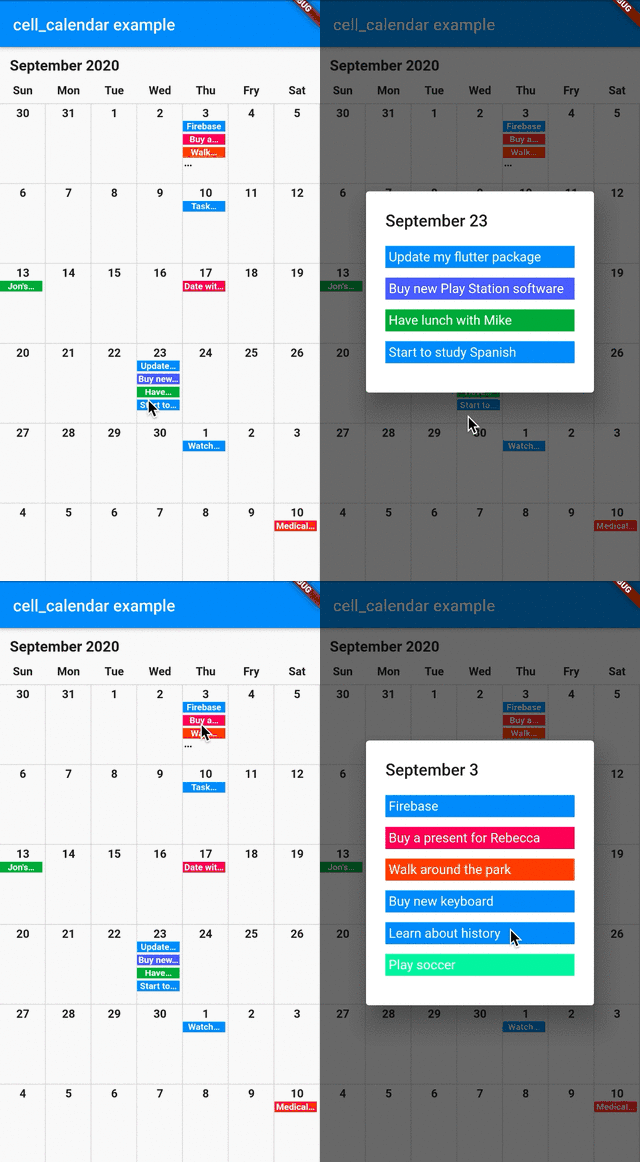
現代化日曆組件,具備實用功能。可立即開發出設計精美的日曆。靈感來自 Google 日曆的使用者介面。
104喜歡 777近 30 天下載140Pub 分數
AndroidiOSWebmacOSWindowsLinux
現代化日曆組件,具備實用功能。讓您能立即開發出設計精緻的日曆。

{"sdk":"flutter"}^2.3.6{"sdk":"flutter"}以下為英文專案原文快照,最新內容請造訪 GitHub。
Modern calendar widget with useful features. Enables to develop well designed calendar in a moment.
Inspired by the UI of Google Calendar
cell_calendar
You can show the events in the calendar by inserting the list of CalendarEvent as events
    CellCalendar(
      events: [
        CalendarEvent(eventName: "Event 1",eventDate: DateTime1),
        CalendarEvent(eventName: "Event 2",eventDate: DateTime2),
      ]
    );
If you need to customize the calendar more, the additional parameters like eventBackGroundColor, eventTextColor and eventID are helpful.
The callback onPageChanged is literally called when the current page is changed.
    CellCalendar(
      onPageChanged: (firstDate, lastDate) {
        print("This is the first date of the new page: $firstDate");
        print("This is the last date of the new page: $lastDate");
      }
    );
In this sample code, firstDate is the date in the very first cell of the new page, and its logic is same as lastDate.
The callback onCellTapped is called when user tapped a cell.
    CellCalendar(
      onCellTapped: (date) {
        print("$date is tapped !");
      }
    );
It is called with tapped DateTime, so you can get the events on the date if you want.
    CellCalendar(
      onCellTapped: (date){
        print("$date is tapped !");
        final eventsOnTheDate = sampleEvents().where((event) {
          final eventDate = event.eventDate;
          return eventDate.year == date.year &&
              eventDate.month == date.month &&
              eventDate.day == date.day;
        }).toList();
        /// ex) Show dialog or navigate to new page with [eventsOnTheDate]
      }
    );
If you don't want to use default labels on the calendar, you can use callbacks for customization.
    CellCalendar(
      daysOfTheWeekBuilder: (dayIndex) {
        /// dayIndex: 0 for Sunday, 6 for Saturday.
        final labels = ["S", "M", "T", "W", "T", "F", "S"];
        return Padding(
          padding: const EdgeInsets.only(bottom: 4.0),
          child: Text(
            labels[dayIndex],
            style: TextStyle(
              fontWeight: FontWeight.bold,
            ),
            textAlign: TextAlign.center,
          ),
        );
      },
      monthYearLabelBuilder: (datetime) {
        final year = datetime.year.toString();
        final month = datetime.month.toString();
        return Padding(
          padding: const EdgeInsets.all(16.0),
          child: Text(
            "$month, $year",
            style: TextStyle(
              fontSize: 24,
              fontWeight: FontWeight.bold,
            ),
          ),
        );
      },
    )
If you have any requests or questions, please feel free to ask on github.
Thanks goes to these wonderful people (emoji key):
| Santa Takahashi Santa Takahashi 💻 |
Denis Filonov Denis Filonov 💻 |
HPanda HPanda 💻 |
This project follows the all-contributors specification. Contributions of any kind welcome!