


 v0.7.4
flutter_math_fork
使用純 Dart 與 Flutter 快速且高品質地呈現 TeX 數學方程式。
172喜歡 33.1萬近 30 天下載140Pub 分數
AndroidiOSWebmacOSWindowsLinux
flutter_math 的分支,解決了 flutter_math 停止維護後出現的相容性問題。

以下為英文專案原文快照,最新內容請造訪 GitHub。


This is a fork of flutter_math addressing compatibility
problems while flutter_math is not being maintained.
Math equation rendering in pure Dart & Flutter.
This project aims to achieve maximum compatibility and fidelity with regard to the KaTeX project, while maintaining the performance advantage of Dart and Flutter. A further UnicodeMath-style equation editing support will be experimented in the future.
The TeX parser is a Dart port of the KaTeX parser. There are only a few unsupported features and parsing differences compared to the original KaTeX parser. List of some unsupported features can be found here.
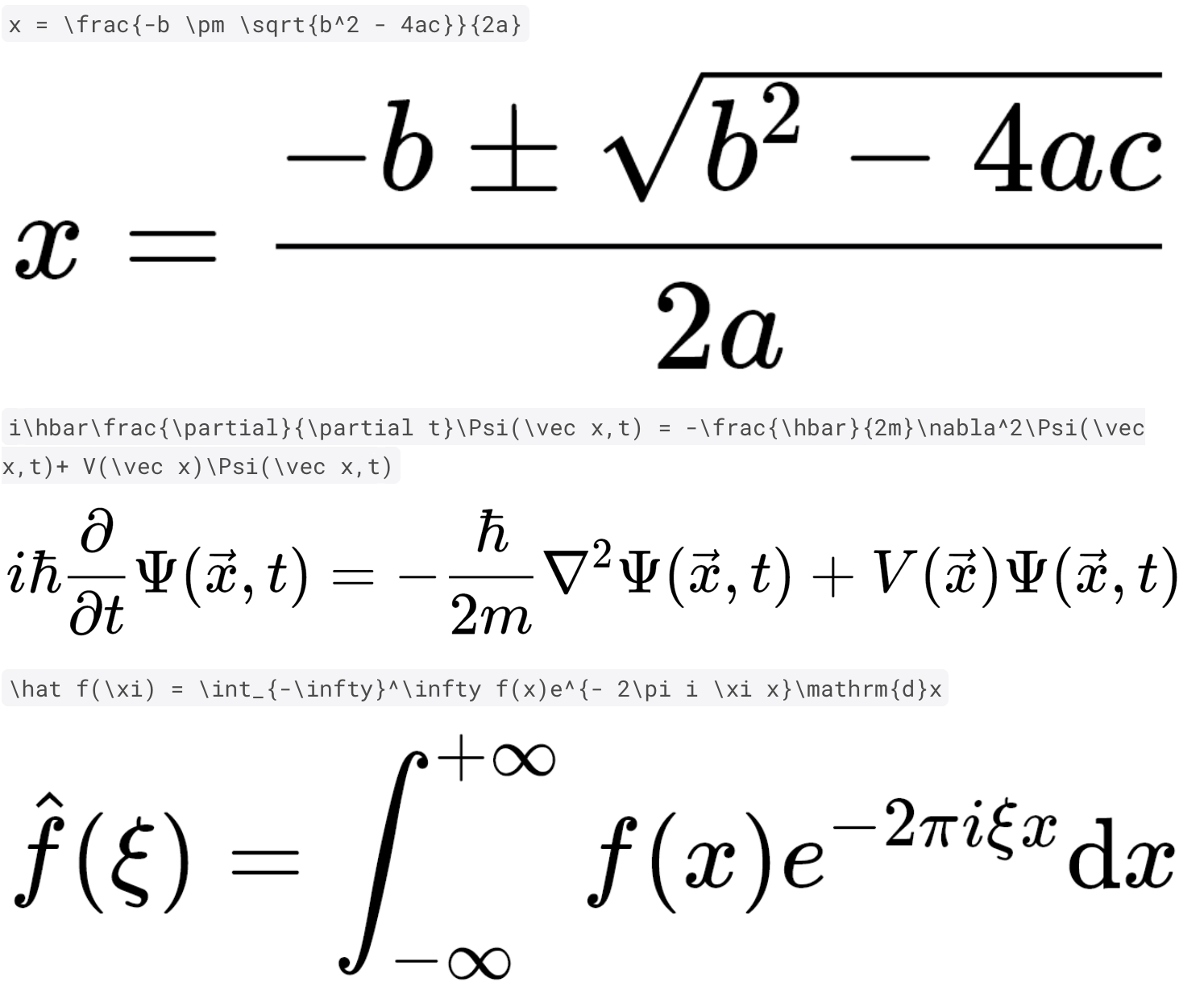
x = \frac{-b \pm \sqrt{b^2 - 4ac}}{2a}
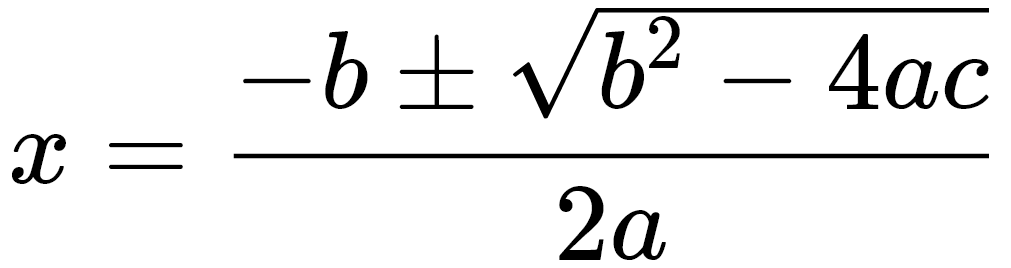
i\hbar\frac{\partial}{\partial t}\Psi(\vec x,t) = -\frac{\hbar}{2m}\nabla^2\Psi(\vec x,t)+ V(\vec x)\Psi(\vec x,t)

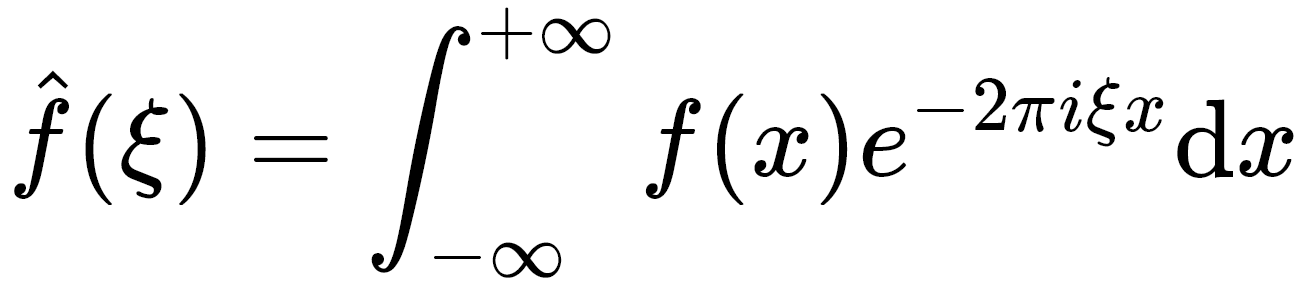
\hat f(\xi) = \int_{-\infty}^\infty f(x)e^{- 2\pi i \xi x}\mathrm{d}x
Add flutter_math to your pubspec.yaml dependencies
Currently only Android platform has been tested. If you encounter any issues with iOS, please file them.
Web support is added in v0.1.6. It is tested for DomCanvas backend. In general it should behave largely the same with mobile. It is expected to break with CanvasKit backend. Check out the Online Demo
The usage is straightforward. Just Math.tex(r'\frac a b'). There is also optional arguments of TexParserSettings settings, which corresponds to Settings in KaTeX and support a subset of its features.
Display-style equations:
Math.tex(r'\frac a b', mathStyle: MathStyle.display) // Default
In-line equations
Math.tex(r'\frac a b', mathStyle: MathStyle.text)
The default size of the equation is obtained from the build context. If you wish to specify the size, you can use textStyle. Note: this parameter will also change how big 1cm/1pt/1inch is rendered on the screen. If you wish to specify the size of those absolute units, use logicalPpi
Math.tex(
  r'\frac a b',
  textStyle: TextStyle(fontSize: 42),
  // logicalPpi: MathOptions.defaultLogicalPpiFor(42),
)
There is also a selectable variant SelectableMath that creates selectable and copy-able equations on both mobile and web. (EXPERIMENTAL) Users can select part of the equation and obtain the encoded TeX strings. The usage is similar to Flutter's SelectableText.
SelectableMath.tex(r'\frac a b', textStyle: TextStyle(fontSize: 42))
If you would like to display custom styled error message, you should use onErrorFallback parameter. You can also process the errors in this function. But beware this function is called in build function.
Math.tex(
  r'\garbled $tring',
  textStyle: TextStyle(color: Colors.green),
  onErrorFallback: (err) => Container(
    color: Colors.red,
    child: Text(err.messageWithType, style: TextStyle(color: Colors.yellow)),
  ),
)
If you wish to have more granularity dealing with equations, you can manually invoke the parser and supply AST into the widget.
SyntaxTree ast;
try {
  ast = SyntaxTree(greenRoot: TexParser(r'\frac a b', TexParserSettings()).parse());
} on ParseException catch (e) {
  // Handle my error here
}

SelectableMath(
  ast: ast,
  mathStyle: MathStyle.text,
  textStyle: TextStyle(fontSize: 42),
)
This project is possible thanks to the inspirations and resources from the KaTeX Project, MathJax, Zefyr, and CaTeX.
依賴清單 7 項
{"sdk":"flutter"}>=2.0.0+1 <3.0.0^6.0.5^1.8.0^1.17.0^2.0.1{"sdk":"flutter"}先依使用情境篩選,再比較專案活躍情況,最後到原始儲存庫確認使用要求。
“A repository is the most basic element of GitHub.”
GitHub Docs — About repositories ↗