
 v6.6.6
textless
少即是多;無元件文字
66喜歡 96近 30 天下載50Pub 分數
平台暫無資料
少即是多;無元件文字
以下為英文專案原文快照,最新內容請造訪 GitHub。



Less is More; Widgetless Text

Add this to your package's pubspec.yaml file:
...
dependencies:
  textless: ^6.6.6
Now in your Dart code, you can use:
import 'package:textless/textless.dart';
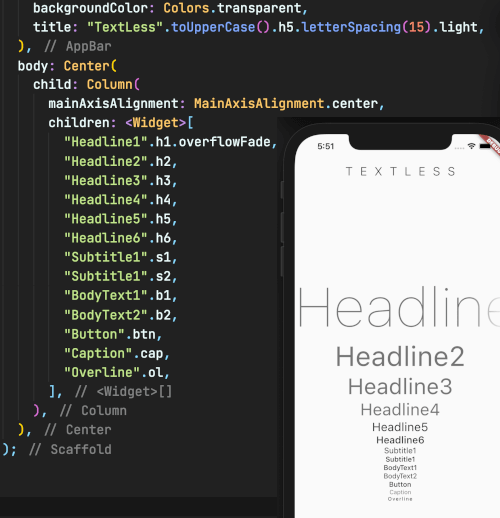
TEXTLESS magically uses
MaterialApp's default text theme
[ Start with ] .h1 .h2 .h3 .h4 .h5 .h6 .s1 .s2 .b1 .b2 .btn .cap .ol .text .style
[ End_ with ] .lineThrough .underline .overline .color .backgroundColor .size .height .italic .thin .extraLight .light .regular .medium .semiBold .bold .extraBold .black .solidLine .dottedLine .doubledLine .wavyLine .dashedLine .lineColor .lineThickness .alphabeticBaseline .ideographicBaseline .fontFamily .letterSpacing .wordSpacing .locale .foreground .shadows .fontFeatures .overflowVisible .overflowClip .overflowEllipsis .overflowFade .maxLine .scaleFactor .alignLeft .alignRight .alignCenter .alignJustify .alignStart .alignEnd .softWrap


依賴清單 2 項
{"sdk":"flutter"}{"sdk":"flutter"}先依使用情境篩選,再比較專案活躍情況,最後到原始儲存庫確認使用要求。
“A repository is the most basic element of GitHub.”
GitHub Docs — About repositories ↗