
 v2.1.0
flutter_dynamic_icon
一個用於動態變更應用程式圖示和應用程式圖示批次號的 Flutter 插件
423喜歡 2110近 30 天下載150Pub 分數
AndroidiOS
一個用於動態變更應用程式圖示和應用程式圖示批次號的 Flutter 插件

依賴清單 1 項
{"sdk":"flutter"}以下為英文專案原文快照,最新內容請造訪 GitHub。
A flutter plugin for dynamically changing app icon and app icon batch number in the mobile platform. Supports only iOS (with version > 10.3).
To use this plugin, add flutter_dynamic_icon as a dependency in your pubspec.yaml file.
Check out the example directory for a sample app using flutter_dynamic_icon.
2x - 120px x 120px3x - 180px x 180pxTo integrate your plugin into the iOS part of your app, follow these steps
teamfortress@2x.png, teamfortress@3x.pngphotos@2x.png, photos@3x.png,chills@2x.png, chills@3x.png,Assets.xcassets folder, but outside. When copying to Xcode, you can select 'create folder references' or 'create groups', if not you will get and error when uploading the build to the AppStore saying: (Thanks to @nohli for this observation)
TMS-90032: Invalid Image Path - - No image found at the path referenced under key 'CFBundleAlternateIcons':...Here is my directory structure:
directory_structure
Info.plist
Icon files (iOS 5) to the Information Property ListCFBundleAlternateIcons as a dictionary, it is used for alternative iconsCFBundleAlternateIcons, they are correspond to teamfortress, photos, and chillsUIPrerenderedIcon and CFBundleIconFiles need to be configuredUINewsstandIcon is showing under Icon files (iOS 5) and you don't plan on using it (it is intended for use with Newstand features), erase it or the app will get rejected upon submission on the App StoreNote that if you need it work for iPads, You need to add these icon declarations in CFBundleIcons~ipad as well. See here for more details.
Here is my Info.plist after adding Alternate Icons
info.plist
<?xml version="1.0" encoding="UTF-8"?>
<!DOCTYPE plist PUBLIC "-//Apple//DTD PLIST 1.0//EN" "http://www.apple.com/DTDs/PropertyList-1.0.dtd">
<plist version="1.0">
<dict>
	<key>CFBundleDevelopmentRegion</key>
	<string>en</string>
	<key>CFBundleExecutable</key>
	<string>$(EXECUTABLE_NAME)</string>
	<key>CFBundleIcons</key>
	<dict>
		<key>CFBundleAlternateIcons</key>
		<dict>
			<key>chills</key>
			<dict>
				<key>CFBundleIconFiles</key>
				<array>
					<string>chills</string>
				</array>
				<key>UIPrerenderedIcon</key>
				<false/>
			</dict>
			<key>photos</key>
			<dict>
				<key>CFBundleIconFiles</key>
				<array>
					<string>photos</string>
				</array>
				<key>UIPrerenderedIcon</key>
				<false/>
			</dict>
			<key>teamfortress</key>
			<dict>
				<key>CFBundleIconFiles</key>
				<array>
					<string>teamfortress</string>
				</array>
				<key>UIPrerenderedIcon</key>
				<false/>
			</dict>
		</dict>
		<key>CFBundlePrimaryIcon</key>
		<dict>
			<key>CFBundleIconFiles</key>
			<array>
				<string>chills</string>
			</array>
			<key>UIPrerenderedIcon</key>
			<false/>
		</dict>
	</dict>
	<key>CFBundleIdentifier</key>
	<string>$(PRODUCT_BUNDLE_IDENTIFIER)</string>
	<key>CFBundleInfoDictionaryVersion</key>
	<string>6.0</string>
	<key>CFBundleName</key>
	<string>flutter_dynamic_icon_example</string>
	<key>CFBundlePackageType</key>
	<string>APPL</string>
	<key>CFBundleShortVersionString</key>
	<string>$(FLUTTER_BUILD_NAME)</string>
	<key>CFBundleSignature</key>
	<string>????</string>
	<key>CFBundleVersion</key>
	<string>$(FLUTTER_BUILD_NUMBER)</string>
	<key>LSRequiresIPhoneOS</key>
	<true/>
	<key>UILaunchStoryboardName</key>
	<string>LaunchScreen</string>
	<key>UIMainStoryboardFile</key>
	<string>Main</string>
	<key>UISupportedInterfaceOrientations</key>
	<array>
		<string>UIInterfaceOrientationPortrait</string>
		<string>UIInterfaceOrientationLandscapeLeft</string>
		<string>UIInterfaceOrientationLandscapeRight</string>
	</array>
	<key>UISupportedInterfaceOrientations~ipad</key>
	<array>
		<string>UIInterfaceOrientationPortrait</string>
		<string>UIInterfaceOrientationPortraitUpsideDown</string>
		<string>UIInterfaceOrientationLandscapeLeft</string>
		<string>UIInterfaceOrientationLandscapeRight</string>
	</array>
	<key>UIViewControllerBasedStatusBarAppearance</key>
	<false/>
</dict>
</plist>
Now, you can call FlutterDynamicIcon.setAlternateIconName with the CFBundleAlternateIcons key as the argument to set that icon.
From your Dart code, you need to import the plugin and use it's static methods:
import 'package:flutter_dynamic_icon/flutter_dynamic_icon.dart';

try {
  if (await FlutterDynamicIcon.supportsAlternateIcons) {
    await FlutterDynamicIcon.setAlternateIconName("photos");
    print("App icon change successful");
    return;
  }
} on PlatformException {} catch (e) {}
print("Failed to change app icon");

...

// set batch number
try {
	await FlutterDynamicIcon.setApplicationIconBadgeNumber(9399);
} on PlatformException {} catch (e) {}

// gets currently set batch number
int batchNumber = FlutterDynamicIcon.getApplicationIconBadgeNumber();
Check out the example app for more details
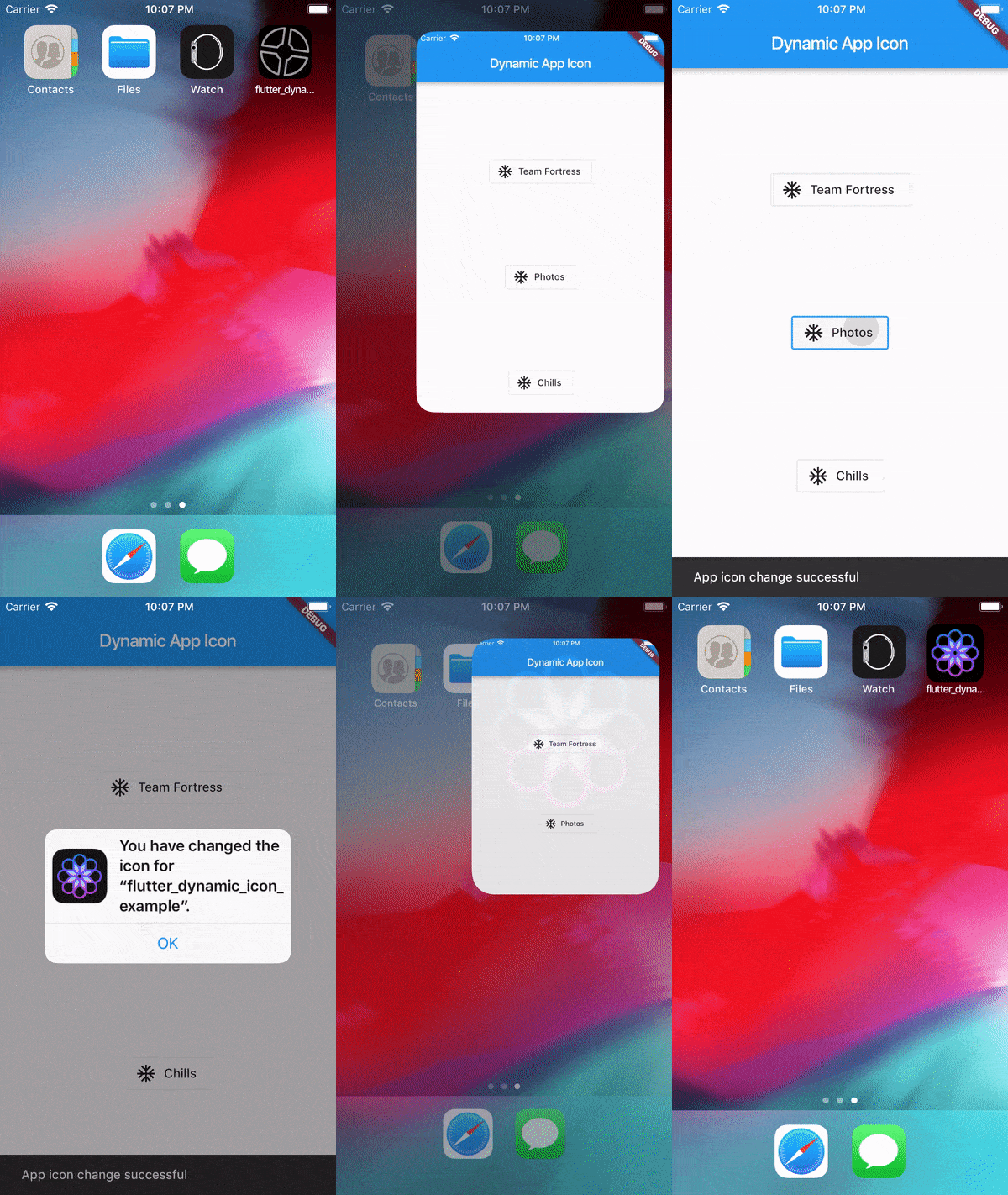
Screenrecording of the example
Screenrecording of the example
This was made possible because this blog. I borrowed a lot of words from this blog. https://medium.com/ios-os-x-development/dynamically-change-the-app-icon-7d4bece820d2