
 v0.1.6
flutter_polls
適用於 Flutter 的可自訂投票。簡單、易用且高度可自訂。
170喜歡 1130近 30 天下載150Pub 分數
AndroidiOSWebmacOSWindowsLinux
🗳 適用於 Flutter 的可自定義投票功能。
以下為英文專案原文快照,最新內容請造訪 GitHub。
Customizable Polls for Flutter. Simple, easy to use and highly customizable.
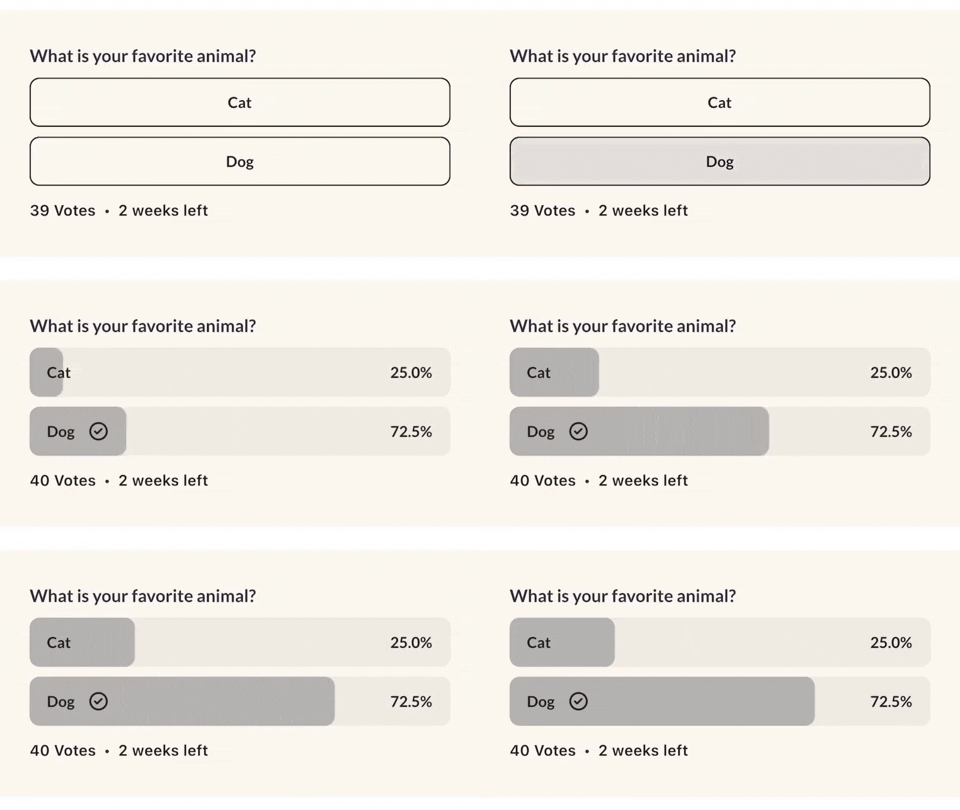
In the pubspec.yaml of your flutter project, add the following dependency:
dependencies:
  ...
  flutter_polls: ^0.1.6
Import it:
import 'package:flutter_polls/flutter_polls.dart';
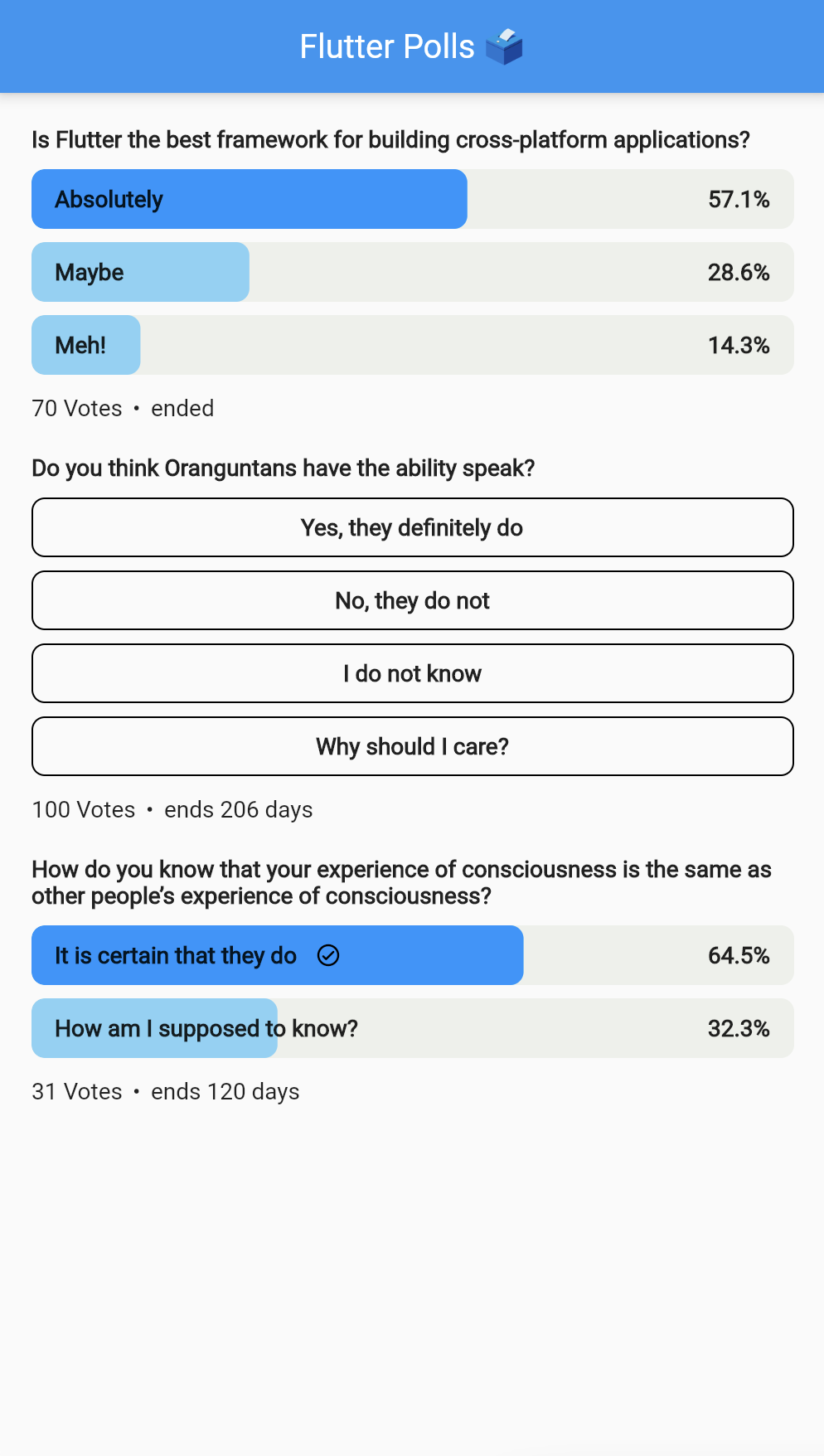
Check out the example project in the example directory here: example on github
FlutterPolls(
    pollId: '1',
    onVoted: (PollOption pollOption, int newTotalVotes) {
      print('Voted: ${pollOption.id}');
    },
    pollOptionsSplashColor: Colors.white(),
    votedProgressColor: Colors.greyDark().withOpacity(0.3),
    votedBackgroundColor: Colors.grey().withOpacity(0.2),
    votesTextStyle: themeData.textTheme.subtitle1,
    votedPercentageTextStyle:
        themeData.textTheme.headline4?.copyWith(
    color: Colors.black(),
    ),
    votedCheckmark: Icon(
        Icons.circle_check,
        color: AppColors.black(),
        height: 18,
        width: 18,
    ),
    pollTitle: Align(
    alignment: Alignment.centerLeft,
    child: AutoSizeText(
        poll['title'],
        style: TextStyle(
            fontSize: 20,
        ),
    ),
    pollOptions: poll['options'].map(
    (option) {
        return PollOption(
        id: option['id'],
        title: AutoSizeText(
            option['title'],
            style: tTextStyle(
            fontSize: 20,
        ),
        ),
        votes: option['votes'],
        );
    },
    ).toList(),
    metaWidget: Row(
    children: [
        const SizedBox(width: 6),
        AutoSizeText(
        '•',
        style: TextStyle(
            fontSize: 20,
        ),
        ),
        const SizedBox(
        width: 6,
        ),
        AutoSizeText(
        '2 weeks left',
        style: TextStyle(
            fontSize: 20,
        ),
        ),
    ],
    ),
),
| Parameter | Type | Description |
|---|---|---|
| pollId | String | The poll id. |
| hasVoted | bool | Whether the user has voted. |
| userVotedOptionId | String | The user voted option id. If the user hasn't voted, this will be null. |
| onVoted | void Function(PollOption pollOption, int newTotalVotes) | The callback when the user voted. |
| pollTitle | Widget | The poll title. Can be any widget. |
| pollOptions | List | The poll options. Each item is a map with the following keys: id, title, votes. |
| heightBetweenTitleAndOptions | double | The height between the poll title and the poll options. |
| heightBetweenOptions | double | The height between the poll options. |
| votesText | String | Votes text. Can be "Votes", "Votos", "Ibo" or whatever language. If not specified, "Votes" is used. |
| votesTextStyle | TextStyle | The style of the votes text. |
| metaWidget | Widget | The meta widget. Can be any widget. |
| createdBy | String | The poll creator. |
| userToVote | String | The user to vote. |
| pollStartDate | DateTime | The poll start date. |
| pollEnded | bool | If the poll is closed. |
| pollOptionsHeight | double | The poll options height. |
| pollOptionsWidth | double | The poll options width. |
| pollOptionsBorderRadius | BorderRadius | The poll options border radius. |
| pollOptionsBorder | BoxBorder | The poll options border. |
| pollOptionsFillColor | Color | The poll options fill color. |
| pollOptionsSplashColor | Color | The poll options splash color. |
| votedPollOptionsRadius | Radius | The voted poll options border radius. |
| votedBackgroundColor | Color | The voted poll options background color. |
| votedProgressColor | Color | The voted poll options progress color. |
| voteInProgressColor | Color | The voted poll options background color when user has voted and its still in progress. |
| votedCheckmark | Widget | The voted poll options checkmark. |
| votedPercentageTextStyle | TextStyle | The voted poll options percentage text style. |
| votedAnimationDuration | int | The voted poll options animation duration. |
| loadingWidget | Widget | The loading widget when a user votes. Can be any widget. |

依賴清單 5 項
{"sdk":"flutter"}^0.20.4^4.2.3^3.0.1{"sdk":"flutter"}先依使用情境篩選,再比較專案活躍情況,最後到原始儲存庫確認使用要求。
“A repository is the most basic element of GitHub.”
GitHub Docs — About repositories ↗