
 v1.1.1
rich_readmore
一個顯示文字的元件,根據提供的設定可選擇顯示更多或更少。
45喜歡 1700近 30 天下載160Pub 分數
AndroidiOSWebmacOSWindowsLinux
一個允許動態展開和收起豐富文字的Flutter外掛

{"sdk":"flutter"}{"sdk":"flutter"}以下為英文專案原文快照,最新內容請造訪 GitHub。
rich_readmore workflow codecov MIT License
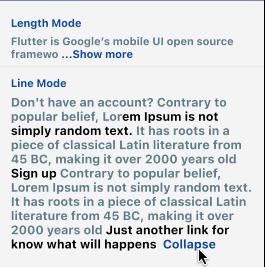
A widget that displays text with an option to show more or show less based on the provided settings.
The RichReadMoreText widget allows you to trim text either based on the character length or the number of lines.
When the text is longer than the specified trim length or exceeds the maximum number of lines, it provides a toggle option to show more or show less of the text.
It has two options for settings, the LineModeSettings or LengthModeSettings for trimming using the behavior that you want.
If you want to pass a string directly instead of a TextSpan, you can just be using the the RichReadMoreText.fromString(...). There are some examples for that below.
https://raw.githubusercontent.com/thierryoliveira/rich_readmore/HEAD/read-more-text-view-flutter.gif
import:
import 'package:rich_readmore/rich_readmore.dart';
For TextSpan data:
 RichReadMoreText(
   textSpan,
   settings: LineModeSettings(
     trimLines: 3,
     trimCollapsedText: 'Expand',
     trimExpandedText: ' Collapse ',
     onPressReadMore: () {
       /// specific method to be called on press to show more
     },
     onPressReadLess: () {
       /// specific method to be called on press to show less
     },
   ),
 ),
Or for String data:
 RichReadMoreText.fromString(
   text: 'Lorem ipsum dolor sit amet, consectetur adipiscing elit.',
   textStyle: TextStyle(color: Colors.purpleAccent),
   settings: LengthModeSettings(
     trimLength: 20,
     trimCollapsedText: 'Expand',
     trimExpandedText: ' Collapse ',
     onPressReadMore: () {
       /// specific method to be called on press to show more
     },
     onPressReadLess: () {
       /// specific method to be called on press to show less
     },
     lessStyle: TextStyle(color: Colors.blue),
     moreStyle: TextStyle(color: Colors.blue),
   ),
 ),