v1.19.0
meta
用於表達開發人員意圖的註解,這些意圖無法透過靜態分析來推斷來源碼。
480喜歡 1930萬近 30 天下載150Pub 分數
AndroidiOSWebmacOSWindowsLinux
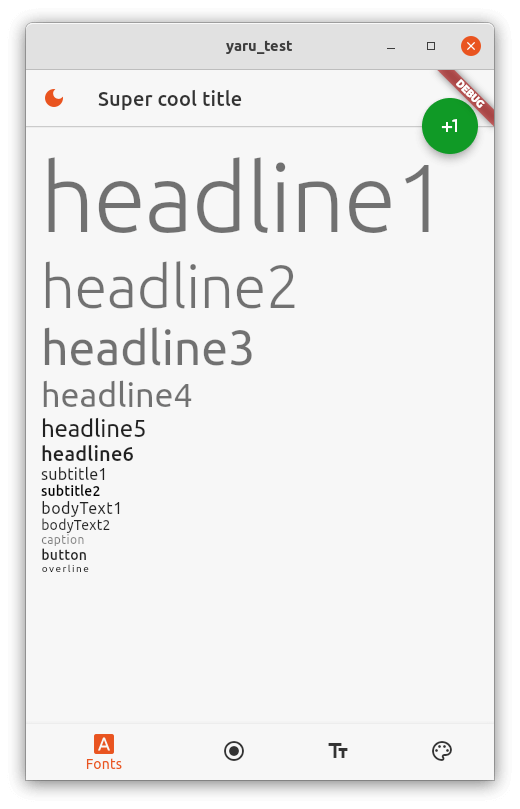
:penguin: :orange_heart: 使用 Flutter 建立的 Ubuntu 桌面系統設定應用程式。

以下為英文專案原文快照,最新內容請造訪 GitHub。
The goal of this project is to build a feature complete settings app for the Ubuntu desktop (GNOME, gtk and gnome-shell) with the Flutter UI toolkit.
| Light | Dark |
|---|---|
 |
 |
The app will be soon available as a snap.
The following steps are needed to run the app from the source code.
sudo apt -y install git curl cmake meson make clang libgtk-3-dev pkg-config && mkdir -p ~/development && cd ~/development && git clone https://github.com/flutter/flutter.git -b stable && echo 'export PATH="$PATH:$HOME/development/flutter/bin"' >> ~/.bashrc && source ~/.bashrc
Run the app with vscode or with
flutter run
This project really needs help to finish the last pages and also in the future when the GNOME desktop changes. Any help is welcome!
用於表達開發人員意圖的註解,這些意圖無法透過靜態分析來推斷來源碼。
一個用於 Dart 的 PDF 產生器。它可以在 Web 或 Flutter 中建立 PDF 檔案。
構建桌面和Web應用程式時常用的Flutter小部件。
功能齊全的 Dart XML — 支援 DOM 解析、SAX 流式處理、XPath 3 查詢,以及流暢的建構器 API。
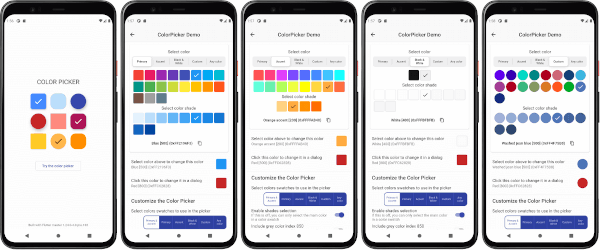
一個可自訂的 Flutter 主色、強調色和自訂顏色選擇器。包含一個可選的 HSV 輪盤顏色選擇器。
由 get_it 提供支援的簡單狀態管理。它允許觀察 get_it 服務定位器內物件的變更,並依此重新建構 UI。
D-Bus 訊息總線用戶端的原生 Dart 實作。此套件允許 Dart 應用程式直接存取 Linux 桌面服務。
提供一個客戶端以連接到 BlueZ - Linux 藍牙堆疊。
用於讓使用 'Duration' 更輕鬆的實用工具。將持續時間格式化為易讀的形式,並可將易讀的形式解析為 Dart 的 Duration。
一個用於取得人性化的檔案大小的套件。將原始檔案大小轉換為可讀的字串。
SpinBox 是一個數值輸入元件,包含一個用於輸入特定值的輸入欄位,以及用於快速、方便且精確調整值的旋轉按鈕。
提供一個客戶端,用於連接 NetworkManager —— 管理 Linux 上網路連接的服務。
依賴清單 39 項
^0.8.0^1.17.1^0.7.8^4.0.3^2.0.3^1.0.0^0.9.2^2.0.1^3.3.0{"sdk":"flutter"}{"sdk":"flutter"}^2.0.3^0.13.1^2.0.7^0.2.8^0.4.0^1.1.0^0.19.0{"git":"https://github.com/ubuntu-flutter-community/linux_datetime"}{"git":{"url":"https://github.com/Feichtmeier/linux_system_info.git","ref":"update_dbus_ffi_and_xml"}}^1.9.1^2.0.0^0.5.0^2.0.9^3.7.4^6.1.2^0.4.0^0.4.0^0.7.0^6.0.20^1.4.2{"git":"https://github.com/ubuntu-flutter-community/xdg_accounts"}^6.2.2{"git":{"url":"https://github.com/ubuntu/yaru.dart","ref":"ba067738fe0a3887bf788b94295fd70a0e1cf908"}}^2.1.2^5.0.0{"sdk":"flutter"}^0.6.0^5.0.16先依使用情境篩選,再比較專案活躍情況,最後到原始儲存庫確認使用要求。
“A repository is the most basic element of GitHub.”
GitHub Docs — About repositories ↗