
 v1.0.7
flutter_dropdown_alert
一個用於 Flutter 的下拉提醒套件,幫助使用者在呼叫 API 成功、失敗或警告時,像推播通知一樣收到提醒。
99喜歡 4580近 30 天下載140Pub 分數
AndroidiOSWebmacOSWindowsLinux
Flutter 下拉提醒可幫助使用者在成功、警告或錯誤時收到通知,類似於應用內推播通知。

依賴清單 2 項
{"sdk":"flutter"}{"sdk":"flutter"}以下為英文專案原文快照,最新內容請造訪 GitHub。
A dropdown alert package for flutter
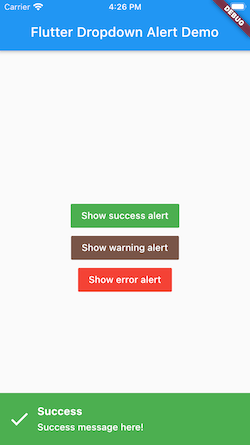
Dropdown alert will help to notify to user when you call api success, error or something like that, such as in app notification. It's will similar with push notification but you can custom more than that. You can show alert at anywhere without widget.
https://github.com/vantuan88291/flutter_dropdown_alert/raw/master/screenshot/dropdown.gif
https://github.com/vantuan88291/flutter_dropdown_alert/raw/master/screenshot/demo-2.png
# pubspec.yaml

dependencies:
  flutter:
    sdk: flutter
  flutter_dropdown_alert: <last-version>
Just create a Stack widget and add DropdownAlert() inside MaterialApp which should be in main.dart like this:
import 'package:flutter_dropdown_alert/dropdown_alert.dart';
 MaterialApp(
       title: 'Dropdown Alert Demo',
       theme: ThemeData(
         visualDensity: VisualDensity.adaptivePlatformDensity,
       ),
       builder: (context, child) => Stack(
         children: [
            child!,
            DropdownAlert()
         ],
       ),
       home: MyHomePage(title: 'Flutter Dropdown Alert Demo'),
     );
https://github.com/vantuan88291/flutter_bloc_modular
Next, import 'alert_controller.dart' into your dart code
import 'package:flutter_dropdown_alert/alert_controller.dart';
AlertController.show("Title", "message here!", TypeAlert.success, payload);
The payload param is Map<String, dynamic>, this param is optional, should use to give data into the alert and get it when click on alert.
The alert will automatically hide, but if you use delayDismiss: 0, it will freeze and not auto hide, you have to hide the alert by this code:
AlertController.hide();
There are 2 ways to do that:
initState() of widget: AlertController.onTabListener((Map<String, dynamic>? payload, TypeAlert type) {
print("$payload - $type");
});
onTap: DropdownAlert(onTap: (Map<String, dynamic> payload?, TypeAlert type) {
print("$payload - $type");
},)
| Type | description |
|---|---|
| TypeAlert.success | Type when action success, the background of alert will green |
| TypeAlert.warning | Type when action warning, the background of alert will brown |
| TypeAlert.error | Type when action error, the background of alert will red |
| parameter | description | default |
|---|---|---|
| onTap | Callback when tab to alert, will give: Function(Map<String, dynamic>, TypeAlert) | null |
| successImage | Image.asset() of success alert, uri of assets image | Icon widget |
| warningImage | Image.asset() of warning alert, uri of assets image | Icon widget |
| errorImage | Image.asset() of error alert, uri of assets image | Icon widget |
| closeImage | Image.asset() of close image, when showCloseButton is true | Icon widget |
| errorBackground | Color of background when error | Colors.red |
| successBackground | Colors.green | |
| warningBackground | 0xFFCE863D | |
| titleStyle | TextStyle of title | |
| contentStyle | TextStyle of content | |
| maxLinesTitle | null | |
| maxLinesContent | null | |
| duration | duration of animation | 300 |
| delayDismiss | delay time when alert auto dismiss, set to 0 if you want to freeze alert | 3000 |
| position | show the position of alert, include: AlertPosition.TOP, AlertPosition.BOTTOM | AlertPosition.TOP |
| showCloseButton | When close button is present, only can click on button close to hide the alert | false |
| avoidBottomInset | Add optional variable for inset overlap | false |
The ideal from react-native-dropdownalert