
md2_tab_indicator
westdabestdb/md2_tab_indicator open-source repository details.

- 星標
- 42
- 分支
- 16
- 最近推送(UTC)
- 2022年4月24日
- 專案狀態
- 未封存
原始 README
以下為英文專案原文快照,最新內容請造訪 GitHub。
md2_tab_indicator / MD2 Tab Indicator
MD2TabIndicator is a tab indicator influenced by Google's Material Design 2 tab indicator design and developed by westdabestdb.

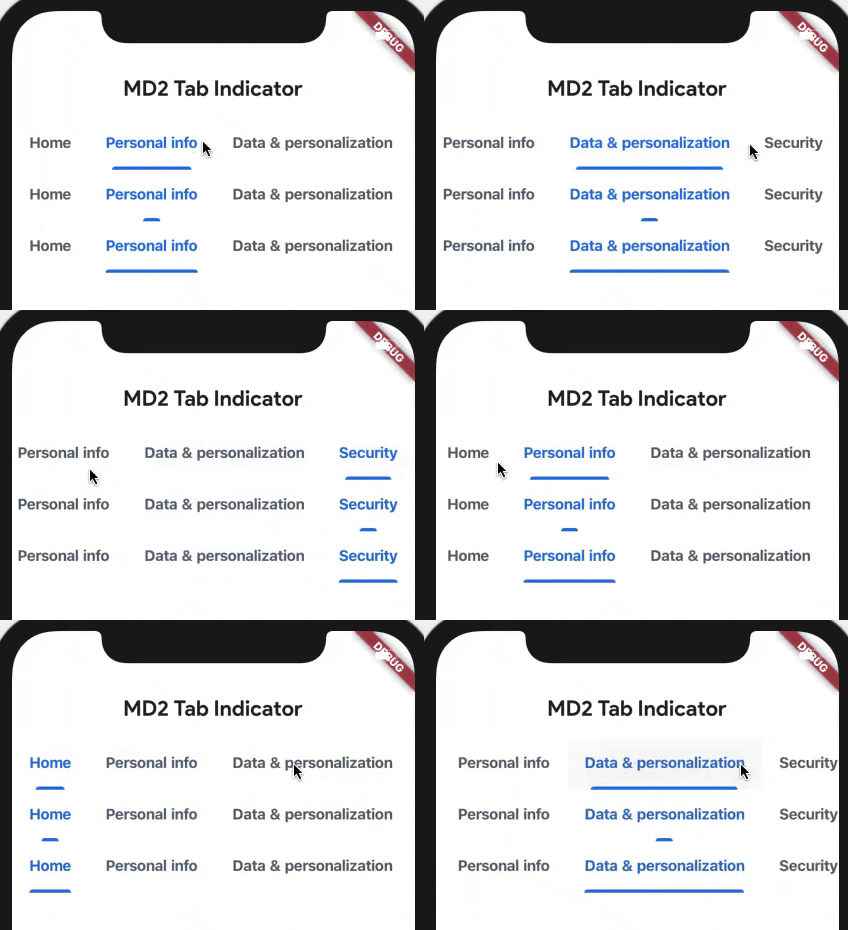
Getting Started
Add this to your package's pubspec.yaml file:
...
dependencies:
  md2_tab_indicator: ^1.0.2
Now in your Dart code, you can use:
import 'package:md2_tab_indicator/md2_tab_indicator.dart';
Usage
TabBar(
  labelStyle: TextStyle( //up to your taste
    fontWeight: FontWeight.w700
  ),
  indicatorSize: TabBarIndicatorSize.label, //makes it better
  labelColor: Color(0xff1a73e8), //Google's sweet blue
  unselectedLabelColor: Color(0xff5f6368), //niceish grey
  isScrollable: true, //up to your taste
  indicator: MD2Indicator( //it begins here
    indicatorHeight: 3,
    indicatorColor: Color(0xff1a73e8),
    indicatorSize: MD2IndicatorSize.normal //3 different modes tiny-normal-full
  ),
  tabs: <Widget>[
    Tab(
      text: "Home",
    ),
    Tab(
      text: "Personal info",
    ),
    Tab(
      text: "Data & personalization",
    ),
    Tab(
      text: "Security",
    )
  ],
),

GitHub 作者
Görkem Erol ↗
語言DartJavaObjective-C
使用的依賴
依賴清單 2 項
- flutter
{"sdk":"flutter"} - flutter_test開發依賴
{"sdk":"flutter"}
如何選擇適合專案的儲存庫?
先依使用情境篩選,再比較專案活躍情況,最後到原始儲存庫確認使用要求。
- 透過儲存庫名稱、作者或描述搜尋,再依技術分類縮小範圍。
- 綜合星標、分支與最近推送比較專案;星標反映社群關注,不保證品質。
- 使用前在 GitHub 確認 README、授權條款與 Issues。
來源與維護
“A repository is the most basic element of GitHub.”
GitHub Docs — About repositories ↗