
 v0.1.7+1
advance_image_picker
純Dart程式碼撰寫的Flutter外掛,可從Android/iOS相簿中選擇/編輯多張圖片,並在相同畫面中使用相機拍攝新照片。
127喜歡 21近 30 天下載60Pub 分數
平台暫無資料
Flutter 插件,可從 Android 與 iOS 圖庫中選擇多張圖片,使用相機拍攝新照片,並在使用前進行編輯,例如旋轉、裁剪、加入貼紙/濾鏡。

^0.9.7+1{"sdk":"flutter"}^0.0.6+1^3.1.3^2.0.0^1.0.2^2.0.10^2.1.2^0.14.0{"sdk":"flutter"}以下為英文專案原文快照,最新內容請造訪 GitHub。
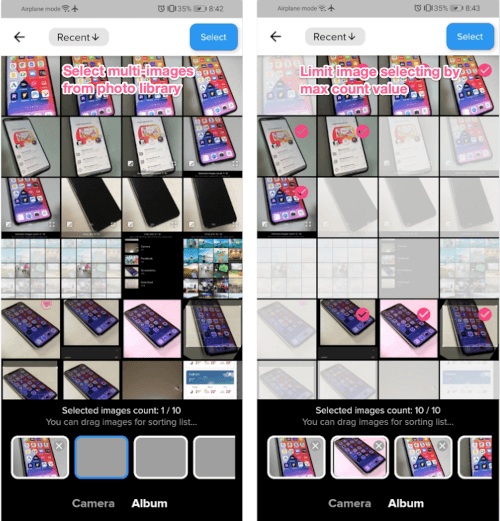
Flutter plugin for selecting multiple images from the Android and iOS image library, taking new pictures with the camera, and edit them before using such as rotating, cropping, adding sticker/filters.
This is an advanced version of image_picker plugin.
1. freemar.vn - Shopping app for Vietnamese
2. trainghiem.vn - Find places to have fun, find places to experience!
3. Henoo - Heritage in your pocket (Le patrimoine dans la poche)
This plugin requires dart version 2.16.1 or later
Add these settings to the ios/Runner/Info.plist
<key>NSCameraUsageDescription</key>
<string>Can I use the camera please?</string>
<key>NSMicrophoneUsageDescription</key>
<string>Can I use the mic please?</string>
<key>NSPhotoLibraryUsageDescription</key>
<string>App need your agree, can visit your album</string>
Modify TOCropViewController version in snapshot (ios/Podfile.lock) to 2.6.1
TOCropViewController (2.6.1)
Change the minimum Android sdk version to 21 (or higher), and compile sdk to 31 (or higher) in your android/app/build.gradle file (refer example project).
compileSdkVersion 31
minSdkVersion 21
Change kotlin version to 1.5.21 or later in your android/build.gradle file (refer example project).
ext.kotlin_version = '1.5.21'
Add activity and uses-permissions to your AndroidManifest.xml, just like next.
<manifest xmlns:android="http://schemas.android.com/apk/res/android"
    package="vn.weta.freemarimagepickerexample">

    <application
        android:name="io.flutter.app.FlutterApplication"
        android:label="freemarimagepicker_example"
        android:requestLegacyExternalStorage="true"
        android:icon="@mipmap/ic_launcher">
        <activity
            android:name="com.yalantis.ucrop.UCropActivity"
            android:screenOrientation="portrait"
            android:theme="@style/Theme.AppCompat.Light.NoActionBar"/>
    </application>
    <uses-permission android:name="android.permission.WRITE_EXTERNAL_STORAGE" />
    <uses-permission android:name="android.permission.READ_EXTERNAL_STORAGE" />
    <uses-permission android:name="android.permission.CAMERA" />
</manifest>
Add to pubspec
dependencies:
  advance_image_picker: $latest_version
Import dart code
import 'package:advance_image_picker/advance_image_picker.dart';
Setting configs & text translate function
// Setup image picker configs (global settings for app)
var configs = ImagePickerConfigs();
configs.appBarTextColor = Colors.black;
configs.stickerFeatureEnabled = false; // ON/OFF features
configs.translateFunc = (name, value) => Intl.message(value, name: name); // Use intl function

// Add plugin's string inside lib/l10n/intl_**.arb of your project to use translation
// For example about english messages, declared inside intl_en.arb
{
  "app_title": "FreeMar - Share your things",
  "image_picker_exit_without_selecting": "Do you want to exit without selecting images?",
  "image_picker_select_images_title": "Selected images count",
  "image_picker_select_images_guide": "You can drag images for sorting list...",
  "image_picker_camera_title": "Camera",
  "image_picker_album_title": "Album",
  "image_picker_preview_title": "Preview",
  "image_picker_confirm_delete": "Do you want to delete this image?",
  "image_picker_confirm_reset_changes": "Do you want to clear all changes for this image?",
  "image_picker_no_images": "No images...",
  "image_picker_image_crop_title": "Image crop",
  "image_picker_image_filter_title": "Image filter",
  "image_picker_image_edit_title": "Image edit",
  "image_picker_select_button_title": "Select",
  "image_picker_image_sticker_title": "Image sticker",
  "image_picker_image_addtext_title": "Image add text",
  "image_picker_image_sticker_guide": "You can click on below icons to add into image, double click to remove it from image",
  "image_picker_edit_text": "Edit text",
  "suitcase": "Suitcase",
  "handbag": "Handbag",
  "bottle": "Bottle",
  "tie": "Tie",
  ...
}

// Or you can simply write your own translate function like this
// configs.translateFunc = (name, value) => Intl.message(value, name: name);
   configs.translateFunc = (name, value) {
     switch (name) {
       case 'image_picker_select_images_title':
         return 'Le immagini selezionate contano';
       case 'image_picker_select_images_guide':
         return 'È possibile trascinare le immagini per lelenco di ordinamento...';
       case 'image_picker_camera_title':
         return 'Telecamera';
       case 'image_picker_album_title':
         return 'Album';
       // ... Declare all your strings here
       default:
         return value;
     }
   }
Sample for adding external image editors.
(You can replace ImageEdit widget by your owned image editor widget, that output file after editing finised)
configs.externalImageEditors['external_image_editor_1'] = EditorParams(
      title: 'external_image_editor_1',
      icon: Icons.edit_rounded,
      onEditorEvent: (
              {required BuildContext context,
              required File file,
              required String title,
              int maxWidth = 1080,
              int maxHeight = 1920,
              int compressQuality = 90,
              ImagePickerConfigs? configs}) async => await Navigator.of(context).push(MaterialPageRoute<File>(
              fullscreenDialog: true,
              builder: (context) => ImageEdit(file: file, title: title, maxWidth: maxWidth, maxHeight: maxHeight, configs: configs)))
  );
Sample for usage
// Get max 5 images
List<ImageObject> objects =
    await Navigator.of(context).push(
        PageRouteBuilder(pageBuilder:
            (context, animation, __) {
  return ImagePicker(maxCount: 5);
}));

if (objects.length > 0) {
  setState(() {
    imageFiles.addAll(objects
        .map((e) => e.modifiedPath)
        .toList());
  });
}
This software uses the following open source packages:
If this plugin was useful to you, helped you to deliver your app, saved you a lot of time, or you just want to support the project, I would be very grateful if you buy me a cup of coffee.