
 v2.0.1
passcode_screen
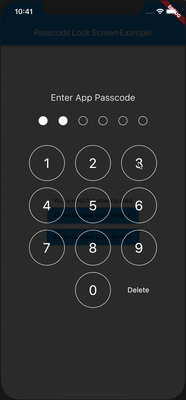
一個跨平台的 Flutter 套件,用於顯示密碼輸入畫面,類似於原生 iOS。可透過顏色、尺寸、字型等自訂畫面。
117喜歡 3540近 30 天下載135Pub 分數
AndroidiOSWebmacOSWindowsLinux
Flutter - 暢碼鎖屏

{"sdk":"flutter"}{"sdk":"flutter"}^5.0.2以下為英文專案原文快照,最新內容請造訪 GitHub。
A Flutter package for iOS and Android for showing passcode input screen, similar to Native iOS.
passcode-screen-demo.gifFirst add passcode_screen as a dependency in your pubspec.yaml file.
Then use import
import 'package:passcode_screen/passcode_screen.dart';
PasscodeScreen(
  title: title,
  passwordEnteredCallback: _onPasscodeEntered,
  cancelButton: Text('Cancel'),
  deleteButton: Text('Delete'),
  shouldTriggerVerification: _verificationNotifier.stream,
);
_onPasscodeEntered(String enteredPasscode) {

}
final StreamController<bool> _verificationNotifier = StreamController<bool>.broadcast();

_onPasscodeEntered(String enteredPasscode) {
  bool isValid = '123456' == enteredPassword;
  _verificationNotifier.add(isValid);
}
Don't forget to close a stream
@override
void dispose() {
  _verificationNotifier.close();
  super.dispose();
}
Customize circles
class CircleUIConfig {
  final Color borderColor;
  final Color fillColor;
  final double borderWidth;
  final double circleSize;
  double extraSize;
}
Customize keyboard
class KeyboardUIConfig {
  final double digitSize;
  final TextStyle digitTextStyle;
  final TextStyle deleteButtonTextStyle;
  final Color primaryColor;
  final Color digitFillColor;
  final EdgeInsetsGeometry keyboardRowMargin;
  final EdgeInsetsGeometry deleteButtonMargin;
}
Plugin is totally platform agnostic. No configuration required - the plugin should work out of the box.
Warmly welcome to submit a pull request!
Passcode Lock Screen is owned and maintained by Redeyes Dev
Vladimir Hudnitsky BeDaut mix1009 pixnbit ssanderson imejiasoft
Basic implementation of a widget.
isValidCallback to help you handle success scenario. isValidCallback will be invoked after passcode screen will pop.cancelCallback to react when user cancelled widget (by @mix1009)