
 v2.1.0
flutter_picker
Flutter 插件選擇器。包含 NumberPicker、DateTimePicker、ArrayPicker 與預設連結選擇器。提供靈活的參數以滿足各種需求。
441喜歡 4470近 30 天下載70Pub 分數
平台暫無資料
Flutter 選擇器外掛
以下為英文專案原文快照,最新內容請造訪 GitHub。


Flutter plugin picker. Include NumberPicker, DateTimePicker, ArrayPicker, and default linkage Picker. Provide flexible parameters to meet various needs. At the same time, you can extend more functions through custom adapters.
Supported Platforms
- Android
- IOS
- Windows
- MacOS
- Linux
- Web
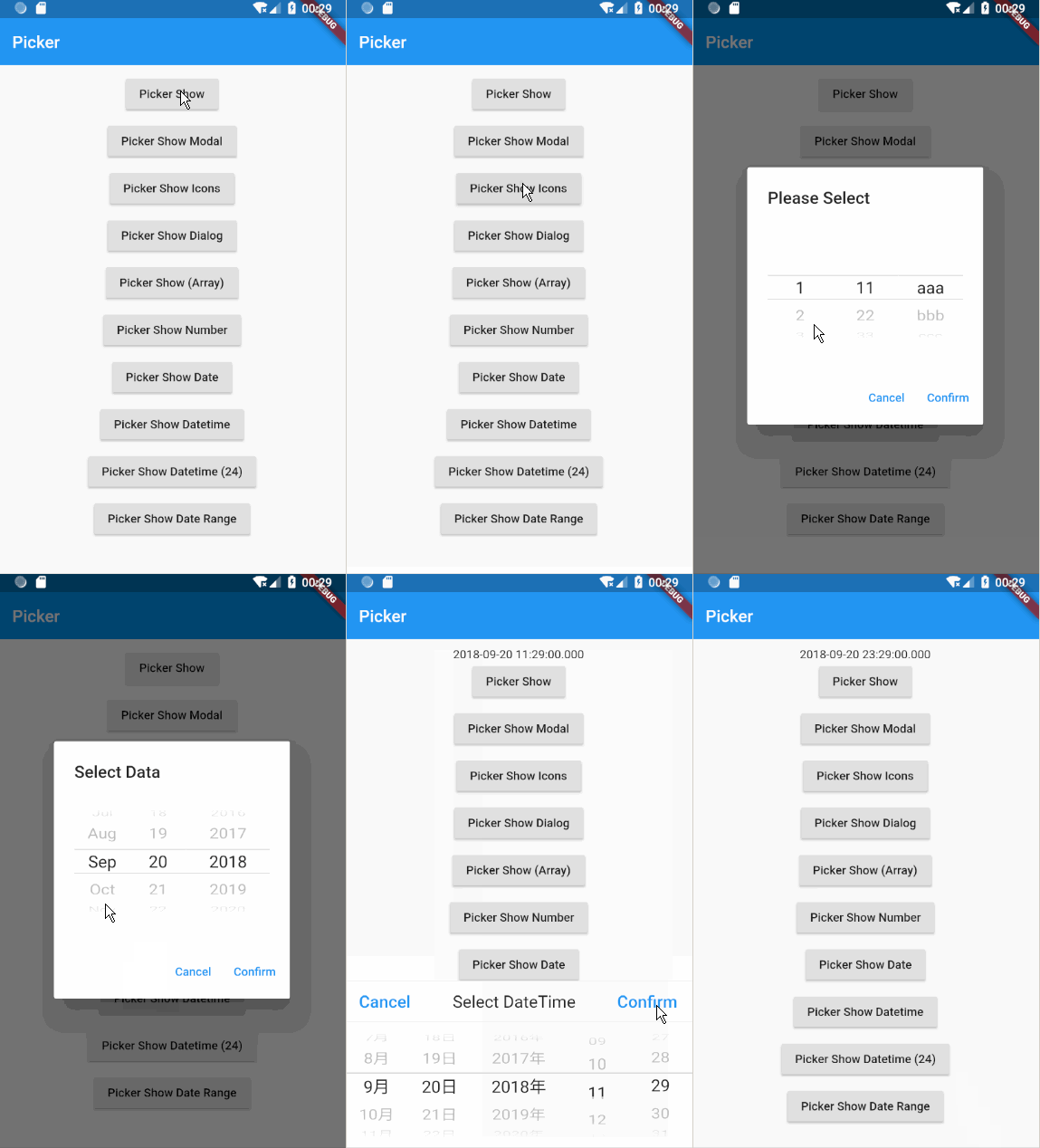
# add this line to your dependencies
flutter_picker:
  git:
    url: https://github.com/yangyxd/flutter_picker.git
import 'package:flutter_picker/flutter_picker.dart';
    showPicker(BuildContext context) {
      Picker picker = new Picker(
        adapter: PickerDataAdapter<String>(pickerdata: new JsonDecoder().convert(PickerData)),
        changeToFirst: true,
        textAlign: TextAlign.left,
        columnPadding: const EdgeInsets.all(8.0),
        onConfirm: (Picker picker, List value) {
          print(value.toString());
          print(picker.getSelectedValues());
        }
      );
      picker.show(_scaffoldKey.currentState);
    }

    showPickerModal(BuildContext context) {
      new Picker(
        adapter: PickerDataAdapter<String>(pickerdata: new JsonDecoder().convert(PickerData)),
        changeToFirst: true,
        hideHeader: false,
        onConfirm: (Picker picker, List value) {
          print(value.toString());
          print(picker.adapter.text);
        }
      ).showModal(this.context); //_scaffoldKey.currentState);
    }

    showPickerIcons(BuildContext context) {
      new Picker(
        adapter: PickerDataAdapter(data: [
          new PickerItem(text: Icon(Icons.add), value: Icons.add, children: [
            new PickerItem(text: Icon(Icons.more)),
            new PickerItem(text: Icon(Icons.aspect_ratio)),
            new PickerItem(text: Icon(Icons.android)),
            new PickerItem(text: Icon(Icons.menu)),
          ]),
          new PickerItem(text: Icon(Icons.title), value: Icons.title, children: [
            new PickerItem(text: Icon(Icons.more_vert)),
            new PickerItem(text: Icon(Icons.ac_unit)),
            new PickerItem(text: Icon(Icons.access_alarm)),
            new PickerItem(text: Icon(Icons.account_balance)),
          ]),
          new PickerItem(text: Icon(Icons.face), value: Icons.face, children: [
            new PickerItem(text: Icon(Icons.add_circle_outline)),
            new PickerItem(text: Icon(Icons.add_a_photo)),
            new PickerItem(text: Icon(Icons.access_time)),
            new PickerItem(text: Icon(Icons.adjust)),
          ]),
          new PickerItem(text: Icon(Icons.linear_scale), value: Icons.linear_scale, children: [
            new PickerItem(text: Icon(Icons.assistant_photo)),
            new PickerItem(text: Icon(Icons.account_balance)),
            new PickerItem(text: Icon(Icons.airline_seat_legroom_extra)),
            new PickerItem(text: Icon(Icons.airport_shuttle)),
            new PickerItem(text: Icon(Icons.settings_bluetooth)),
          ]),
          new PickerItem(text: Icon(Icons.close), value: Icons.close),
        ]),
        title: new Text("Select Icon"),
        onConfirm: (Picker picker, List value) {
          print(value.toString());
          print(picker.getSelectedValues());
        }
    ).show(_scaffoldKey.currentState);
  }

  showPickerDialog(BuildContext context) {
    new Picker(
        adapter: PickerDataAdapter<String>(pickerdata: new JsonDecoder().convert(PickerData)),
        hideHeader: true,
        title: new Text("Select Data"),
        onConfirm: (Picker picker, List value) {
          print(value.toString());
          print(picker.getSelectedValues());
        }
    ).showDialog(context);
  }

  showPickerArray(BuildContext context) {
    new Picker(
        adapter: PickerDataAdapter<String>(pickerdata: new JsonDecoder().convert(PickerData2), isArray: true),
        hideHeader: true,
        title: new Text("Please Select"),
        onConfirm: (Picker picker, List value) {
          print(value.toString());
          print(picker.getSelectedValues());
        }
    ).showDialog(context);
  }

  showPickerNumber(BuildContext context) {
    new Picker(
        adapter: NumberPickerAdapter(data: [
          NumberPickerColumn(begin: 0, end: 999),
          NumberPickerColumn(begin: 100, end: 200),
        ]),
        delimiter: [
          PickerDelimiter(child: Container(
            width: 30.0,
            alignment: Alignment.center,
            child: Icon(Icons.more_vert),
          ))
        ],
        hideHeader: true,
        title: new Text("Please Select"),
        onConfirm: (Picker picker, List value) {
          print(value.toString());
          print(picker.getSelectedValues());
        }
    ).showDialog(context);
  }
const PickerData2 = '''
[
    [
        1,
        2,
        3,
        4
    ],
    [
        11,
        22,
        33,
        44
    ],
    [
        "aaa",
        "bbb",
        "ccc"
    ]
]
    ''';
const PickerData = '''
[
    {
        "a": [
            {
                "a1": [
                    1,
                    2,
                    3,
                    4
                ]
            },
            {
                "a2": [
                    5,
                    6,
                    7,
                    8
                ]
            },
            {
                "a3": [
                    9,
                    10,
                    11,
                    12
                ]
            }
        ]
    },
    {
        "b": [
            {
                "b1": [
                    11,
                    22,
                    33,
                    44
                ]
            },
            {
                "b2": [
                    55,
                    66,
                    77,
                    88
                ]
            },
            {
                "b3": [
                    99,
                    1010,
                    1111,
                    1212
                ]
            }
        ]
    },
    {
        "c": [
            {
                "c1": [
                    "a",
                    "b",
                    "c"
                ]
            },
            {
                "c2": [
                    "aa",
                    "bb",
                    "cc"
                ]
            },
            {
                "c3": [
                    "aaa",
                    "bbb",
                    "ccc"
                ]
            }
        ]
    }
]
    ''';
Flutter Picker插件已经更新以支持最新版本的Flutter。主要更新内容如下:
兼容性升级:
API更新:
ScaffoldState.showBottomSheet方法为Scaffold.maybeOfButtonStyle和颜色相关的API,使用colorScheme.primary替代过时的colorScheme.secondary使用说明:
The Flutter Picker plugin has been updated to support the latest versions of Flutter. Major updates include:
Compatibility Upgrade:
API Updates:
ScaffoldState.showBottomSheet method with Scaffold.maybeOfButtonStyle and color-related APIs, using colorScheme.primary instead of the deprecated colorScheme.secondaryUsage Notes:

依賴清單 2 項
{"sdk":"flutter"}{"sdk":"flutter"}先依使用情境篩選,再比較專案活躍情況,最後到原始儲存庫確認使用要求。
“A repository is the most basic element of GitHub.”
GitHub Docs — About repositories ↗