


 v0.5.3
bubble_box
一個功能強大的氣泡框,實現了基本氣泡、邊框、虛線、漸變色、角度、自適應寬高、氣泡方向、偏移等特性。
52喜歡 1250近 30 天下載150Pub 分數
AndroidiOSWebmacOSWindowsLinux
flutter 一個強大的氣泡盒子

以下為英文專案原文快照,最新內容請造訪 GitHub。
A powerful bubble box, which implements basic bubble, border, dotted line, gradient color, angle, adaptive width and height, bubble direction, offset, etc.
This project was wrote with pure dart code,which means it's support both iOS As well as Android, web, windows, linux, etc.
Modified a lot of APIs, please pay attention to upgrade
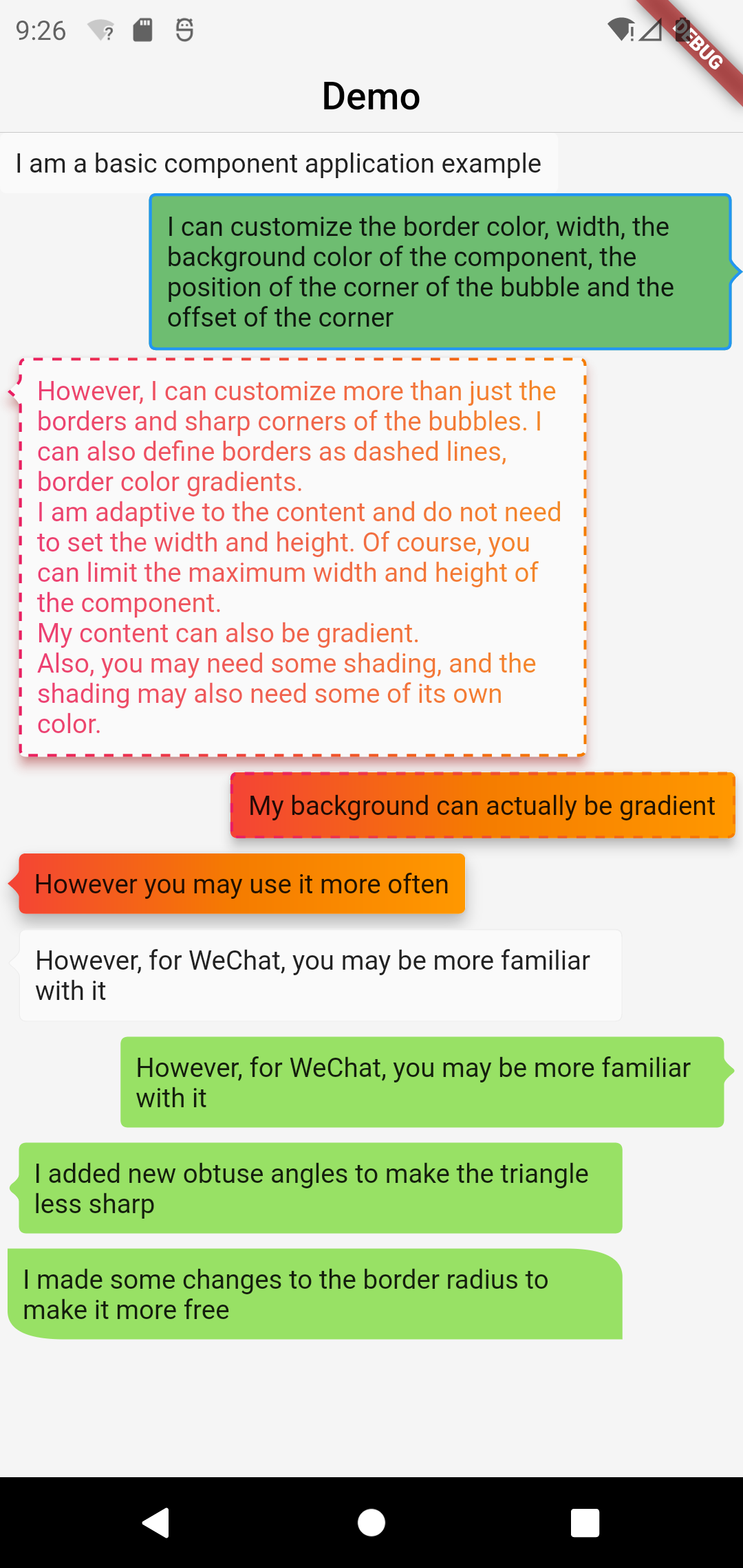
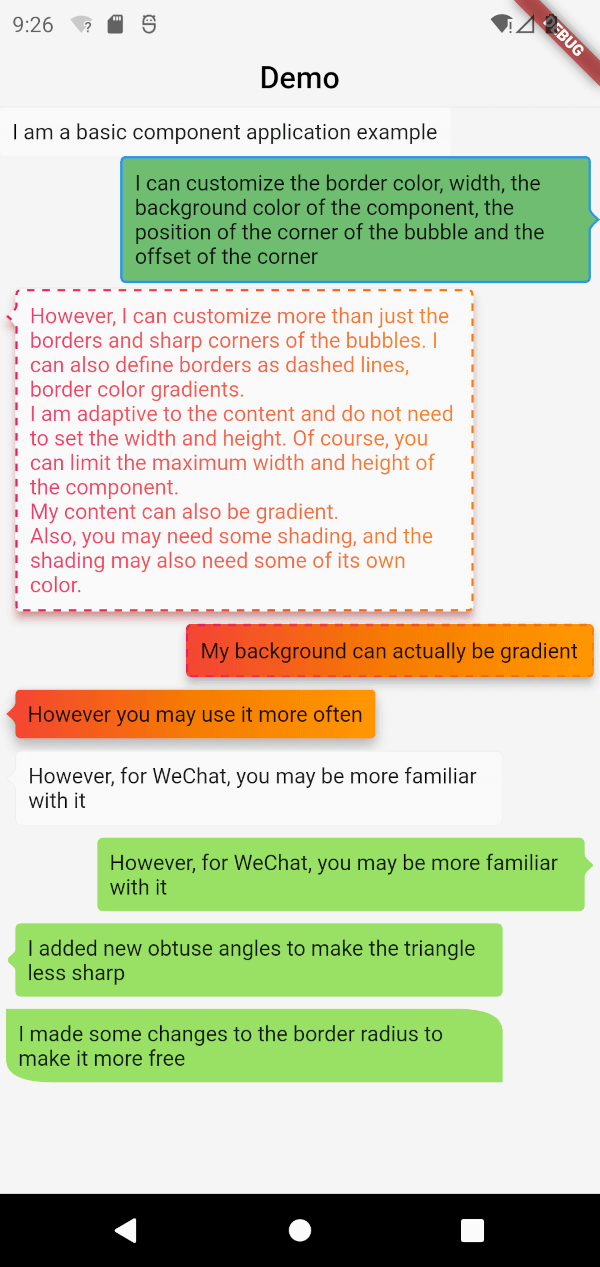
BubbleBox(
    maxWidth: MediaQuery.of(context).size.width * 0.8,
    child: Text('I am a basic component application example'),
)
BubbleBox(
    maxWidth: MediaQuery.of(context).size.width * 0.8,
    shape: BubbleShapeBorder(
      border: BubbleBoxBorder(
        color: Colors.blue,
        width: 3,
      ),
      position: const BubblePosition.center(0),
      direction: BubbleDirection.right,
    ),
    backgroundColor: Colors.green.withOpacity(0.8),
    child: Text('I can customize the color and width of the border, the background color of the component, the position of the sharp corner of the bubble and the offset of the sharp corner'),
  )
BubbleBox(
    maxWidth: MediaQuery.of(context).size.width * 0.8,
    gradient: LinearGradient(
      colors: [
        Colors.pink,
        Colors.orange[700],
      ],
    ),
    blendMode: BlendMode.srcATop,
    shape: BubbleShapeBorder(
      border: BubbleBoxBorder(
        gradient: LinearGradient(
          colors: [
            Colors.pink,
            Colors.orange[700],
          ],
        ),
        width: 3,
        style: BubbleBoxBorderStyle.dashed,
      ),
      direction: BubbleDirection.left,
      position: const BubblePosition.start(12),
    ),
    margin: EdgeInsets.all(4),
    elevation: 5,
    shadowColor: Colors.redAccent,
    child: Text(
        'However, I can not only customize the border and sharp corners of the bubble. I can also define the border as a dashed line and a gradient of border color. \nI am adaptive to the content, there is no need to set the width and height. Of course, you can limit the maximum width and height of the component. \nMy content can also be faded. \nIn addition, you may need some shadows, and the shadows may also need some of their own colors.'),
  )
BubbleBox(
    maxWidth: MediaQuery.of(context).size.width * 0.85,
    elevation: 5,
    gradient: LinearGradient(colors: [
      Colors.red,
      Colors.orange[700],
      Colors.orange[500],
    ]),
    shape: BubbleShapeBorder(
      border: BubbleBoxBorder(
        gradient: LinearGradient(
          colors: [
            Colors.pink,
            Colors.orange[700],
          ],
        ),
        color: Colors.blue,
        width: 3,
        style: BubbleBoxBorderStyle.dashed,
      ),
      direction: BubbleDirection.none,
      position: const BubblePosition.start(12),
    ),
    margin: EdgeInsets.all(4),
    child: Text(
      'my background can actually fade',
    ),
  ),
BubbleBox(
    maxWidth: MediaQuery.of(context).size.width * 0.85,
    shape: BubbleShapeBorder(
      direction: BubbleDirection.left,
      position: const BubblePosition.start(12),
      arrowQuadraticBezierLength: 2,
    ),
    backgroundColor: Color(0xff98E165),
    margin: EdgeInsets.all(4),
    child: Text(
      'We added new obtuse angles so that the triangles are no longer so sharp',
    ),
  ),
BubbleBox(
    maxWidth: MediaQuery.of(context).size.width * 0.85,
    backgroundColor: Color(0xff98E165),
    margin: EdgeInsets.all(4),
    shape: BubbleShapeBorder(
      radius: BorderRadius.only(
          topRight: Radius.elliptical(30, 15),
          bottomLeft: Radius.elliptical(30, 15)),
    ),
    child: Text(
      'We have made some modifications to the border radius to make it more free',
    ),
  ),
依賴清單 3 項
{"sdk":"flutter"}^1.0.4{"sdk":"flutter"}先依使用情境篩選,再比較專案活躍情況,最後到原始儲存庫確認使用要求。
“A repository is the most basic element of GitHub.”
GitHub Docs — About repositories ↗