
 v5.5.1
requests_inspector
Ein Flutter-Paket zum Protokollieren von REST-APIs und GraphQL-Anfragen, das über das Schütteln des Telefons auf dem Bildschirm das RequestsInspector-Widget anzeigt.
167Likes 611030-Tage-Downloads130Pub-Punkte
AndroidiOS
Abdelazeem777/requests_inspector open-source repository details.

Abhängigkeiten 12 Einträge
^1.19.1^7.3.1^5.8.0+1{"sdk":"flutter"}^1.0.1^5.2.4^5.3.0^6.1.5^6.1.1^13.1.0^5.0.0{"sdk":"flutter"}Englischer Projektschnappschuss. Aktuelle Inhalte auf GitHub.
A Flutter package for logging API requests (Http Requests & GraphQL) requests.
Http request, GraphQL and WebSockets.cURL, or HAR file to re-run it again (ex. Postman).And more and more
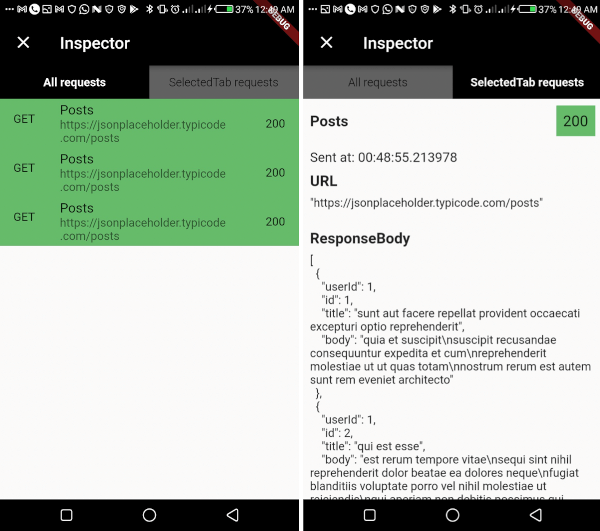
RequestsInspector widget on your screen:📱💃 : Shake your phone.
📱👈 : Long-Press on any free space on the screen.
https://raw.githubusercontent.com/Abdelazeem777/requests_inspector/main/images/mobile_list.jpg https://raw.githubusercontent.com/Abdelazeem777/requests_inspector/main/images/mobile_request.jpg
Also you can share the request details as (Log, cURL command, or HAR file) with your team to help them debug the API requests.
From Inspector to Postman 🧡 🎉️
Now you can extract cURL command from the inspector to send the request again from your terminal or Postman 💪💪
HAR File Support 📦 🎉️ You can now share requests as HAR (HTTP Archive) files! HAR files are a standard format that can be imported into various tools like Postman, Proxyman, or any HAR-compatible tool for debugging and analysis. You can share HAR files in two formats:
.har fileThe HAR format includes complete request/response details, headers, timing information, and more, making it perfect for comprehensive API debugging and sharing with your team.
SetupFirst, add it at the top of your MaterialApp with enabled: true.
void main() {
  runApp(const RequestsInspector(
    child: MyApp(),
  ));
}
Dio, pass by RequestsInspectorInterceptor() to Dio.interceptors and we are good to go 🎉️🎉️.final dio = Dio()..interceptors.add(RequestsInspectorInterceptor());
Dio then don't worryIn your API request just add a new RequestDetails using RequestInspectorController filled with the API data.
InspectorController().addNewRequest(
    RequestDetails(
        requestName: requestName,
        requestMethod: RequestMethod.GET,
        url: apiUrl,
        queryParameters: params,
        statusCode: responseStatusCode,
        responseBody: responseData,
        ),
    );
a. Normal InspectorController().addNewRequest.
Future<List<Post>> fetchPosts() async {
  final dio = Dio();
  final params = {'userId': 1};

  final response = await dio.get(
    '[https://jsonplaceholder.typicode.com/posts](https://jsonplaceholder.typicode.com/posts)',
    queryParameters: params,
  );

  final postsMap = response.data as List;
  final posts = postsMap.map((postMap) => Post.fromMap(postMap)).toList();

  InspectorController().addNewRequest(
    RequestDetails(
      requestName: 'Posts',
      requestMethod: RequestMethod.GET,
      url: '[https://jsonplaceholder.typicode.com/posts](https://jsonplaceholder.typicode.com/posts)',
      queryParameters: params,
      statusCode: response.statusCode ?? 0,
      responseBody: response.data,
    ),
  );

  return posts;
}
b. Using RequestsInspectorInterceptor.
Future<List<Post>> fetchPosts() async {
  final dio = Dio()..interceptors.add(RequestsInspectorInterceptor());
  final response = await dio.get('[https://jsonplaceholder.typicode.com/posts](https://jsonplaceholder.typicode.com/posts)');

  final postsMap = response.data as List;
  final posts = postsMap.map((postMap) => Post.fromMap(postMap)).toList();

  return posts;
}
Shake your phone to get the Inspector<img src = "https://raw.githubusercontent.com/Abdelazeem777/requests_inspector/main/images/mobile_list.jpg" width ="280" /> <img src = "https://raw.githubusercontent.com/Abdelazeem777/requests_inspector/main/images/mobile_request.jpg" width ="280" />
To use requests_inspector with graphql_flutter library.
you jus need to wrap your normal HttpLink with our GraphQLInspectorLink and we are done.
Example:
 Future<List<Post>> fetchPostsGraphQlUsingGraphQLFlutterInterceptor() async {
 Future<List<Post>> fetchPostsGraphQlUsingGraphQLFlutterInterceptor() async {
  final client = GraphQLClient(
    cache: GraphQLCache(),
    link: Link.split(
      (request) => request.isSubscription,
      GraphQLInspectorLink(WebSocketLink('ws://graphqlzero.almansi.me/api')),
      GraphQLInspectorLink(HttpLink('[https://graphqlzero.almansi.me/api](https://graphqlzero.almansi.me/api)')),
    ),
  );
  const query = r'''query {
    post(id: 1) {
      id
      title
      body
    }
    }''';

  final options = QueryOptions(document: gql(query));
  final result = await client.query(options);
  if (result.hasException) {
    log(result.exception.toString());
  } else {
    log(result.data.toString());
  }
  var post = Post.fromMap(result.data?['post']);
  return [post];
}
requests_inspector (Stopper) enables your to stop and edit requests (before sending it to server) and responses (before receiving it inside the app).
MaterialApp then pass it to RequestsInspector to show Stopper dialogs.final navigatorKey = GlobalKey<NavigatorState>();
void main() => runApp(
RequestsInspector(
// Add your `navigatorKey` to enable `Stopper` feature
navigatorKey: navigatorKey,
child: const MyApp(),
),
);
// ...
@override
Widget build(BuildContext context) {
return MaterialApp(
navigatorKey: navigatorKey, // <== Here!
// ...
<img src="https://raw.githubusercontent.com/Abdelazeem777/requests_inspector/main/images/stopper_feature.gif" width="280"/>
Obviously, The shaking won't be good enough for those platforms 😅
So you can specify showInspectorOn with ShowInspectorOn.LongPress.
void main() {
  runApp(const RequestsInspector(
    enabled: true,
    showInspectorOn: ShowInspectorOn.LongPress
    child: MyApp(),
  ));
}
OR, you can just pass ShowInspectorOn.Both to open the Inspector with Shaking or with LongPress.
void main() {
  runApp(const RequestsInspector(
    enabled: true,
    showInspectorOn: ShowInspectorOn.Both,
    child: MyApp(),
  ));
}
https://raw.githubusercontent.com/Abdelazeem777/requests_inspector/main/images/web_list.png https://raw.githubusercontent.com/Abdelazeem777/requests_inspector/main/images/web_request.png https://raw.githubusercontent.com/Abdelazeem777/requests_inspector/main/images/mac_list.png https://raw.githubusercontent.com/Abdelazeem777/requests_inspector/main/images/mac_request.png https://raw.githubusercontent.com/Abdelazeem777/requests_inspector/main/images/linux_list.png https://raw.githubusercontent.com/Abdelazeem777/requests_inspector/main/images/linux_request.png
Contributors helping improve requests_inspector: 💻🎨📖🚧
We welcome contributions from everyone! Here's how you can help:
To add yourself as a contributor, simply follow the contribution guidelines and your efforts will be recognized here!
GraphQL.GraphQL request and response displaying structure.This project is licensed under the MIT License - see the LICENSE file for details.