
 v0.0.1+1
quds_popup_menu
Eine neue Möglichkeit, erweiterte Pop-up-Menüs in Flutter anzuzeigen. Das Paket ist Teil des quds_ui_kit-Pakets.
81Likes 630-Tage-Downloads150Pub-Punkte
AndroidiOSWebmacOSWindowsLinux
Flutter UI-Kit [Animation (Symbole, Symbol-Buttons, Texte, Zähler, Digitaluhr) - Toasts - Dialoge - Pagination - Startbildschirm ... usw.]
Englischer Projektschnappschuss. Aktuelle Inhalte auf GitHub.
This library consists of:
To use this package see the following example.
 QudsAnimatedIcon(
            iconData: AnimatedIcons.play_pause,
            showStartIcon: _isPlaying,
          )

What if desired to combine another two icons?
 QudsAnimatedCombinedIcons(
        startIcon: Icons.accessible,
        endIcon: Icons.accessibility_new,
        showStartIcon: _onChair,
      ),

You can customize the sizes, colors, transition duration and curve, ..etc.

QudsAnimatedText(
          _isPlaying ? 'Playing' : 'Paused',
        )

QudsAnimatedCounter(
        counter,
        duration: Duration(milliseconds: 200),
        length: 4,
        style: TextStyle(fontSize: 30),
      )

All animated icons in this library wrapped in buttons with capturing tap ability.
QudsAnimatedCombinedIconsButton(
            tooltip: 'Toggle',
            startIcon: Icons.arrow_forward,
            // startIconColor: Colors.white,
            onPressed: _toggle,
          ),
Other Buttons:

Wide collection of page route tranistion are now supported in Quds UI Kit
Up Down Left Right Start End], duration, curve})Navigator.push(
context,
QudsSlidePageRoute(
builder: (c) => _SecondScreen(),
slideDirection: SlideDirection.Up, //Default [SlideDirection.Start]
))

Customized toasts with easy control,
showQudsToast(context,
                  content: Text('Copied!'),
                  toastTime: QudsToastTime.VeryShort,
                  leadingActions: [
                    QudsAutoAnimatedCombinedIcons(
                      startIcon: Icons.copy,
                      endIcon: Icons.paste,
                      showStartIcon: false,
                    )
                  ])

showQudsModalBottomSheet(
              context,
              (c) => Column(
                    children: [
                      for (int i = 0; i < 5; i++) ListTile(title: Text('Hi'))
                    ],
                  ),
              titleText: 'Test Bottom Sheet')

QudsCollectionPagination<_ExampleModel>(
        resultsPerPage: itemsPerPage,
        itemsPadding: EdgeInsets.all(2),
        onResultsPerPageChanged: (p) {
          page = 1;
          itemsPerPage = p;
          _fillItems();
        },
        currentPageItems: currItems,
        onPageChanged: (p) {
          page = p;
          _fillItems();
        },
        selectedPage: page,
        total: provider.list.length,
        itemBuilder: (c, i, o) => ListTile(
          title: Text(o.name),
          subtitle: Text(o.id.toString()),
        ),
      )
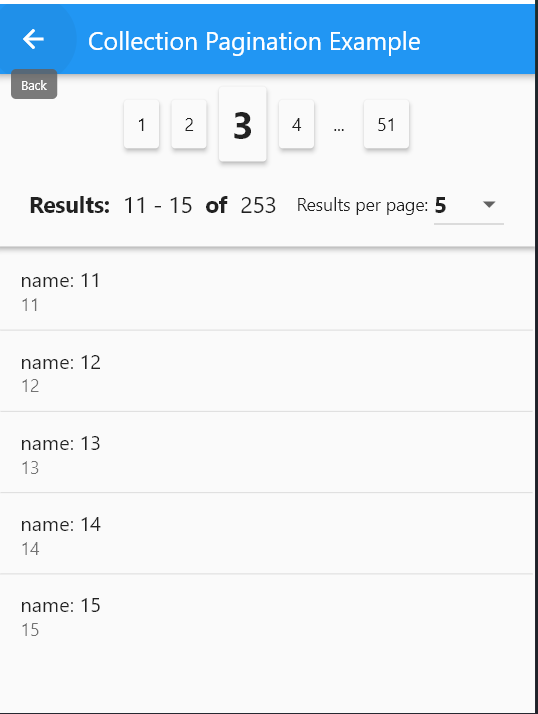
    showQudsDialog(context,
            title: Text('Save'),
            builder: (c) => Text(
                    'Would you like to save the document before existing?'));
 showQudsConfirmDeleteDialog(context,
              onDeletePressed: () => showQudsToast(context,
                  toastTime: QudsToastTime.VeryShort,
                  leadingActions: [
                    QudsAutoAnimatedCombinedIcons(
                        startIcon: Icons.delete, endIcon: Icons.done)
                  ],
                  content: Text('Deleted!'),
                  trailingActions: [
                    InkWell(
                        onTap: () {
                          showQudsToast(context,
                              toastTime: QudsToastTime.VeryShort,
                              content: Text('Undo pressed'));
                        },
                        child: Container(
                            padding: EdgeInsets.all(5),
                            child: QudsAutoAnimatedCombinedIcons(
                              startIcon: CupertinoIcons.delete,
                              endIcon: CupertinoIcons.arrow_turn_up_left,
                              showStartIcon: false,
                            )))
                  ]))

class MainDrawer extends StatelessWidget {
  @override
  Widget build(BuildContext context) {
    return QudsLightDrawer(
      bottomAboutButton: ...,
      bottomButton: ...,
      body: ...;
  }
}

    QudsPopupButton(
              // backgroundColor: Colors.red,
              tooltip: 'T',
              items: getMenuItems(),
              child: Icon(Icons.menu)),


List<QudsPopupMenuBase> getMenuItems() {
    return [
      QudsPopupMenuSection(
          backgroundColor: Colors.yellow.shade200,
          titleText: 'أبو أسعد الأمير',
          subTitle: Text('See your profile'),
          leading: Icon(
            Icons.redeem,
            size: 40,
          ),
          subItems: [
            QudsPopupMenuSection(
                titleText: 'Settings',
                leading: Icon(Icons.settings),
                subItems: [
                  QudsPopupMenuItem(
                      leading: Icon(Icons.logout),
                      title: Text('Logout'),
                      onPressed: () {
                        showToast('Logout Pressed!');
                      })
                ]),
          ]),
      QudsPopupMenuDivider(),
      QudsPopupMenuItem(
          leading: Icon(Icons.info_outline),
          title: Text('Give Feedback'),
          subTitle: Text('Help us improve our new app'),
          onPressed: () {
            showToast('Feedback Pressed!');
          }),
      QudsPopupMenuDivider(),
      QudsPopupMenuSection(
          leading: Icon(Icons.place),
          titleText: 'Settings & Privacy',
          subItems: [
            QudsPopupMenuItem(
                leading: Icon(Icons.settings),
                title: Text('Settings'),
                onPressed: () {
                  showToast('Settings Pressed!');
                }),
            QudsPopupMenuItem(
                leading: Icon(Icons.lock),
                title: Text('Privacy Checkup'),
                onPressed: () {
                  showToast('Privacy Checkup Pressed!');
                }),
            QudsPopupMenuItem(
                leading: Icon(Icons.lock_clock),
                title: Text('Privacy Shortcuts'),
                onPressed: () {
                  showToast('Privacy Shourtcuts Pressed!');
                }),
            QudsPopupMenuItem(
                leading: Icon(Icons.list),
                title: Text('Activity Log'),
                onPressed: () {
                  showToast('Activity Log Pressed!');
                }),
            QudsPopupMenuItem(
                leading: Icon(Icons.card_membership),
                title: Text('News Feed Preferences'),
                onPressed: () {
                  showToast('News Feed Preferences Pressed!');
                }),
            QudsPopupMenuItem(
                leading: Icon(Icons.language),
                title: Text('Language'),
                onPressed: () {
                  showToast('Language Pressed!');
                }),
          ]),
      QudsPopupMenuDivider(),
      QudsPopupMenuWidget(
          builder: (c) => Container(
              padding: EdgeInsets.all(10),
              child: IntrinsicHeight(
                child: Row(
                  mainAxisAlignment: MainAxisAlignment.center,
                  children: [
                    IconButton(
                        onPressed: () {
                          showToast('Favourite Pressed!');
                        },
                        icon: Icon(
                          Icons.favorite,
                          color: Colors.red,
                        )),
                    VerticalDivider(),
                    IconButton(
                        onPressed: () {},
                        icon: Icon(
                          Icons.music_note,
                          color: Colors.blue,
                        )),
                    VerticalDivider(),
                    IconButton(
                        onPressed: () {},
                        icon: Icon(
                          Icons.umbrella,
                          color: Colors.green,
                        ))
                  ],
                ),
              )))
    ];
  }

class SplashScreen extends StatelessWidget {
  @override
  Widget build(BuildContext context) {
    return Scaffold(
      body: QudsSplashView(
      progressIndicator: ...,
      futures: [...],
      onCompleted: ...,
      ),
    );
  }
}
 QudsDigitalTimeViewer(
        hour: 10,
        minute: 59,
        second: 40,
        milliSecond: 10,
      ),
QudsDigitalClockViewer(
        showSeconds: true,
        showMilliSeconds: true,
      )

 v0.0.1+1
Eine neue Möglichkeit, erweiterte Pop-up-Menüs in Flutter anzuzeigen. Das Paket ist Teil des quds_ui_kit-Pakets.
 v0.0.7+10
Flutter UI-Kit [(animierte Symbole, Buttons, Texte, Zähler, Digitaluhr) - Seitenübergänge - Toasts - Dialoge - Pagination - Startbildschirm ... usw.]
Abhängigkeiten 3 Einträge
{"sdk":"flutter"}^1.0.4{"sdk":"flutter"}Nach Anwendungsfall filtern, Aktivität vergleichen und vor der Nutzung das Originalprojekt prüfen.
“A repository is the most basic element of GitHub.”
GitHub Docs — About repositories ↗