
 v0.2.2
animated_analog_clock
Ein anpassbarer und animierter Analoguhr-Widget für Flutter-Anwendungen.
16Likes 16730-Tage-Downloads150Pub-Punkte
AndroidiOSWebmacOSWindowsLinux
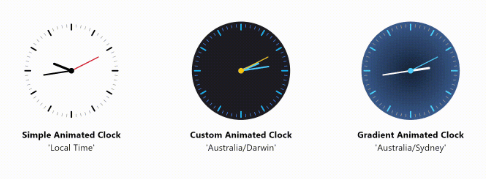
Ein anpassbarer und animierter Analoguhr-Widget. Dieses Paket bietet einen vollständig anpassbaren Analoguhr-Widget, der Animationen für glatte Übergänge der Uhrzeiger unterstützt.

{"sdk":"flutter"}^0.10.0{"sdk":"flutter"}^5.0.0Englischer Projektschnappschuss. Aktuelle Inhalte auf GitHub.
A customizable and animated analog clock widget. This package provides a fully customizable analog clock widget that supports animation for smooth transitions of clock hands. Users can customize various aspects of the clock including size, colors, background, and more.
Flutter Analog Clock Screenshot
You can now use an Image Dial as the clock's face, allowing you to set a background image. This can be a network image or an asset image, making your analog clock even more visually appealing and customizable.
AnimatedAnalogClock(
  backgroundImage: NetworkImage(
    'https://cdn.pixabay.com/photo/2023/12/01/22/27/spiderman-8424632_1280.jpg',
  ),
);
Or with an asset image:
AnimatedAnalogClock(
  backgroundImage: AssetImage(
    'path/to/your/image.png',
  ),
);
In your pubspec.yaml file of your Flutter Project, add the following dependency:
dependencies:
  animated_analog_clock: ^0.2.2
import 'package:animated_analog_clock/animated_analog_clock.dart';
Customizable Design: Users can customize various aspects of the analog clock, including size, colors, background, and more, to match their app's design aesthetics.
Smooth Animations: The analog clock widget supports smooth animations for clock hands, providing a visually pleasing experience for users.
Timezone Support: The clock widget supports displaying time in different timezones, allowing users to customize the clock based on their location or preferences.
Timezone Support with Location Specification: Users can specify a location name, and the clock will display the time according to the timezone associated with that location. To find valid location names for timezones, check out the this documentation.
Lightweight and Efficient: The package is designed to be lightweight and efficient, ensuring smooth performance even on devices with limited resources.
DialType Enum: Introduced the DialType enum to support different dial options: dashes, numbers, numberAndDashes, and none.
const AnimatedAnalogClock()
AnimatedAnalogClock(
          location: 'Australia/Darwin',
          // Gradient Background if you want
          // backgroundGradient: RadialGradient(colors: []),
          // Set a network image as the background
          // backgroundImage: NetworkImage(
          // 'url',
          // ),
          // Alternatively, set an asset image as the background
          // backgroundImage: AssetImage(
          //   'path/to/your/asset/image.png',
          // ),
          clock: () => DateTime.now(),
          backgroundColor: Color(0xff1E1E26),
          hourHandColor: Colors.lightBlueAccent,
          minuteHandColor: Colors.lightBlueAccent,
          secondHandColor: Colors.amber,
          centerDotColor: Colors.amber,
          hourDashColor: Colors.lightBlue,
          minuteDashColor: Colors.blueAccent,
        ),
For detailed information about the classes and methods available in this package, refer to the API documentation.
More examples can be found in the example/ folder.
This package is distributed under the MIT License. See the LICENSE file for details.
For questions, feedback, or suggestions regarding this package, please feel free to contact the author at [devhasanzaman@gmail.com](mailto:devhasanzaman@gmail.com).