
 v2.1.0
icon_decoration
Fügen Sie dem Icon-Widget Dekorationsmöglichkeiten mit Rahmen und Gradienten hinzu.
97Likes 252030-Tage-Downloads150Pub-Punkte
AndroidiOSWebmacOSWindowsLinux
Fügen Sie dem Icon-Widget Dekorationsmöglichkeiten mit Schatten, Rändern und Verläufen hinzu.

Englischer Projektschnappschuss. Aktuelle Inhalte auf GitHub.
Pub Version Test workflow Coverage Status
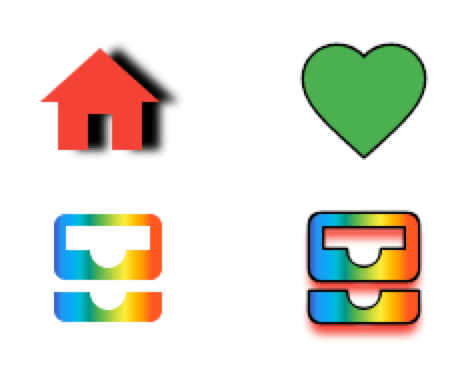
Add decoration capabilities to the Icon widget with borders and gradients. This new DecoratedIcon widget overlap itself with the base Icon widget to provide a more complete decoration system through a IconDecoration property.
pubspec.yamlicon_decoration: any
import 'package:icon_decoration/icon_decoration.dart';
DecoratedIcon(
    icon: Icon(Icons.favorite, color: Colors.green),
    decoration: IconDecoration(border: IconBorder()),
)
Gradients are supported on Flutter Web only with the canvaskit renderer
https://raw.githubusercontent.com/TesteurManiak/icon_decoration/refs/heads/main/screenshots/base_gradient.pngDecoratedIcon(
icon: Icon(Icons.all_inbox),
decoration: IconDecoration(
gradient: rainbowGradient,
),
)
DecoratedIcon(
    icon: Icon(
        Icons.all_inbox,
        shadows: [
            Shadow(
                color: Colors.red,
                blurRadius: 3,
                offset: Offset(0, 2),
            ),
        ],
    ),
    decoration: IconDecoration(
        gradient: _rainbowGradient,
        border: IconBorder(),
    ),
)
IconDecoration.shadows, use Icon.shadows instead.Before
DecoratedIcon(
    icon: Icon(Icons.all_inbox),
    decoration: IconDecoration(
        shadows: [
            Shadow(
                color: Colors.red,
                blurRadius: 3,
                offset: Offset(0, 2),
            ),
        ],
    ),
)
After
Icon(
    Icons.all_inbox,
    shadows: [
        Shadow(
            color: Colors.red,
            blurRadius: 3,
            offset: Offset(0, 2),
        ),
    ],
),