Aus öffentlichen Paketdaten erstellte Orientierung.
Alchemist ist ein Flutter-Testunterstützungspaket, das entwickelt wurde, um Goldtests zu vereinfachen und zu optimieren. Es bietet Werkzeuge, die das Schreiben, Verwalten und Pflegen von visuellen Tests erleichtern, indem Boilerplate reduziert und die Testzuverlässigkeit verbessert wird. Mit Funktionen wie automatischer Bildschirmfotovergleich und intuitiver Testkonfiguration verbessert Alchemist die Entwicklererfahrung bei der UI-Tests über mehrere Plattformen hinweg. Es integriert sich nahtlos in den Flutter-Testframework und ist besonders nützlich für Teams, die auf eine konsistente UI-Wiedergabe achten.
Anwendungsfälle
Visuelle Regressionstests
Automatisierte UI-Validierung
Überprüfung der plattformübergreifenden UI-Konsistenz
Golden-Test-Einrichtung vereinfachen
Komplexe Widget-Interaktionen testen
Hauptmerkmale
Einfache Erstellung von Goldenen Tests
Automatische Bildschirmfoto-Vergleich
Unterstützung für mehrere Plattformen
Intuitive API für Testkonfiguration
Integration mit dem Testframework von Flutter
Geeignet für
UI-Test-Teams
Entwickler, die Goldtests verwenden
Projekte, die visuelle Konsistenz erfordern
Teams, die automatisierte UI-Validierung übernehmen
Flutter-Anwendungen mit komplexen Benutzeroberflächen
One is platform tests, which generate golden files with human readable text. These can be considered regular golden tests and are usually only run on a local machine.
The other is CI tests, which look and function the same as platform tests, except that the text blocks are replaced with colored squares.
The reason for this distinction is that the output of platform tests is dependent on the platform the test is running on. In particular, individual platforms are known to render text differently than others. This causes readable golden files generated on macOS, for example, to be ever so slightly off from the golden files generated on other platforms, such as Windows or Linux, causing CI systems to fail the test. CI tests, on the other hand, were made to circumvent this, and will always have the same output regardless of the platform.
Additionally, CI tests are always run using the Ahem font family, which is a font that solely renders square characters. This is done to ensure that CI tests are platform agnostic -- their output is always consistent regardless of the host platform.
Basic usage
Writing the test
In your project's test/ directory, add a file for your widget's tests. Then, write and run golden tests by using the goldenTest function.
We recommend putting all golden tests related to the same component into a test group.
Every goldenTest commonly contains a group of scenarios related to each other (for example, all scenarios that test the same constructor or widget in a particular context).
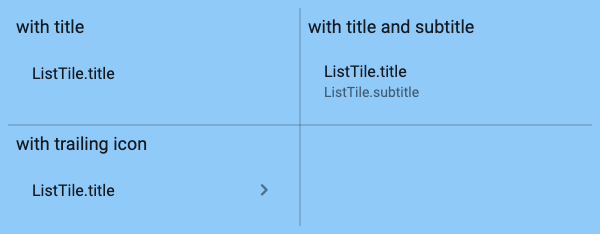
This example shows a basic golden test for ListTiles that makes use of some of the more advanced features of the goldenTest API to control the output of the test.
Then, simply run Flutter test and pass the --update-goldens flag to generate the golden files.
flutter test --update-goldens
Recommended Setup Guide
For a more detailed explanation on how Betterment uses Alchemist, read the included Recommended Setup Guide.
Test groups
While the goldenTest function can take in and performs tests on any arbitrary widget, it is most commonly given a GoldenTestGroup. This is a widget used for organizing a set of widgets that groups multiple testing scenarios together and arranges them in a table format.
Alongside the children parameter, GoldenTestGroup contains two additional properties that can be used to customize the resulting table view:
Field
Default
Description
int? columns
null
The amount of columns in the grid. If left unset, this will be determined based on the amount of children.
ColumnWidthBuilder? columnWidthBuilder
null
A function that returns the width for each column. If left unset, the width of each column is determined by the width of the widest widget in that column.
Test scenarios
Golden test scenarios are typically encapsulated in a GoldenTestScenario widget. This widget contains a name property that is used to identify the scenario, along with the widget it should display. The regular constructor allows a name and child to be passed in, but the .builder and .withTextScaleFactor constructors allow the use of a widget builder and text scale factor to be passed in respectively.
Generating the golden file
To run the test and generate the golden file, run flutter test with the --update-goldens flag.
# Should always succeed
flutter test --update-goldens
After all golden tests have run, the generated golden files will be in the goldens/ci/ directory relative to the test file. Depending on the platform the test was run on (and the current AlchemistConfig), platform goldens will be in the goldens/<platform_name> directory.
When you want to run golden tests regularly and compare them to the generated golden files (in a CI process for example), simply run flutter test.
By default, all golden tests will have a "golden" tag, meaning you can select when to run golden tests.
# Run all tests.
flutter test# Only run golden tests.
flutter test --tags golden
# Run all tests except golden tests.
flutter test --exclude-tags golden
Advanced usage
Alchemist has several extensions and mechanics to accommodate for more advanced golden testing scenarios.
About AlchemistConfig
All tests make use of the AlchemistConfig class. This configuration object contains various settings that can be used to customize the behavior of the tests.
A default AlchemistConfig is provided for you, and contains the following settings:
Field
Default
Description
bool forceUpdateGoldenFiles
false
If true, the golden files will always be regenerated, regardless of the --update-goldens flag.
ThemeData? theme
null
The theme to use for all tests. If null, the default ThemeData.light() will be used.
PlatformGoldensConfig platformGoldensConfig
const PlatformGoldensConfig()
The configuration to use when running readable golden tests on a non-CI host.
CiGoldensConfig ciGoldensConfig
const CiGoldensConfig()
The configuration to use when running obscured golden tests in a CI environment.
Both the PlatformGoldensConfig and CiGoldensConfig classes contain a number of settings that can be used to customize the behavior of the tests. These are the settings both of these objects allow you to customize:
Field
Default
Description
bool enabled
true
Indicates if this type of test should run. If set to false, this type of test is never allowed to run. Defaults to true.
bool obscureText
true for CI, false for platform
Indicates if the text in the rendered widget should be obscured by colored rectangles. This is useful for circumventing issues with Flutter's font rendering between host platforms.
bool renderShadows
false for CI, true for platform
Indicates if shadows should actually be rendered, or if they should be replaced by opaque colors. This is useful because shadow rendering can be inconsistent between test runs.
double diffThreshold
0.0
The maximum allowed pixel difference ratio (between 0.0 inclusive and 1.0 exclusive) before a golden test fails. The value is a fraction of differing pixels — for example, 0.001 means 0.1% and 0.01 means 1%. When the diff is greater than 0 but within this threshold, the test passes. This is useful for handling minor cross-platform or cross-architecture rendering differences. Defaults to 0.0 (no tolerance).
FilePathResolver filePathResolver
<_defaultFilePathResolver>
A function that resolves the path to the golden file, relative to the test that generates it. By default, CI golden test files are placed in goldens/ci/, and readable golden test files are placed in goldens/.
ThemeData? theme
null
The theme to use for this type of test. If null, the enclosing AlchemistConfig's theme will be used, or ThemeData.light() if that is also null. Note that CI tests are always run using the Ahem font family, which is a font that solely renders square characters. This is done to ensure that CI tests are always consistent across platforms.
Alongside these arguments, the PlatformGoldensConfig contains an additional setting:
Field
Default
Description
Set<HostPlatform> platforms
All platforms
The platforms that platform golden tests should run on. By default, this is set to all platforms, meaning that a golden file will be generated if the current platform matches any platforms in the provided set.
Advanced theming
In addition to the theme property on the AlchemistConfig, CiGoldensConfig and PlatformGoldensConfig classes, Alchemist also supports inherited theming. This means that any theme provided through a custom pumpWidget callback given to goldenTest will be used instead of the theme property on the AlchemistConfig.
The theme resolver works as follows:
If a theme is given to the platform-specific test (using CiGoldensConfig or PlatformGoldensConfig), it is used.
Otherwise, if an inherited theme is provided by the pumpWidget callback (for example, through a MaterialApp), it is used.
Otherwise, if a theme is provided in the AlchemistConfig, it is used.
Otherwise, a default ThemeData.fallback() is used.
Using a custom config
The current AlchemistConfig can be retrieved at any time using AlchemistConfig.current().
A custom can be set by using AlchemistConfig.runWithConfig. Any code executed within this function will cause AlchemistConfig.current() to return the provided config. This is achieved using Dart's zoning system.
This file is executed every time a test file is about to be run. To set a global config, simply wrap the testMain function in a AlchemistConfig.runWithConfig call, like so:
Any test executed in the package will now use the provided config.
For single tests or groups
A config can also be set for a single test or test group, which will override the default for those tests. This can be achieved by wrapping that group or test in a AlchemistConfig.runWithConfig call, like so:
Additionally, settings for a given code block can be partially overridden by using AlchemistConfig.copyWith or, more commonly, AlchemistConfig.merge. The copyWith method will create a copy of the config it is called on, and then override the settings passed in. The merge is slightly more flexible, allowing a second AlchemistConfig (or null) to be passed in, after which a copy will be created of the instance, and all settings defined on the provided config will replace ones on the instance.
Fortunately, the replacement mechanic of merge makes it possible to replace deep/nested values easily, like this:
Click to open AlchemistConfig.merge example
voidmain() {
// The top level config is defined here.AlchemistConfig.runWithConfig(
config: AlchemistConfig(
forceUpdateGoldenFiles: true,
platformGoldensConfig: PlatformGoldensConfig(
renderShadows: false,
fileNameResolver: (String name) => 'top_level_config/goldens/$name.png',
),
),
run: () {
final currentConfig = AlchemistConfig.current();
print(currentConfig.forceUpdateGoldenFiles);
// > trueprint(currentConfig.platformGoldensConfig.renderShadows);
// > falseprint(currentConfig.platformGoldensConfig.fileNameResolver('my_widget'));
// > top_level_config/goldens/my_widget.pngAlchemistConfig.runWithConfig(
// Here, the current config (defined above) is merged// with a new config, where only the defined options are// replaced, preserving the rest.
config: AlchemistConfig.current().merge(
AlchemistConfig(
platformGoldensConfig: PlatformGoldensConfig(
renderShadows: true,
),
),
),
),
run: () {
// AlchemistConfig.current() will now return the merged config.final currentConfig = AlchemistConfig.current();
print(currentConfig.forceUpdateGoldenFiles);
// > true (preserved from the top level config)print(currentConfig.platformGoldensConfig.renderShadows);
// > true (changed by the newly merged config)print(currentConfig.platformGoldensConfig.fileNameResolver('my_widget'));
// > top_level_config/goldens/my_widget.png (preserved from the top level config)
},
);
},
);
}
Simulating gestures
Some golden tests may require some form of user input to be performed. For example, to make sure a button shows the right color when being pressed, a test may require a tap gesture to be performed while the golden test image is being generated.
These kinds of gestures can be performed by providing the goldenTest function with a whilePerforming argument. This parameter takes a function that will be used to find the widget that should be pressed. There are some default interactions already provided, such as press and longPress.
By default, Alchemist will automatically find the smallest possible size for the generated golden image and the widgets it contains, and will resize the image accordingly.
The default size and this scaling behavior are configurable, and fully encapsulated in the constraints argument to the goldenTest function.
The constraints are set to const BoxConstraints() by default, meaning no minimum or maximum size will be enforced.
If a minimum width or height is set, the image will be resized to that size as long as it would not clip the widgets it contains. The same is true for a maximum width or height.
If the passed in constraints are tight, meaning the minimum width and height are equal to the maximum width and height, no resizing will be performed and the image will be generated at the exact size specified.
Custom pumping behavior
Before tests
Before running every golden test, the goldenTest function will call its pumpBeforeTest function. This function is used to prime the widget tree prior to generating the golden test image. By default, the tree is pumped and settled (using tester.pumpAndSettle()), but in some scenarios, custom pumping behavior may be required.
In these cases, a different pumpBeforeTest function can be provided to the goldenTest function. A set of predefined functions are included in this package, including pumpOnce, pumpNTimes(n), and onlyPumpAndSettle, but custom functions can be created as well.
Additionally, there is a precacheImages function, which can be passed to pumpBeforeTest in order to preload all images in the tree, so that they will appear in the generated golden files.
Pumping widgets
If desired, a custom pumpWidget function can be provided to any goldenTest call. This will override the default behavior and allow the widget being tested to be wrapped in any number of widgets, and then pumped.
By default, Alchemist will simply pump the widget being tested using tester.pumpWidget. Note that the widget under test will always be wrapped in a set of bootstrapping widgets, regardless of the pumpWidget callback provided.
Custom text scale factor
The GoldenTestScenario.withTextScaleFactor constructor allows a custom text scale factor value to be provided for a single scenario. This can be used to test text rendering at different sizes.
To set a default scale factor for all scenarios within a test, the goldenTest function allows a default textScaler to be provided, which defaults to TextScaler.linear(1.0).