
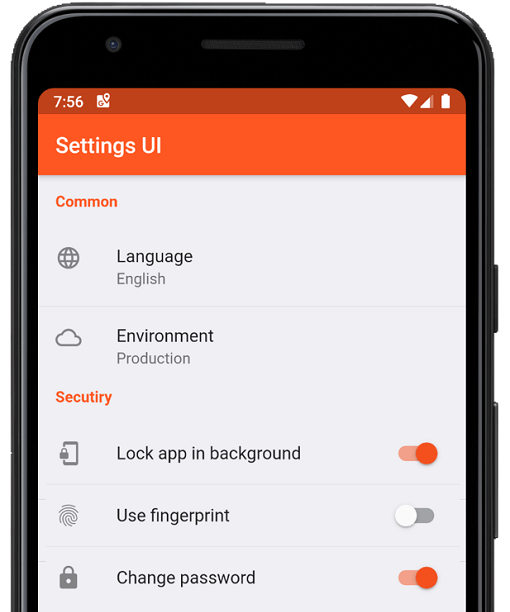
 v4.0.1
settings_ui
Erstellen Sie in Minuten native Einstellungen für Ihre Flutter-App. Verwenden Sie einzelne Schnittstellen zum Erstellen
1040Likes 332.00030-Tage-Downloads160Pub-Punkte
AndroidiOSWebmacOSWindowsLinux
:weight_lifting: :medal_sports: Open-Source, plattformübergreifender HIIT- und Tabata-Intervalltimer. Pull Requests werden geschätzt!
 v4.0.1
Erstellen Sie in Minuten native Einstellungen für Ihre Flutter-App. Verwenden Sie einzelne Schnittstellen zum Erstellen
 v0.8.0
Bunte Konfetti über den gesamten Bildschirm verteilen. Feiern Sie Erfolge in der App mit Stil. Steuern Sie Geschwindigkeit, Winkel, Schwere und Menge des Konfettis.
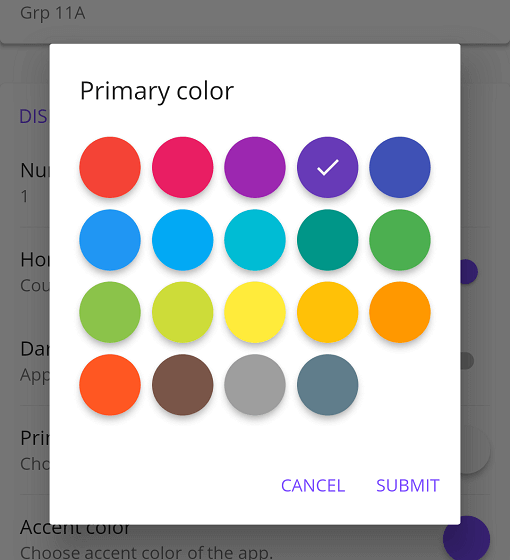 v1.2.0
Material-Farbwähler mit einigen möglichen Anpassungen für Flutter-Anwendungen
{"sdk":"flutter"}^1.9.0^4.5.3^0.8.0^2.4.0+2^1.5.2^1.2.0^1.2.3^3.0.0^8.1.0^3.0.0^2.7.0^10.3.10^2.1.3^12.0.2^12.0.0+1^2.5.5^6.3.0^6.1.2^1.0.0^0.1.1^3.0.1^9.0.1^0.14.1{"sdk":"flutter"}^6.0.0{"sdk":"flutter"}Englischer Projektschnappschuss. Aktuelle Inhalte auf GitHub.
Integration Tests Nightly Build Pre-Release Release
https://raw.githubusercontent.com/a-mabe/OpenHIIT/HEAD/assets/icon/openhiit-ios.png
https://www.buymeacoffee.com/assets/img/custom_images/orange_img.png https://raw.githubusercontent.com/a-mabe/OpenHIIT/HEAD/docs/images/Google_Play_Badge.svg Get it at IzzyOnDroid https://raw.githubusercontent.com/a-mabe/OpenHIIT/HEAD/docs/images/Download_on_the_App_Store_Badge_US-UK_RGB_blk_092917.svg
OpenHIIT is a free, open-source interval timer app built with Flutter. Create unlimited workout timers with custom audio/visual cues. No ads, no paywalls, no subscriptions.
▶️ The background timer package is developed separately here.
| ⏲️ Customizable Timers | Build interval timers. |
| 🔊 Visual & Audio Cues | Stay on track with cues for every interval transition. |
| 💾 Save & Load | Store unlimited timer configurations. |
| 📱 Export & Import | Export and share timer configs or import configs. |
| 🖌️ Color Coding | Color-code your timers to keep your routines organized. |
| 🏋️ Exercise Labels | Add exercise names that display on-screen while the timer runs. |
https://github.com/user-attachments/assets/2d64f356-526b-419e-8b71-cc43bf8da65b https://github.com/user-attachments/assets/8ada8439-deae-47ea-b76c-96c49cfdf914 https://github.com/user-attachments/assets/4b470c2f-96db-4e01-95c9-228cccb65316 https://github.com/user-attachments/assets/a74e76e5-4608-4303-a751-e156f1645335
Check out the OpenHIIT Roadmap to see planned features, work in progress, and ideas under consideration. Have a suggestion? Open an issue or start a discussion.
https://raw.githubusercontent.com/a-mabe/OpenHIIT/HEAD/docs/images/Google_Play_Badge.svg https://raw.githubusercontent.com/a-mabe/OpenHIIT/HEAD/docs/images/Download_on_the_App_Store_Badge_US-UK_RGB_blk_092917.svg
Install Flutter — follow the official Flutter installation guide to set up Flutter and the Dart SDK.
Clone the repository:
git clone https://github.com/a-mabe/openhiit.git
cd openhiit
Install dependencies:
flutter pub get
Run the app — connect a device or start an emulator, then:
flutter run
Encountering an issue? Visit the support page for troubleshooting guidance and known issues.
Contributions are welcome! Please open an issue before creating a PR. To begin working on an issue:
feature/rest-round-alerts).Please check the Roadmap and open issues before starting work to avoid duplication.
OpenHIIT is released under the MIT License. You're free to use, modify, and distribute this app under those terms. See the LICENSE file for full details.