
v6.1.5+1
provider
Ein Wrapper um InheritedWidget, um sie einfacher zu verwenden und wiederverwendbarer zu machen.
11.000Likes 1,2 Mio.30-Tage-Downloads150Pub-Punkte
AndroidiOSWebmacOSWindowsLinux
Ein GUI-Paketmanager und Paketinstaller für das Windows Subsystem for Android (WSA)

Ein Wrapper um InheritedWidget, um sie einfacher zu verwenden und wiederverwendbarer zu machen.
 v4.17.0
Implementiert die Benutzeroberfläche von Microsofts Windows in Flutter.
 v0.1.6
Ein Paket zur Unterstützung bei der Erstellung benutzerdefinierter Fenster mit Flutter Desktop (benutzerdefinierte Rahmen, Titelleiste und Minimieren/Maximieren/Schließen-Schaltflächen) sowie gängiger Desktop-Fensteroperationen (Anzeigen/Ausblenden/Position auf dem Bildschirm) für Windows und macOS
Rufen Sie allgemeine Windows-APIs direkt aus Dart mit FFI auf.
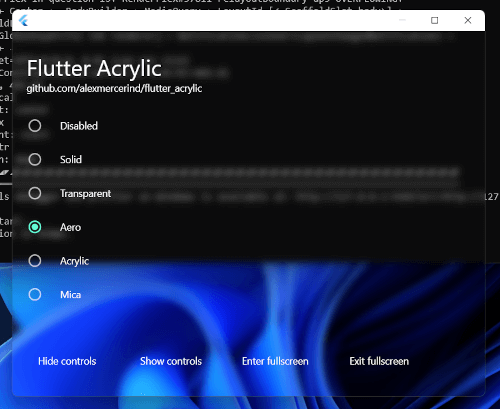 v1.1.4
Fenster-Acryl-, Mica- und Transparenz-Effekte für Flutter unter Windows, macOS und Linux.
Laufzeitbibliothek für Protokollpuffer-Unterstützung. Verwenden Sie zusammen mit package:protoc_plugin, um Dart-Code für Ihre '.proto'-Dateien zu generieren.
Bietet Encoder und Decoder für verschiedene Archiv- und Komprimierungsformate wie zip, tar, bzip2, gzip und zlib.
Sperrmechanismus zum Verhindern des gleichzeitigen Zugriffs auf asynchronen Code.
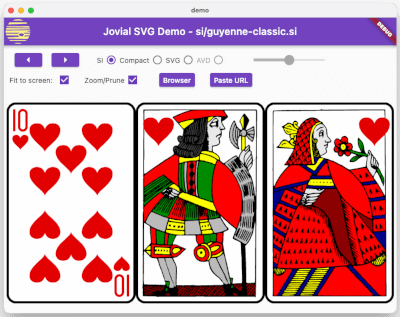 v1.1.31
SVG - Robuste Rendern von skalierbaren Vektorgrafiken mit Unterstützung für ein gut definiertes SVG-Profil, einem schnellen Binär-Speicherformat und Animationen.
Ein Parser für YAML, ein menschenfreundliches Daten-Serienformat
Ein Flutter-Plugin zum Abrufen und Beobachten der Systemakzentfarbe. Unterstützt Android, iOS, Web, Windows, macOS und Linux.
Bibliothek für Zeichensatz-Encoding und -Decoding, einschließlich iso-(2-15), Windows-Serie, gbk, euc-jp, euc-kr, shift-jis. Unterstützt Zeichensatz-Erkennung, canEncode und canDecode.
Abhängigkeiten 21 Einträge
{"sdk":"flutter"}{"sdk":"flutter"}3.12.0^2.1.2^3.0.0^6.0.02.0.0{"git":{"url":"https://github.com/alesimula/bitsdojo_window.git","path":"bitsdojo_window","ref":"master"}}{"git":"https://github.com/alesimula/dyn_mouse_scroll.git"}^1.0.0+2^0.2.0^3.1.0{"git":"https://github.com/brendan-duncan/archive.git"}{"git":"https://github.com/alesimula/jovial_svg.git"}^2.0.0^5.0.0-nullsafety.0^3.0.0^2.1.1^0.1.1{"sdk":"flutter"}^1.0.4Englischer Projektschnappschuss. Aktuelle Inhalte auf GitHub.
Installer
A GUI package manager and package installer for Windows Subsystem for Android (WSA).
Currently provides a double-click GUI installer for .apk and .xapk files that shows app information (package, icon, version and permissions), allows normal installations as well as upgrades and downgrades.
The app additionally provides a button to open Android settings and one to open the "Manage Applications" Android settings page, from which you can uninstall or disable applications and grant or revoke permissions
Q: WSA PacMan is always showing the Offline status, why is that?
A: First things first make sure WSA is installed (duh); Open the 'Windows Subsystem for Android™ Settings' app, in the Developer tab and make sure the 'Developer mode' switch is enabled; inside manage developer settings, make sure the 'USB debugging' option is enabled.
Should all of the above fail, try following this procedure; make sure to check the 'always allow' option.
Q: Can I use WSA PacMan on older versions of Windows (eg. Windows 10)?
A: WSA PacMan depends on Windows Subsystem for Linux, which is only officially supported on Windows 11.
However, you may be able to install WSA on Windows 10 using this project by JimDude7404 and following the step-by-step guide on the GitHub page.
Q: Can i install the Play Store?
A: The play store is not officially supported on WSA, and at the moment it is only possible to install it using an unofficial WSA build. I recommend installing the Aurora Store instead, which is an unofficial Play Store client; but if you really want the Play Store and other Google apps, check out this project.
Installing Installed Downgrade Main screen Settings