Englischer Projektschnappschuss. Aktuelle Inhalte auf GitHub.
Animated Hint TextField
A Flutter package designed to animate the label/hint text of a textfield, providing suggestive guidance to the user regarding what to input. Try out our example app .
Platform Support
Android
iOS
MacOS
Web
Linux
Windows
✅
✅
✅
✅
✅
✅
Installing
1. Depend on it
Add this to your package's pubspec.yaml file:
dependencies:
  animated_hint_textfield: ^1.0.0
2. Install it
You can install packages from the command line:
with pub:
$ pub get
with Flutter:
$ flutter pub get
3. Import it
Now in your Dart code, you can use:
import 'package:animated_hint_textfield/animated_hint_textfield.dart' ;
Animations
Currently this package supports 3 animations, more animations will be added in the future.
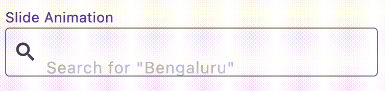
Slide
AnimatedTextField (
animationType: Animationtype .slide,
decoration: InputDecoration (
prefixIcon: Icon (Icons .search),
border: OutlineInputBorder (
borderSide: BorderSide (color: Colors .red, width: 2 ,
),
borderRadius: BorderRadius .circular (4 ),
),
focusedBorder: OutlineInputBorder (
borderSide: BorderSide (color: Colors .black, width: 2 ,
),
borderRadius: BorderRadius .circular (4 ),
),
contentPadding: EdgeInsets .all (12 ),
),
staticHintText: 'Search for ' ,
hintTexts: [
'"Bengaluru"' ,
'"Mumbai"' ,
'"Chennai"' ,
],
);
Fade
AnimatedTextField (
animationType: Animationtype .fade,
decoration: InputDecoration (
prefixIcon: Icon (Icons .search),
border: OutlineInputBorder (
borderSide: BorderSide (color: Colors .red, width: 2 ,
),
borderRadius: BorderRadius .circular (4 ),
),
focusedBorder: OutlineInputBorder (
borderSide: BorderSide (color: Colors .black, width: 2 ,
),
borderRadius: BorderRadius .circular (4 ),
),
contentPadding: EdgeInsets .all (12 ),
),
hintTexts: [
'Search for "Bengaluru"' ,
'Search for "Mumbai"' ,
'Search for "Chennai"' ,
],
);
Typer
AnimatedTextField (
animationType: Animationtype .typer,
hintTextStyle: const TextStyle (
color: Colors .deepPurple,
overflow: TextOverflow .ellipsis,
),
hintTexts: const [
'How is the weather today?' ,
'Will it rain today?' ,
'What is the temperature' ,
],
decoration: InputDecoration (
suffixIcon: const Icon (Icons .search),
filled: true ,
border: OutlineInputBorder (
borderSide: const BorderSide (color: Colors .red, width: 2 ),
borderRadius: BorderRadius .circular (25 ),
),
focusedBorder: OutlineInputBorder (
borderSide: const BorderSide (color: Colors .black, width: 2 ),
borderRadius: BorderRadius .circular (25 ),
),
contentPadding: const EdgeInsets .all (12 ),
),
);
💡 Tip
Use staticHintText when part of the hint should stay fixed while only the animated part changes:
AnimatedTextField (
staticHintText: 'Search for ' ,
hintTexts: const ['Bengaluru' , 'Mumbai' , 'Chennai' ],
);
For suffix-style hints, set staticHintTextPosition:
AnimatedTextField (
staticHintText: ' nearby' ,
staticHintTextPosition: StaticHintTextPosition .suffix,
hintTexts: const ['Cafe' , 'Hotel' , 'Restaurant' ],
);
By default, the animated hint text can span multiple lines if the text is long.
If you want to keep the hint on a single line and show overflow with ellipses (...), set the overflow property in hintTextStyle:
hintTextStyle: TextStyle (
overflow: TextOverflow .ellipsis,
),
Contributors





 v1.3.0