Pakete, Repositories und App-Kategorien suchen

Cover von animated_hint_textfield
Paketdetailsv1.3.0

animated_hint_textfield

Flutter-Paket zum Animieren von Textfeld-Hinweistexten/Labeltexten mit dynamischen und auffälligen Übergängen zur Verbesserung der Benutzererfahrung.

AndroidiOSWebmacOSWindowsLinux
30-Tage-Downloads
3460
Likes
107
Pub-Punkte
160

Paket installieren

flutter pub add animated_hint_textfield

Paketübersicht

Aus öffentlichen Paketdaten erstellte Orientierung.

Ein Flutter-Paket, das den Hinweistext oder Beschriftungstext von Eingabefeldern animiert und so reibungslose und dynamische Übergänge beim Fokussieren oder Verlassen des Felds erzeugt. Es verbessert die Benutzererfahrung durch subtile Animationen als visuelle Rückmeldung, wodurch Eingabefelder ansprechender und intuitiver werden. Ideal für moderne Benutzeroberflächen, bei denen Ästhetik und Interaktivität wichtig sind. Das Paket unterstützt mehrere Plattformen wie Android, iOS, Web, macOS, Windows und Linux und sorgt für konsistentes Verhalten über Geräte hinweg.

Anwendungsfälle

  • Verbesserung von Formulareingaben durch visuelle Rückmeldung
  • Erstellen moderner und interaktiver Anmeldebildschirme
  • Verbesserung der Benutzererfahrung in mobilen und Web-Anwendungen
  • Micro-Interaktionen zu Textfeldern hinzufügen
  • Gestaltung visuell ansprechender Eingabeformulare

Hauptmerkmale

  • Glatte Fokus- und Verschmierungsanimationen
  • Anpassbare Animationsdauer und Kurve
  • Unterstützung für mehrere Plattformen
  • Einfache Integration mit bestehenden Textfeldern
  • Dynamische Hinweispositionierung und Skalierung

Geeignet für

  • UI/UX-Designer, die interaktive Elemente suchen
  • Entwickler, die anspruchsvolle Formulare erstellen
  • Apps, die Benutzerengagement priorisieren
  • Plattformübergreifende Flutter-Projekte
  • Projekte, die subtile, aber effektive Animationen erfordern

Hinweise

  • Kann die Leistung auf Low-End-Geräten beeinträchtigen
  • Erfordert sorgfältige Abstimmung der Animationsparameter
  • Nur begrenzt auf Animationstext für Hinweis/Bezeichnung
  • Nicht geeignet für komplexe Formularvalidierungslogik
  • Abhängig von der korrekten Widget-Hierarchie für optimale Ergebnisse

Original-README

Originaler README-Schnappschuss aus dem verknüpften Quell-Repository. Aktuelle Inhalte finden Sie im Repository.

pub package pub points

Animated Hint TextField

A Flutter package designed to animate the label/hint text of a textfield, providing suggestive guidance to the user regarding what to input. Try out our example app.


Platform Support

Android iOS MacOS Web Linux Windows
✅ ✅ ✅ ✅ ✅ ✅


Installing

1. Depend on it

Add this to your package's pubspec.yaml file:

dependencies:
  animated_hint_textfield: ^1.0.0
2. Install it

You can install packages from the command line:

with pub:

$ pub get

with Flutter:

$ flutter pub get
3. Import it

Now in your Dart code, you can use:

import 'package:animated_hint_textfield/animated_hint_textfield.dart';


Animations

Currently this package supports 3 animations, more animations will be added in the future.

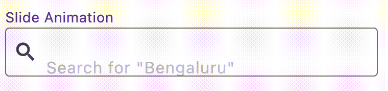
Slide

AnimatedTextField(
  animationType: Animationtype.slide, // Use Animationtype.slide for Slide animations
  decoration: InputDecoration(
    prefixIcon: Icon(Icons.search),
    border: OutlineInputBorder(
      borderSide: BorderSide(color: Colors.red, width: 2,
      ),
      borderRadius: BorderRadius.circular(4),
    ),
    focusedBorder: OutlineInputBorder(
      borderSide: BorderSide(color: Colors.black, width: 2,
      ),
      borderRadius: BorderRadius.circular(4),
    ),
    contentPadding: EdgeInsets.all(12),
  ),
  staticHintText: 'Search for ',
  hintTexts: [
    '"Bengaluru"',
    '"Mumbai"',
    '"Chennai"',
  ],
);

Fade

AnimatedTextField(
  animationType: Animationtype.fade, // Use Animationtype.fade for Fade animations
  decoration: InputDecoration(
    prefixIcon: Icon(Icons.search),
    border: OutlineInputBorder(
      borderSide: BorderSide(color: Colors.red, width: 2,
      ),
      borderRadius: BorderRadius.circular(4),
    ),
    focusedBorder: OutlineInputBorder(
      borderSide: BorderSide(color: Colors.black, width: 2,
      ),
      borderRadius: BorderRadius.circular(4),
    ),
    contentPadding: EdgeInsets.all(12),
  ),
  hintTexts: [
    'Search for "Bengaluru"',
    'Search for "Mumbai"',
    'Search for "Chennai"',
  ],
);

Typer

AnimatedTextField(
  animationType: Animationtype.typer, // Use Animationtype.typer for Type Write Style animations
  hintTextStyle: const TextStyle(
    color: Colors.deepPurple,
    overflow: TextOverflow.ellipsis,
  ),
  hintTexts: const [
    'How is the weather today?',
    'Will it rain today?',
    'What is the temperature',
  ],
  decoration: InputDecoration(
    suffixIcon: const Icon(Icons.search),
    filled: true,
    border: OutlineInputBorder(
      borderSide: const BorderSide(color: Colors.red, width: 2),
      borderRadius: BorderRadius.circular(25),
    ),
    focusedBorder: OutlineInputBorder(
      borderSide: const BorderSide(color: Colors.black, width: 2),
      borderRadius: BorderRadius.circular(25),
    ),
    contentPadding: const EdgeInsets.all(12),
  ),
);
💡 Tip

Use staticHintText when part of the hint should stay fixed while only the animated part changes:

AnimatedTextField(
  staticHintText: 'Search for ',
  hintTexts: const ['Bengaluru', 'Mumbai', 'Chennai'],
);

For suffix-style hints, set staticHintTextPosition:

AnimatedTextField(
  staticHintText: ' nearby',
  staticHintTextPosition: StaticHintTextPosition.suffix,
  hintTexts: const ['Cafe', 'Hotel', 'Restaurant'],
);

By default, the animated hint text can span multiple lines if the text is long. If you want to keep the hint on a single line and show overflow with ellipses (...), set the overflow property in hintTextStyle:

hintTextStyle: TextStyle(
  overflow: TextOverflow.ellipsis,
),

Contributors


Deekshith Shetty

Torregrossa François

Kategorien

Abhängigkeiten

Abhängigkeiten 1 Einträge

Quell-Repository

Projekte, die dieses Paket verwenden

Noch keine Daten verfügbar.