

 v0.0.4
textuality
Textuality ist ein Flutter-Paket, das den Text-Widget mit erweiterten Stiloptionen wie Gradienten, Konturen, Neon-Effekten und mehr verbessert.
39Likes 37430-Tage-Downloads140Pub-Punkte
AndroidiOSWebmacOSWindowsLinux
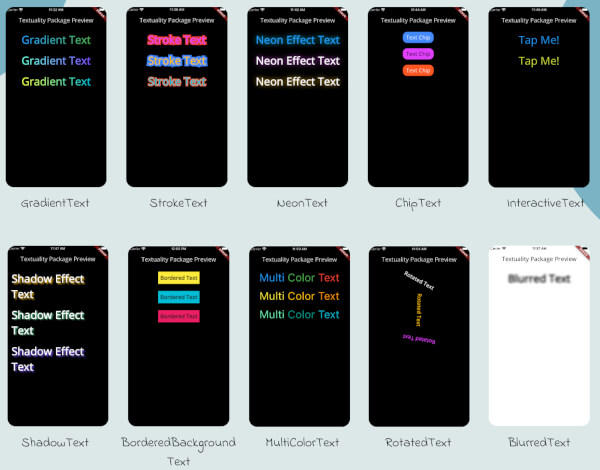
Textuality ist ein leistungsstarkes Flutter-Paket, das die Darstellung von Text-Widgets mit einer Vielzahl an anpassbaren Texteffekten und -stilen verbessert. Mit diesem Paket können Sie ganz einfach Gradiententext, Strichtext, Neon-Effekte, Schatten-Effekte, interaktiven Text und vieles mehr in Ihre Flutter-App integrieren.

Englischer Projektschnappschuss. Aktuelle Inhalte auf GitHub.
Textuality is a powerful Flutter package that enhances the appearance of text widgets with a variety of customizable text effects and styles. With this package, you can easily add gradient text, stroke text, neon effects, shadow effects, interactive text, and more to your Flutter app.
Each widget accepts various optional parameters for customization, such as style, text alignment, maxLines, overflow, and more.
To use the textuality package in your Flutter project, follow these steps:
Add the package to your pubspec.yaml file:
dependencies:
  textuality: ^0.0.1
Run the following command to install the package:
flutter pub get
💻Example
Below is an example of how to use the Textuality package in your Flutter app:
import 'package:flutter/material.dart';
import 'package:textuality/textuality.dart';

class TextualityExample extends StatefulWidget {
  const TextualityExample({super.key});

  @override
  State<TextualityExample> createState() => _TextualityExampleState();
}

class _TextualityExampleState extends State<TextualityExample> {
  @override
  Widget build(BuildContext context) {
    return Scaffold(
      backgroundColor: Colors.white,
      appBar: AppBar(
          backgroundColor: Colors.white,
          title: Text(
            'Textuality Package Preview',
            style: TextStyle(color: Colors.black),
          )),
      body: SingleChildScrollView(
        padding: EdgeInsets.all(16.0),
        child: Center(
          child: Column(
            children: [
              // Gradient Text
              GradientText(
                text: 'Gradient Text',
                giveGradient: [Colors.blue, Colors.green],
                style: TextStyle(fontSize: 40, fontWeight: FontWeight.bold),
              ),
              SizedBox(height: 20),

              // Stroke Text
              StrokeText(
                text: 'Stroke Text',
                strokeColor: Colors.red,
                strokeWidth: 8.0,
                style: TextStyle(
                    fontSize: 40,
                    fontWeight: FontWeight.bold,
                    color: Colors.purpleAccent),
              ),
              SizedBox(height: 20),
              // Neon Text
              NeonText(
                text: 'Neon Effect Text',
                glowColor: Colors.cyan,
                blurRadius: 20.0,
                style: TextStyle(
                    fontSize: 40,
                    fontWeight: FontWeight.bold,
                    color: Colors.blue),
              ),
              SizedBox(height: 20),
              // Text Chips
              ChipText(
                text: 'Text Chip',
                chipColor: Colors.blueAccent,
                style: TextStyle(fontSize: 20, color: Colors.white),
              ),
              SizedBox(height: 20),

              // Shadow Text
              ShadowText(
                  text: 'Shadow Effect Text',
                  shadows: [
                    Shadow(
                      blurRadius: 5.0,
                      color: Colors.amber,
                      offset: Offset(5, 5),
                    ),
                  ],
                  style: TextStyle(
                      fontSize: 40,
                      fontWeight: FontWeight.bold,
                      color: Colors.white)),
              SizedBox(height: 20),
               ShadowText.simple(
                  text: 'Simple Shadow Effect Text',
                  style: TextStyle(
                     fontSize: 24,
                     fontWeight: FontWeight.bold,
                     color: Colors.blue,
                  ),
                  shadowColor: Colors.red,
                  shadowBlurRadius: 8.0,
                  shadowOffset: Offset(3, 3),
               ),
               SizedBox(height: 20),
              // Multi-Color Text
              MultiColorText(
                spans: [
                  TextSpan(
                    text: 'Multi',
                    style: TextStyle(color: Colors.blue, fontSize: 40),
                  ),
                  TextSpan(
                    text: 'Color ',
                    style: TextStyle(color: Colors.green, fontSize: 40),
                  ),
                  TextSpan(
                    text: 'Text',
                    style: TextStyle(color: Colors.red, fontSize: 40),
                  ),
                ],
              ),
              SizedBox(height: 20),
              // InteractiveTextuality
              InteractiveText(
                text: 'on Tap',
                onTap: () {},
                style: TextStyle(fontSize: 20, fontWeight: FontWeight.bold),
              ),
              SizedBox(height: 20),
              // Rotated Text
              RotatedText(
                text: 'Rotated Text',
                rotationAngle: 0.5, // Rotate 90 degrees
                style: TextStyle(fontSize: 40, fontWeight: FontWeight.bold),
              ),
              SizedBox(height: 20),

              // Blurred Text
              BlurredText(
                text: 'Blurred Text',
                blurStrength: 5.0,
                style: TextStyle(fontSize: 40, fontWeight: FontWeight.bold),
              ),
              SizedBox(height: 20),

              // Bordered Background Text
              BorderedBackgroundText(
                text: 'Bordered Background Text',
                borderColor: Colors.black,
                borderWidth: 3.0,
                backgroundColor: Colors.yellow,
                style: TextStyle(fontSize: 40, fontWeight: FontWeight.bold),
              ),
            ],
          ),
        ),
      ),
    );
  }
}
GradientText
ChipText
StrokeText
InteractiveText
NeonText
ShadowText
MultiColorText
RotatedText
BlurredText
BorderedText
See the CHANGELOG.md file for updates.
This package is licensed under the MIT License.
Abhängigkeiten 3 Einträge
{"sdk":"flutter"}{"sdk":"flutter"}^3.0.0Nach Anwendungsfall filtern, Aktivität vergleichen und vor der Nutzung das Originalprojekt prüfen.
“A repository is the most basic element of GitHub.”
GitHub Docs — About repositories ↗