Pakete, Repositories und App-Kategorien suchen

Cover von textuality
Paketdetailsv0.0.4

textuality

Textuality ist ein Flutter-Paket, das den Text-Widget mit erweiterten Stiloptionen wie Gradienten, Konturen, Neon-Effekten und mehr verbessert.

AndroidiOSWebmacOSWindowsLinux
30-Tage-Downloads
374
Likes
39
Pub-Punkte
140

Paket installieren

flutter pub add textuality

Paketübersicht

Aus öffentlichen Paketdaten erstellte Orientierung.

Textuality ist ein Flutter-Paket, das die Funktionalität des Text-Widgets mit fortgeschrittenen visuellen Effekten erweitert. Es ermöglicht Entwicklern, direkt auf Text Gradientenfüllungen, Strichkonturen, Neonbeleuchtung und Schatteneffekte anzuwenden, wodurch die UI-Asthetik verbessert wird, ohne komplexe benutzerdefinierte Malerei zu erfordern. Dank seiner einfachen Handhabung lässt es sich nahtlos in bestehende Flutter-Projekte integrieren. Das Paket unterstützt mehrere Plattformen wie Android, iOS, Web, macOS, Windows und Linux und ist daher ideal für plattformübergreifende Anwendungen, die ausdrucksstarke Typografie erfordern.

Anwendungsfälle

  • Auffällige Überschriften erstellen
  • Dekorative Texteffekte in Spielen hinzufügen
  • Verbesserung von App-Onboarding-Bildschirmen
  • Themenbasierte Benutzeroberflächen mit lebendigem Text gestalten
  • Verbesserung der Barrierefreiheit durch visuellen Kontrast

Hauptmerkmale

  • Gradienten-Textstil
  • Strich- und Kontureffekte
  • Neon-Glow-Effekte
  • Schatten- und Tiefenverbesserungen
  • Einfache API-Integration

Geeignet für

  • UI-Designer, die visuellen Glanz suchen
  • Entwickler kreativer Apps
  • Plattformübergreifende mobile und Web-Projekte
  • Apps mit dynamischem oder animiertem Text

Hinweise

  • Kann die Leistung bei schweren Effekten beeinträchtigen
  • Beschränkte Anpassung über die bereitgestellten Stile hinaus
  • Erfordert sorgfältige Tests über Plattformen hinweg
  • Nicht geeignet für High-Performance-Animationen

Original-README

Originaler README-Schnappschuss aus dem verknüpften Quell-Repository. Aktuelle Inhalte finden Sie im Repository.

Textuality Package

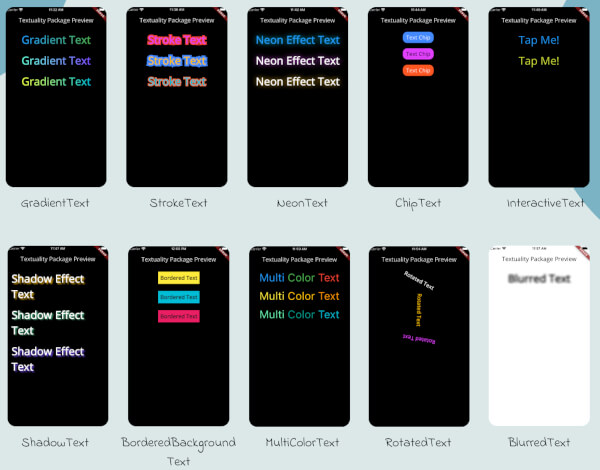
Textuality is a powerful Flutter package that enhances the appearance of text widgets with a variety of customizable text effects and styles. With this package, you can easily add gradient text, stroke text, neon effects, shadow effects, interactive text, and more to your Flutter app.

Textuality

Features

  • GradientText: Add gradient colors to your text.
  • StrokeText: Apply an outline or stroke around your text.
  • NeonText: Create a glowing neon text effect.
  • ChipText: Display text inside stylish chip-like containers.
  • ShadowText: Add customizable shadows to your text.
  • InteractiveText: Make text interactive for clicks, taps, or custom gestures.
  • MultiColorText: Display text in multiple colors, even within the same string.
  • RotatedText: Rotate the text in any direction, including vertical.
  • BlurredText: Add a blurred effect to your text.
  • BorderedBackgroundText: Add a border around the background of your text.

Each widget accepts various optional parameters for customization, such as style, text alignment, maxLines, overflow, and more.

Installation

To use the textuality package in your Flutter project, follow these steps:

  1. Add the package to your pubspec.yaml file:

    dependencies:
      textuality: ^0.0.1


Run the following command to install the package:

flutter pub get

💻Example

Below is an example of how to use the Textuality package in your Flutter app:

import 'package:flutter/material.dart';
import 'package:textuality/textuality.dart';

class TextualityExample extends StatefulWidget {
  const TextualityExample({super.key});

  @override
  State<TextualityExample> createState() => _TextualityExampleState();
}

class _TextualityExampleState extends State<TextualityExample> {
  @override
  Widget build(BuildContext context) {
    return Scaffold(
      backgroundColor: Colors.white,
      appBar: AppBar(
          backgroundColor: Colors.white,
          title: Text(
            'Textuality Package Preview',
            style: TextStyle(color: Colors.black),
          )),
      body: SingleChildScrollView(
        padding: EdgeInsets.all(16.0),
        child: Center(
          child: Column(
            children: [
              // Gradient Text
              GradientText(
                text: 'Gradient Text',
                giveGradient: [Colors.blue, Colors.green],
                style: TextStyle(fontSize: 40, fontWeight: FontWeight.bold),
              ),
              SizedBox(height: 20),

              // Stroke Text
              StrokeText(
                text: 'Stroke Text',
                strokeColor: Colors.red,
                strokeWidth: 8.0,
                style: TextStyle(
                    fontSize: 40,
                    fontWeight: FontWeight.bold,
                    color: Colors.purpleAccent),
              ),
              SizedBox(height: 20),
              // Neon Text
              NeonText(
                text: 'Neon Effect Text',
                glowColor: Colors.cyan,
                blurRadius: 20.0,
                style: TextStyle(
                    fontSize: 40,
                    fontWeight: FontWeight.bold,
                    color: Colors.blue),
              ),
              SizedBox(height: 20),
              // Text Chips
              ChipText(
                text: 'Text Chip',
                chipColor: Colors.blueAccent,
                style: TextStyle(fontSize: 20, color: Colors.white),
              ),
              SizedBox(height: 20),

              // Shadow Text
              ShadowText(
                  text: 'Shadow Effect Text',
                  shadows: [
                    Shadow(
                      blurRadius: 5.0,
                      color: Colors.amber,
                      offset: Offset(5, 5),
                    ),
                  ],
                  style: TextStyle(
                      fontSize: 40,
                      fontWeight: FontWeight.bold,
                      color: Colors.white)),
              SizedBox(height: 20),
               ShadowText.simple(
                  text: 'Simple Shadow Effect Text',
                  style: TextStyle(
                     fontSize: 24,
                     fontWeight: FontWeight.bold,
                     color: Colors.blue,
                  ),
                  shadowColor: Colors.red,
                  shadowBlurRadius: 8.0,
                  shadowOffset: Offset(3, 3),
               ),
               SizedBox(height: 20),
              // Multi-Color Text
              MultiColorText(
                spans: [
                  TextSpan(
                    text: 'Multi',
                    style: TextStyle(color: Colors.blue, fontSize: 40),
                  ),
                  TextSpan(
                    text: 'Color ',
                    style: TextStyle(color: Colors.green, fontSize: 40),
                  ),
                  TextSpan(
                    text: 'Text',
                    style: TextStyle(color: Colors.red, fontSize: 40),
                  ),
                ],
              ),
              SizedBox(height: 20),
              // InteractiveTextuality
              InteractiveText(
                text: 'on Tap',
                onTap: () {},
                style: TextStyle(fontSize: 20, fontWeight: FontWeight.bold),
              ),
              SizedBox(height: 20),
              // Rotated Text
              RotatedText(
                text: 'Rotated Text',
                rotationAngle: 0.5, // Rotate 90 degrees
                style: TextStyle(fontSize: 40, fontWeight: FontWeight.bold),
              ),
              SizedBox(height: 20),

              // Blurred Text
              BlurredText(
                text: 'Blurred Text',
                blurStrength: 5.0,
                style: TextStyle(fontSize: 40, fontWeight: FontWeight.bold),
              ),
              SizedBox(height: 20),

              // Bordered Background Text
              BorderedBackgroundText(
                text: 'Bordered Background Text',
                borderColor: Colors.black,
                borderWidth: 3.0,
                backgroundColor: Colors.yellow,
                style: TextStyle(fontSize: 40, fontWeight: FontWeight.bold),
              ),
            ],
          ),
        ),
      ),
    );
  }
}


GradientTextuality GradientText

ChipTextuality ChipText

StrokeTextuality StrokeText

InteractiveTextuality InteractiveText

NeonTextuality NeonText

ShadowTextuality ShadowText

MultiColorTextuality MultiColorText

RotatedTextuality RotatedText

BlurredTextuality BlurredText

BorderedBackgroundTextuality BorderedText

Changelog

See the CHANGELOG.md file for updates.

License

This package is licensed under the MIT License.

Author

Hassan Zaheer

Kategorien

Quell-Repository

Projekte, die dieses Paket verwenden

Noch keine Daten verfügbar.