
 v0.5.5
time_chart
Ein scrollbarer Zeitverlauf in Flutter. Derzeit unterstützt en, ko Sprachen.
76Likes 5830-Tage-Downloads50Pub-Punkte
Keine Plattformdaten
Ein scrollbarer Zeitverlauf in Flutter.

{"sdk":"flutter"}{"sdk":"flutter"}^0.2.0^1.0.2^1.0.1^0.18.0{"sdk":"flutter"}^2.0.1Englischer Projektschnappschuss. Aktuelle Inhalte auf GitHub.
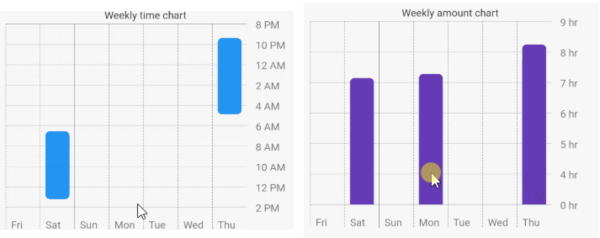
An amazing time chart in Flutter.
How the animation works?
The animation is created by determining the top hour and the bottom hour. The top hour denotes the most top hour displayed at the current scroll position, while the bottom hour represents its opposite. When scrolling occurs, the animation is triggered by comparing the previous top hour and bottom hour with the top hour and bottom hour after scrolling.
| TimeChart | AmountChart |
|---|---|
| https://github.com/jja08111/time_chart/blob/main/assets/images/time_chart/weekly_time_chart.gif?raw=true | https://github.com/jja08111/time_chart/blob/main/assets/images/amount_chart/weekly_amount_chart.gif?raw=true |
| https://github.com/jja08111/time_chart/blob/main/assets/images/time_chart/monthly_time_chart.gif?raw=true | https://github.com/jja08111/time_chart/blob/main/assets/images/amount_chart/monthly_amount_chart.gif?raw=true |
Add it to your package's pubspec.yaml file
dependencies:
  time_chart: ^0.5.4
Install packages from the command line
flutter packages get
Just input your DateTimeRange list to data: argument. The list must be sorted. First data is
latest, last data is oldest.
import 'package:flutter/material.dart';
import 'package:time_chart/time_chart.dart';

void main() => runApp(MyApp());

class MyApp extends StatelessWidget {

  // Data must be sorted.
  final data = [
    DateTimeRange(
      start: DateTime(2021,2,24,23,15),
      end: DateTime(2021,2,25,7,30),
    ),
    DateTimeRange(
      start: DateTime(2021,2,22,1,55),
      end: DateTime(2021,2,22,9,12),
    ),
    DateTimeRange(
      start: DateTime(2021,2,20,0,25),
      end: DateTime(2021,2,20,7,34),
    ),
    DateTimeRange(
      start: DateTime(2021,2,17,21,23),
      end: DateTime(2021,2,18,4,52),
    ),
    DateTimeRange(
      start: DateTime(2021,2,13,6,32),
      end: DateTime(2021,2,13,13,12),
    ),
    DateTimeRange(
      start: DateTime(2021,2,1,9,32),
      end: DateTime(2021,2,1,15,22),
    ),
    DateTimeRange(
      start: DateTime(2021,1,22,12,10),
      end: DateTime(2021,1,22,16,20),
    ),
  ];

  @override
  Widget build(BuildContext context) {
    final sizedBox = const SizedBox(height: 16);

    return MaterialApp(
      home: Scaffold(
        appBar: AppBar(title: const Text('Time chart example app')),
        body: SingleChildScrollView(
          child: Padding(
            padding: const EdgeInsets.all(16.0),
            child: Column(
              children: [
                const Text('Weekly time chart'),
                TimeChart(
                  data: data,
                  viewMode: ViewMode.weekly,
                ),
                sizedBox,
                const Text('Monthly time chart'),
                TimeChart(
                  data: data,
                  viewMode: ViewMode.monthly,
                ),
                sizedBox,
                const Text('Weekly amount chart'),
                TimeChart(
                  data: data,
                  chartType: ChartType.amount,
                  viewMode: ViewMode.weekly,
                  barColor: Colors.deepPurple,
                ),
                sizedBox,
                const Text('Monthly amount chart'),
                TimeChart(
                  data: data,
                  chartType: ChartType.amount,
                  viewMode: ViewMode.monthly,
                  barColor: Colors.deepPurple,
                ),
              ],
            ),
          ),
        ),
      ),
    );
  }
}
| English | Korean |
|---|---|
| https://github.com/jja08111/time_chart/blob/main/assets/images/time_chart/weekly_time_chart.gif?raw=true | https://github.com/jja08111/time_chart/blob/main/assets/images/time_chart/weekly_time_chart_ko.gif?raw=true |
You can also use korean language by Internationalizing Flutter apps.