
 v2.2.2
water_drop_nav_bar
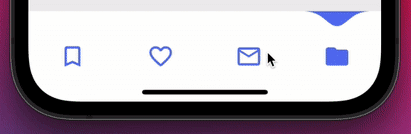
Untere Navigationsleiste mit einzigartigem Tropfeneffekt. Wenn eine Wassertröpfchen fällt, markiert sie das ausgewählte Element.
399Likes 26430-Tage-Downloads160Pub-Punkte
AndroidiOSWebmacOSWindowsLinux
Flutter-Navigationbar mit Wassertropfeneffekt.

{"sdk":"flutter"}{"sdk":"flutter"}^1.0.4Englischer Projektschnappschuss. Aktuelle Inhalte auf GitHub.
Water Drop Nav Bar
Add water_drop_nav_bar: to your pubspec.yaml dependencies then run flutter pub get
 dependencies:
  water_drop_nav_bar:
Add this line to import the package.
import 'package:water_drop_nav_bar/water_drop_nav_bar.dart';
Add WaterDropNavBar() as bottomNavigationBar of Scaffold() and body would be PageView() with NeverScrollableScrollPhysics() don't try to upate the seleted index from onPageChanged or will see some weird behaviour. Insted of PageView() You can use Stack() or AnimatedSwitcher for custom page transition animation.
barItems → List<BarItem>
onItemSelected → OnButtonPressCallback
selectedIndex → int
backgroundColor → Color
waterDropColor → Color
inactiveIconColor → Color
iconSize → double
bottomPadding → double
backgroundColor and waterDropColor of WaterDropNavBar() and Scaffold()'s backgroundColor (or whatever widget you are using) must be different (see the example app) This will visualize that the water drop is hanging from the top. return Scaffold(
body: PageView(
physics: NeverScrollableScrollPhysics(),
controller: pageController,
...
),
bottomNavigationBar: WaterDropNavBar(
backgroundColor: Colors.white,
onItemSelected: (index) {
setState(() {
selectedIndex = index;
});
pageController.animateToPage(selectedIndex,
duration: const Duration(milliseconds: 400),
curve: Curves.easeOutQuad);
},
selectedIndex: selectedIndex,
barItems: [
BarItem(
filledIcon: Icons.bookmark_rounded,
outlinedIcon: Icons.bookmark_border_rounded,
),
BarItem(
filledIcon: Icons.favorite_rounded,
outlinedIcon: Icons.favorite_border_rounded),
],
),
);
Some android phones might have black navigation bar, this looks ugly. It's recommended to wrap Scaffold with AnnotatedRegion<SystemUiOverlayStyle> to change that black navigation bar color to WaterDropNavBar backgroundColor. Check the example app. Like this 👇
return AnnotatedRegion<SystemUiOverlayStyle>(
     value: const SystemUiOverlayStyle(
       //this color must be equal to the WaterDropNavBar backgroundColor
       systemNavigationBarColor: Colors.white,
       systemNavigationBarIconBrightness: Brightness.dark,
     ),
     child: Scaffold(
       body: // code here
     )
);
result 👇
https://raw.githubusercontent.com/watery-desert/assets/main/water_drop_nav_bar/android-solution.pngYou can additionally provide some bottomPadding to add padding at the bottom of the bar, I think 8 is enough.
iPhones without swipe home gesture might have such issue where icons are pushed to the bottom. Provide some bottomPadding. I added 8 padding here.
result 👇
https://raw.githubusercontent.com/watery-desert/assets/main/water_drop_nav_bar/old-iphone-solution.pngNow you might ask how do you know which phone is using swipe home gesture?
Well, you can check bottom padding (using MediaQuery.of(context).padding.bottom) and if it's less than 34 or something then provide some bottom padding. Definitely try running different simulators and see.
The height must be constant because the animation is in vertical direction. According to me 60 is perfect. But if you think needs to be reduced then please create an issue with a screenshot. I will see if I can do something.
Wrap WaterDropNavBar with DecoratedBox or Container and pass BoxDecoration to decoration property. BoxDecoration takes list of boxShadow there you can pass your drop shadow.
DecoratedBox(
    decoration: BoxDecoration(
      boxShadow: [
        BoxShadow(
            color: Colors.black.withOpacity(0.2),
            offset: Offset(0, 4),
            blurRadius: 8.0)
      ],
    ),
    child: WaterDropNavBar()
)
Wrap WaterDropNavBar with ClipRRect and pass BorderRadius to borderRadius property.
  ClipRRect(
      borderRadius: const BorderRadius.vertical(
        top: Radius.circular(16),
      ),
      child: WaterDropNavBar(
    )
● Sliding Clipped Nav Bar
➜ Water Drop Nav Bar
● Swipeable Tile
● Loading Animation Widget