
v0.0.1+1
paymob_payment
Easily accept payments through Online Cards in your Flutter app with Paymob.
39Likes 330-day downloads150Pub points
AndroidiOSmacOS
Paymob payment plugin.
English project snapshot. Visit GitHub for the latest content.
Easily accept payments through Online Cards in your Flutter app with Paymob.
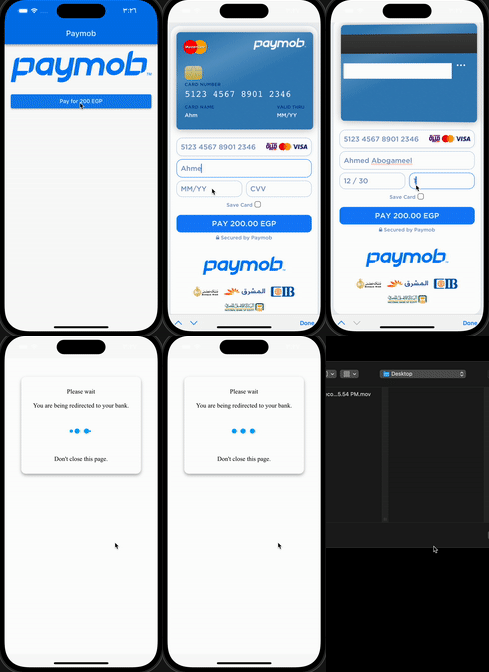
Add this to dependencies in your app's pubspec.yaml
paymob_payment : latest_version
PaymobPayment.instance.initialize(
  apiKey: "", // from dashboard Select Settings -> Account Info -> API Key
  integrationID: 123456, // from dashboard Select Developers -> Payment Integrations -> Online Card ID
  iFrameID: 123456, // from paymob Select Developers -> iframes
);
:pushpin: Note :
You can use this singleton (instance) or Create your own
if you want to create different iFrames or integrations
final PaymobPayment paymobPayment = PaymobPayment();
  paymobPayment.initialize(
  apiKey: "",
  integrationID: 123456,
  iFrameID: 123456,
);
final PaymobResponse? response = await PaymobPayment.instance.pay(
  context: context,
  currency: "EGP",
  amountInCents: "20000", // 200 EGP
  onPayment: (response) => setState(() => this.response = response), // Optional
)
| Variable | Type | Description |
|---|---|---|
| success | bool | Indicates if the transaction was successful or not |
| transactionID | String? | The ID of the transaction |
| responseCode | String? | The response code for the transaction |
| message | String? | A brief message describing the transaction |
| Variable | Description |
|---|---|
| Card Number | 5123456789012346 |
| Expiry Month | 12 |
| Expiry Year | 30 |
| CVV | 123 |
Change cvv to 111 or expiry year to 20
:pushpin: Note :
May be you have to contact paymob support to activate your test card

Dependency list 5 items
^5.2.1+1^4.2.2{"sdk":"flutter"}{"sdk":"flutter"}^2.0.2Start with your use case, compare repository activity, and check the original project before adopting it.
“A repository is the most basic element of GitHub.”
GitHub Docs — About repositories ↗