
Search packages, repositories and app categories

Package detailsv0.0.1+1

paymob_payment

Easily accept payments through Online Cards in your Flutter app with Paymob.

AndroidiOSmacOS
30-day downloads
3
Likes
39
Pub points
150

Install package

flutter pub add paymob_payment

Package Overview

Package selection guidance compiled from public package information, community data, and project usage.

Paymob Payment is a Flutter package that enables seamless integration of online card payments into mobile applications. It simplifies the process of accepting payments through Paymob's secure payment gateway, supporting Android, iOS, and macOS platforms. Developers can easily implement payment functionality with minimal setup using the provided SDK. The package handles tokenization and secure transaction processing, ensuring compliance with industry standards. Ideal for e-commerce apps, subscription services, and any app requiring in-app payment capabilities.

Use cases

  • E-commerce apps
  • Subscription billing
  • In-app purchases
  • Digital service payments
  • Online ticketing

Key features

  • Secure card payments
  • Cross-platform support
  • Easy integration
  • Tokenized transactions
  • Real-time payment status

Suitable for

  • Mobile e-commerce apps
  • Subscription-based services
  • Digital product sellers
  • Payment-integrated platforms
  • Developers using Paymob

Considerations

  • Requires Paymob account setup
  • Needs proper API key configuration
  • Limited to Paymob's supported regions
  • Dependent on internet connectivity
  • May require additional backend validation
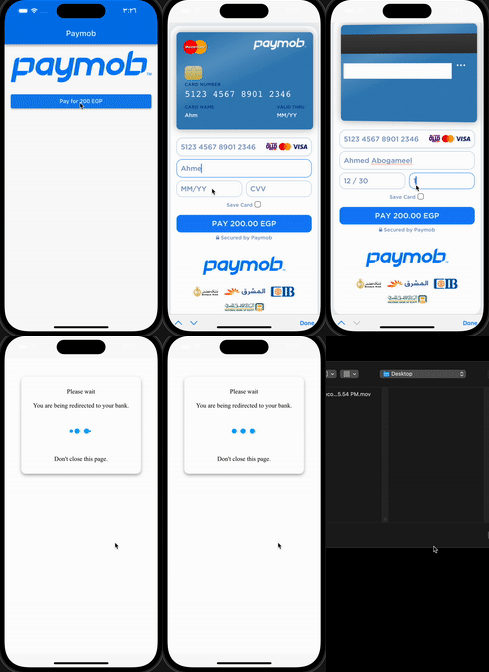
Original README

Original README snapshot from the linked source repository. Visit the repository for the latest content.

paymob_payment

Easily accept payments through Online Cards in your Flutter app with Paymob.

Example

:rocket: Installation

Add this to dependencies in your app's pubspec.yaml

paymob_payment : latest_version

:hammer: Initialization

PaymobPayment.instance.initialize(
  apiKey: "", // from dashboard Select Settings -> Account Info -> API Key 
  integrationID: 123456, // from dashboard Select Developers -> Payment Integrations -> Online Card ID 
  iFrameID: 123456, // from paymob Select Developers -> iframes 
);

:pushpin: Note :

You can use this singleton (instance) or Create your own
if you want to create different iFrames or integrations

final PaymobPayment paymobPayment = PaymobPayment();
  paymobPayment.initialize(
  apiKey: "", 
  integrationID: 123456, 
  iFrameID: 123456, 
);

:bookmark: Usage

final PaymobResponse? response = await PaymobPayment.instance.pay(
  context: context,
  currency: "EGP",
  amountInCents: "20000", // 200 EGP
  onPayment: (response) => setState(() => this.response = response), // Optional
)

:incoming_envelope: PaymobResponse

Variable Type Description
success bool Indicates if the transaction was successful or not
transactionID String? The ID of the transaction
responseCode String? The response code for the transaction
message String? A brief message describing the transaction

:test_tube: Testing Cards

:white_check_mark: Successful payment
Variable Description
Card Number 5123456789012346
Expiry Month 12
Expiry Year 30
CVV 123
:negative_squared_cross_mark: Declined payment

Change cvv to 111 or expiry year to 20

:pushpin: Note :

May be you have to contact paymob support to activate your test card

Categories

Dependencies

Dependency list 2 items

Source repository

Projects using this package

No data available yet.