

 v1.2.1
awesome_drawer_bar
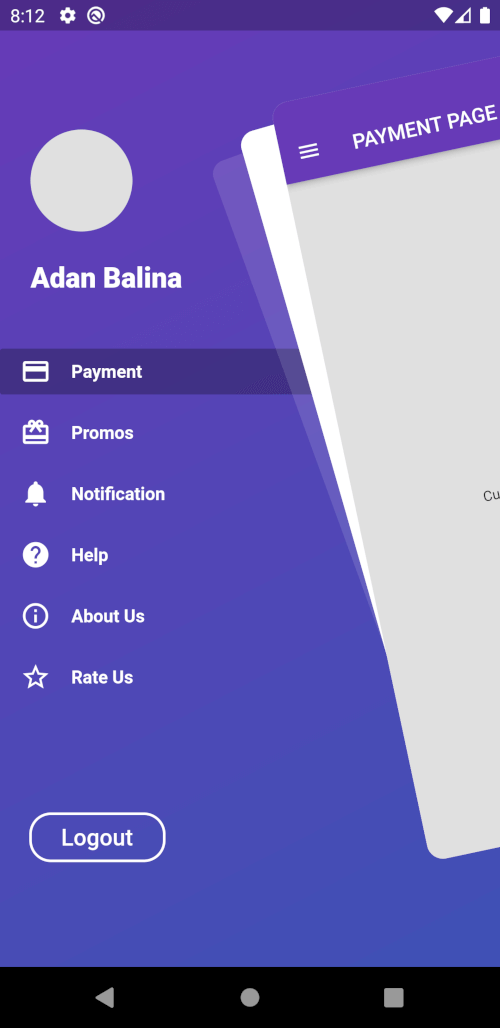
A Flutter package with custom implementation of the Side Menu (Drawer)
56Likes 31430-day downloads140Pub points
AndroidiOSWebmacOSWindowsLinux
AppCheap/awesome_drawer_bar open-source repository details.

English project snapshot. Visit GitHub for the latest content.


A Flutter package with custom implementation of the Side Menu (Drawer)
To start using this package, add awesome_drawer_bar dependency to your pubspec.yaml
dependencies:
  awesome_drawer_bar: '<latest_release>'
    AwesomeDrawerBar(
      controller: AwesomeDrawerBarController,
      menuScreen: MENU_SCREEN,
      mainScreen: MAIN_SCREEN,
      borderRadius: 24.0,
      showShadow: true,
      angle: -12.0,
      backgroundColor: Colors.grey[300],
      slideWidth: MediaQuery.of(context).size.width*.65,
      openCurve: Curves.fastOutSlowIn,
      closeCurve: Curves.bounceIn,
    )
| Parameters | Value | Required | Docs |
|---|---|---|---|
controller |
AwesomeDrawerBarController |
No | Controller to have access to the open/close/toggle function of the drawer |
mainScreen |
Widget |
Yes | Screen containing the main content to display |
menuScreen |
Widget |
Yes | Screen containing the menu/bottom screen |
slideWidth |
double |
No | Sliding width of the drawer - defaults to 275.0 |
borderRadius |
double |
No | Border radius of the slided content - defaults to 16.0 |
angle |
double |
No | Rotation angle of the drawer - defaults to -12.0 - should be 0.0 to -30.0 |
backgroundColor |
Color |
No | Background color of the drawer shadows - defaults to white |
showShadow |
bool |
No | Boolean, whether to show the drawer shadows - defaults to false |
openCurve |
Curve |
No | open animation curve - defaults to Curves.easeOut |
closeCurve |
Curve |
No | close animation curve - defaults to Curves.easeOut |
To get access to the drawer, and be able to control it, there are 2 ways:
AwesomeDrawerBarController inside the main widget where ou have the AwesomeDrawerBar widget and providing it to the widget, which will allow you to trigger the open/close/toggle methods. final _drawerController = AwesomeDrawerBarController();
_drawerController.open();
_drawerController.close();
_drawerController.toggle();
_drawerController.isOpen();
_drawerController.stateNotifier;
AwesomeDrawerBar. AwesomeDrawerBar.of(context).open();
AwesomeDrawerBar.of(context).close();
AwesomeDrawerBar.of(context).toggle();
AwesomeDrawerBar.of(context).isOpen();
AwesomeDrawerBar.of(context).stateNotifier;
    AwesomeDrawerBar(
      controller: AwesomeDrawerBarController,
      menuScreen: MENU_SCREEN,
      mainScreen: MAIN_SCREEN,
      borderRadius: 24.0,
      showShadow: false,
      angle: 0.0,
      backgroundColor: Colors.grey[300],
      slideWidth: MediaQuery.of(context).size.width*(AwesomeDrawerBar.isRTL()? .45: 0.65),
    )
    AwesomeDrawerBar(
      controller: AwesomeDrawerBarController,
      menuScreen: MENU_SCREEN,
      mainScreen: MAIN_SCREEN,
      borderRadius: 24.0,
      showShadow: true,
      angle: 0.0,
      backgroundColor: Colors.grey[300],
      slideWidth: MediaQuery.of(context).size.width*(AwesomeDrawerBar.isRTL()? .45: 0.65),
    )
    AwesomeDrawerBar(
      controller: AwesomeDrawerBarController,
      menuScreen: MENU_SCREEN,
      mainScreen: MAIN_SCREEN,
      borderRadius: 24.0,
      showShadow: false,
      angle: -12.0,
      backgroundColor: Colors.grey[300],
      slideWidth: MediaQuery.of(context).size.width*(AwesomeDrawerBar.isRTL()? .45: 0.65),
    )
    AwesomeDrawerBar(
      controller: AwesomeDrawerBarController,
      menuScreen: MENU_SCREEN,
      mainScreen: MAIN_SCREEN,
      borderRadius: 24.0,
      showShadow: true,
      angle: -12.0,
      backgroundColor: Colors.grey[300],
      slideWidth: MediaQuery.of(context).size.width*(AwesomeDrawerBar.isRTL()? .45: 0.65),
    )
Please file any issues, bugs or feature request as an issue on our GitHub page.
If you would like to contribute to the plugin (e.g. by improving the documentation, solving a bug or adding a cool new feature), please carefully review our contribution guide and send us your pull request.
Credits goes to pedromassango as most of this package comes from his implementation.
Dependency list 3 items
{"sdk":"flutter"}^0.3.1{"sdk":"flutter"}Start with your use case, compare repository activity, and check the original project before adopting it.
“A repository is the most basic element of GitHub.”
GitHub Docs — About repositories ↗