FLUTTER ECOSYSTEM

KinjalDhamat312/FlutterChatBubble

Flutter Widget for creating different types of chat Bubble

FlutterChatBubble project cover
Stars
44
Forks
17
Last push (UTC)
Feb 10, 2023
Project status
Active
Kinjal GitHub avatar
GITHUB User

Kinjal ↗

🚀 📱 Flutter & Android Developer | 💻 Passionate about crafting seamless mobile experiences.

LanguagesDartRubyKotlinSwiftObjective-C

Packages published by this repository

Dependencies used

Dependency list 3 items
  • flutter{"sdk":"flutter"}
  • flutter_testDevelopment{"sdk":"flutter"}
  • testDevelopment^1.16.8

Original README

English project snapshot. Visit GitHub for the latest content.

Expand / collapse project README

Flutter Chat Bubble/UI

Discover the ultimate Flutter widget for creating diverse chat UI designs like WhatsApp, Telegram, and more. With its customizable properties, create stunning chat UI and elevate the user experience in your messaging app. Enhance your Flutter development skills with this top-notch chat UI widget and make a mark in the world of real-time communication.

Usage

Add this to your package's pubspec.yaml file:

dependencies:
  flutter_chat_bubble: <latest-version>

Examples

Easily create dynamic chat bubbles with the ChatBubble widget in Flutter with the extensive range of properties.

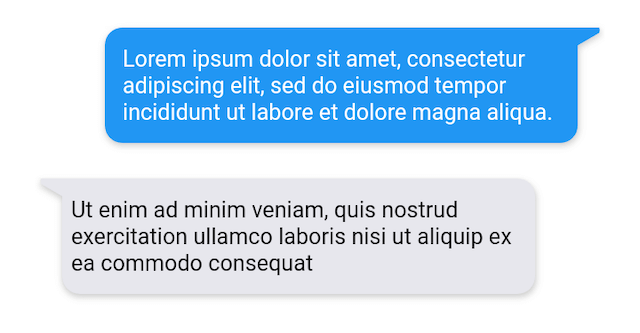
Example 1

example 1

  ChatBubble(
        clipper: ChatBubbleClipper1(type: BubbleType.sendBubble),
        alignment: Alignment.topRight,
        margin: EdgeInsets.only(top: 20),
        backGroundColor: Colors.blue,
        child: Container(
          constraints: BoxConstraints(
            maxWidth: MediaQuery.of(context).size.width * 0.7,
          ),
          child: Text(
            "Lorem ipsum dolor sit amet, consectetur adipiscing elit, sed do eiusmod tempor incididunt ut labore et dolore magna aliqua.",
            style: TextStyle(color: Colors.white),
          ),
        ),
      )
  
  ChatBubble(
    clipper: ChatBubbleClipper1(type: BubbleType.receiverBubble),
    backGroundColor: Color(0xffE7E7ED),
    margin: EdgeInsets.only(top: 20),
    child: Container(
      constraints: BoxConstraints(
        maxWidth: MediaQuery.of(context).size.width * 0.7,
      ),
      child: Text(
        "Ut enim ad minim veniam, quis nostrud exercitation ullamco laboris nisi ut aliquip ex ea commodo consequat",
        style: TextStyle(color: Colors.black),
      ),
    ),
  )
Example 2

example 2

ChatBubble(
    clipper: ChatBubbleClipper2(type: BubbleType.sendBubble),
  )
  
ChatBubble(
    clipper: ChatBubbleClipper2(type: BubbleType.receiverBubble),
  )
Example 3

example 3

ChatBubble(
    clipper: ChatBubbleClipper3(type: BubbleType.sendBubble),
  )
  
ChatBubble(
    clipper: ChatBubbleClipper3(type: BubbleType.receiverBubble),
  )
Example 4

example 4

ChatBubble(
    clipper: ChatBubbleClipper4(type: BubbleType.sendBubble),
  )
  
ChatBubble(
    clipper: ChatBubbleClipper4(type: BubbleType.receiverBubble),
  )
Example 5

example 5

ChatBubble(
    clipper: ChatBubbleClipper5(type: BubbleType.sendBubble),
  )
  
ChatBubble(
    clipper: ChatBubbleClipper5(type: BubbleType.receiverBubble),
  )
Example 6

example 6

ChatBubble(
    clipper: ChatBubbleClipper6(type: BubbleType.sendBubble),
  )
  
ChatBubble(
    clipper: ChatBubbleClipper6(type: BubbleType.receiverBubble),
  )
Example 7

example 7

ChatBubble(
    clipper: ChatBubbleClipper7(type: BubbleType.sendBubble),
  )
  
ChatBubble(
    clipper: ChatBubbleClipper7(type: BubbleType.receiverBubble),
  )
Example 8

example 8

ChatBubble(
    clipper: ChatBubbleClipper8(type: BubbleType.sendBubble),
  )
  
ChatBubble(
    clipper: ChatBubbleClipper8(type: BubbleType.receiverBubble),
  )
Example 9

example 9

ChatBubble(
    clipper: ChatBubbleClipper9(type: BubbleType.sendBubble),
  )
  
ChatBubble(
    clipper: ChatBubbleClipper9(type: BubbleType.receiverBubble),
  )
Example 10

example 10

ChatBubble(
    clipper: ChatBubbleClipper10(type: BubbleType.sendBubble),
  )
  
ChatBubble(
    clipper: ChatBubbleClipper10(type: BubbleType.receiverBubble),
  )

Features and bugs

Submit feature requests and report bugs through the issue tracker.