Get a top-notch chat UI widget for Flutter app development. Create diverse designs like WhatsApp and Telegram. Customize properties for stunning UI. Enhance skills and elevate user experience in real-time communication apps.
Package selection guidance compiled from public package information, community data, and project usage.
A Flutter package that provides a customizable chat bubble UI for building real-time messaging interfaces. Inspired by popular apps like WhatsApp and Telegram, it enables developers to create visually appealing and interactive chat experiences across multiple platforms. With extensive customization options for colors, shapes, and animations, it supports diverse design needs while maintaining performance. Ideal for enhancing user engagement in communication-focused applications.
Use cases
Real-time messaging apps
Customer support chat interfaces
Social media messaging features
Group chat implementations
In-app notifications with chat style
Educational app discussion boards
Key features
Customizable bubble styles
Support for message alignment (left/right)
Built-in animation effects
Cross-platform compatibility
Easy integration with existing chat logic
Responsive design for all screen sizes
Suitable for
Developers building chat applications
UI designers seeking reusable components
Teams creating multi-platform messaging solutions
Startups prototyping communication features
Frontend engineers focused on UX enhancement
Considerations
Requires additional state management for full chat functionality
May need custom styling for complex layouts
Performance impact with large message lists
Limited built-in typing indicators or read receipts
Not a complete chat solution out of the box
Original README
Original README snapshot from the linked source repository. Visit the repository for the latest content.
Flutter Chat Bubble/UI
Discover the ultimate Flutter widget for creating diverse chat UI designs like WhatsApp, Telegram, and more. With its customizable properties, create stunning chat UI and elevate the user experience in your messaging app. Enhance your Flutter development skills with this top-notch chat UI widget and make a mark in the world of real-time communication.
Usage
Add this to your package's pubspec.yaml file:
dependencies:flutter_chat_bubble:<latest-version>
Examples
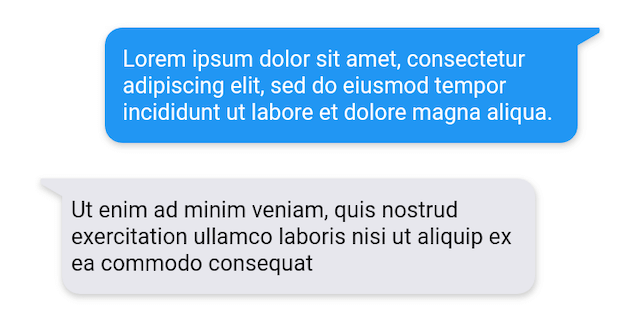
Easily create dynamic chat bubbles with the ChatBubble widget in Flutter with the extensive range of properties.
Example 1
  ChatBubble(
        clipper: ChatBubbleClipper1(type: BubbleType.sendBubble),
        alignment: Alignment.topRight,
        margin: EdgeInsets.only(top: 20),
        backGroundColor: Colors.blue,
        child: Container(
          constraints: BoxConstraints(
            maxWidth: MediaQuery.of(context).size.width * 0.7,
          ),
          child: Text(
            "Lorem ipsum dolor sit amet, consectetur adipiscing elit, sed do eiusmod tempor incididunt ut labore et dolore magna aliqua.",
            style: TextStyle(color: Colors.white),
          ),
        ),
      )

  ChatBubble(
    clipper: ChatBubbleClipper1(type: BubbleType.receiverBubble),
    backGroundColor: Color(0xffE7E7ED),
    margin: EdgeInsets.only(top: 20),
    child: Container(
      constraints: BoxConstraints(
        maxWidth: MediaQuery.of(context).size.width * 0.7,
      ),
      child: Text(
        "Ut enim ad minim veniam, quis nostrud exercitation ullamco laboris nisi ut aliquip ex ea commodo consequat",
        style: TextStyle(color: Colors.black),
      ),
    ),
  )