

v0.0.2
spear_menu
A Flutter spear dropdown menu plugin. supported both iOS and Android.
38Likes 1230-day downloads40Pub points
Platforms unavailable
Mohanraj153/flutter_spear_menu open-source repository details.

English project snapshot. Visit GitHub for the latest content.
A spear dropdown menu plugin. The Spear Menu widget is built to be below placed in the button or Icon widget, replacing the FloatingActionButton widget.
it's possible to set anywhere in scaffold.
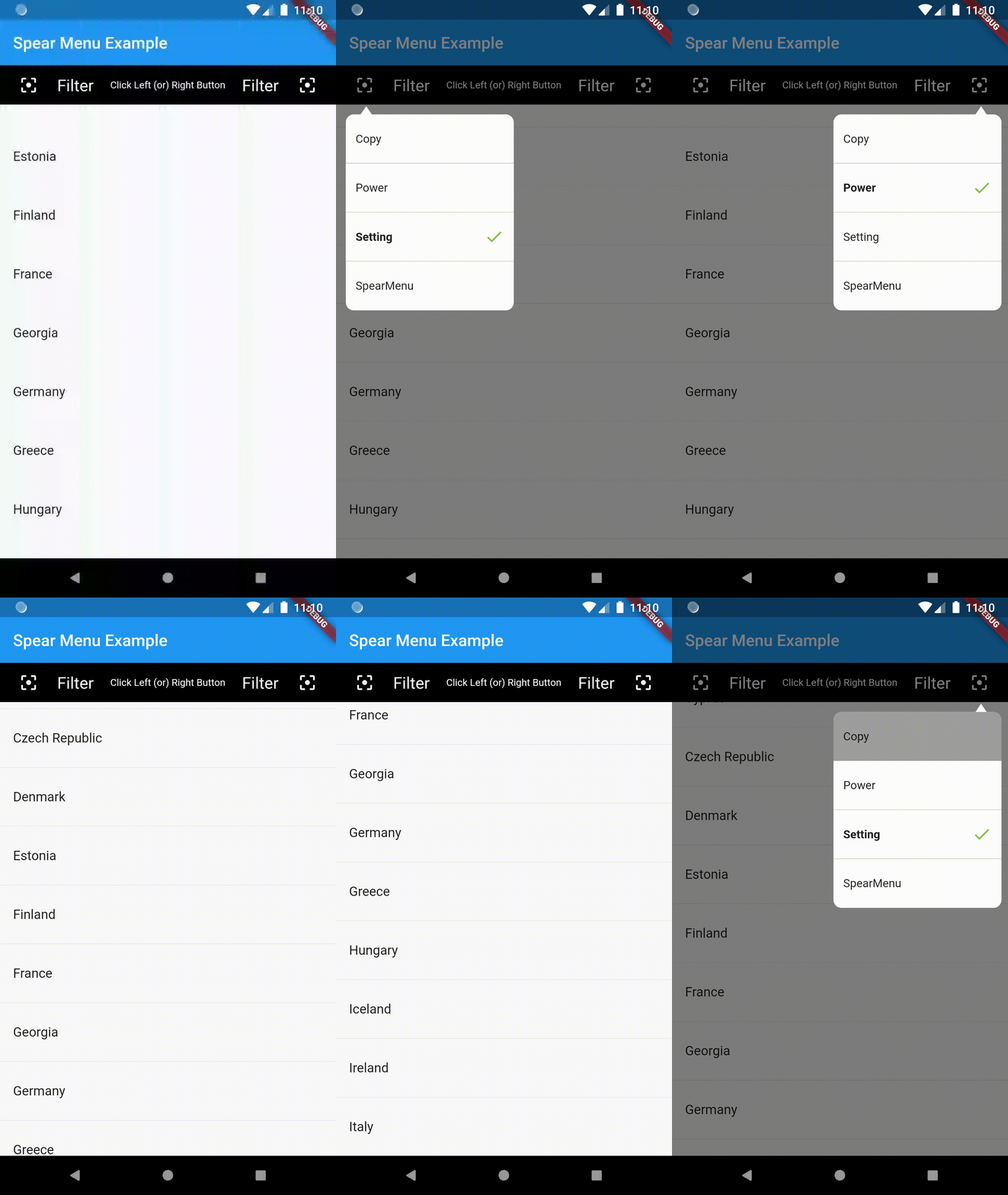
Example Usage (complete with all params):
You can find the demo at the 'example' folder.
First, you should set the context at somewhere in you code. Like below:
PopupMenu.context = context;
import 'package:flutter/material.dart';
import 'package:popup_menu/popup_menu.dart';
import 'CustomData.dart';

void main() => runApp(MyApp());

class MyApp extends StatelessWidget {
  // This widget is the root of your application.
  @override
  Widget build(BuildContext context) {
    return MaterialApp(
      title: 'Flutter Demo',
      home: MyHomePage(title: 'Popup Menu Example'),
    );
  }
}

class MyHomePage extends StatefulWidget {
  MyHomePage({Key key, this.title}) : super(key: key);

  final String title;

  @override
  _MyHomePageState createState() => _MyHomePageState();
}

class _MyHomePageState extends State<MyHomePage> {
  PopupMenu menu;
  GlobalKey btnKey = GlobalKey();
  List<CustomData> menuList = new List<CustomData>();

  @override
  Widget build(BuildContext context) {
    PopupMenu.context = context;

    return Scaffold(
      appBar: AppBar(
        title: Text(widget.title),
      ),
      body: Container(
        alignment: Alignment.topLeft,
        child: Column(
          mainAxisAlignment: MainAxisAlignment.end,
          children: <Widget>[
            Container(
              child: MaterialButton(
                height: 10.0,
                key: btnKey,
                onPressed: menuData,
                child: Icon(Icons.menu,),
              ),
            )
          ],
        ),
      ),
    );
  }

  void menuData() {
    if(menuList.isEmpty){
      menuList.clear();
      menuList.add(CustomData('Copy', false));
      menuList.add(CustomData('Power', false));
      menuList.add(CustomData('Setting', true));
      menuList.add(CustomData('PopupMenu', false));
    }

    List<MenuItemProvider> setData = new List<MenuItemProvider>();
    setData.clear();
    for(var io in menuList){
      print("Result : " + io.name);
      setData.add(MenuItem(title: io.name, isActive: io.isShow));
    }

    PopupMenu menu = PopupMenu(
        //backgroundColor: Colors.teal,
        // lineColor: Colors.tealAccent,
        items: setData,

        onClickMenu: onClickMenu,
        stateChanged: stateChanged,
        onDismiss: onDismiss);
    menu.show(widgetKey: btnKey);
  }

  void onClickMenu(MenuItemProvider item) {
    menuList.map((element) {
      if(item.menuTitle == element.name){
        element.isShow = true;
      }else{
        element.isShow = false;
      }
    }).toList();

    print('Click menu -> ${item.menuTitle}');
  }

  void stateChanged(bool isShow) {
    print('menu is ${isShow ? 'showing' : 'closed'}');
  }

  void onDismiss() {
    print('Menu is dismiss');
  }

}
Please file an issue to send feedback or report a bug. Thank you!
Every pull request is welcome.
Dependency list 2 items
{"sdk":"flutter"}{"sdk":"flutter"}Start with your use case, compare repository activity, and check the original project before adopting it.
“A repository is the most basic element of GitHub.”
GitHub Docs — About repositories ↗