Search packages, repositories and app categories

Package detailsv0.0.2

spear_menu

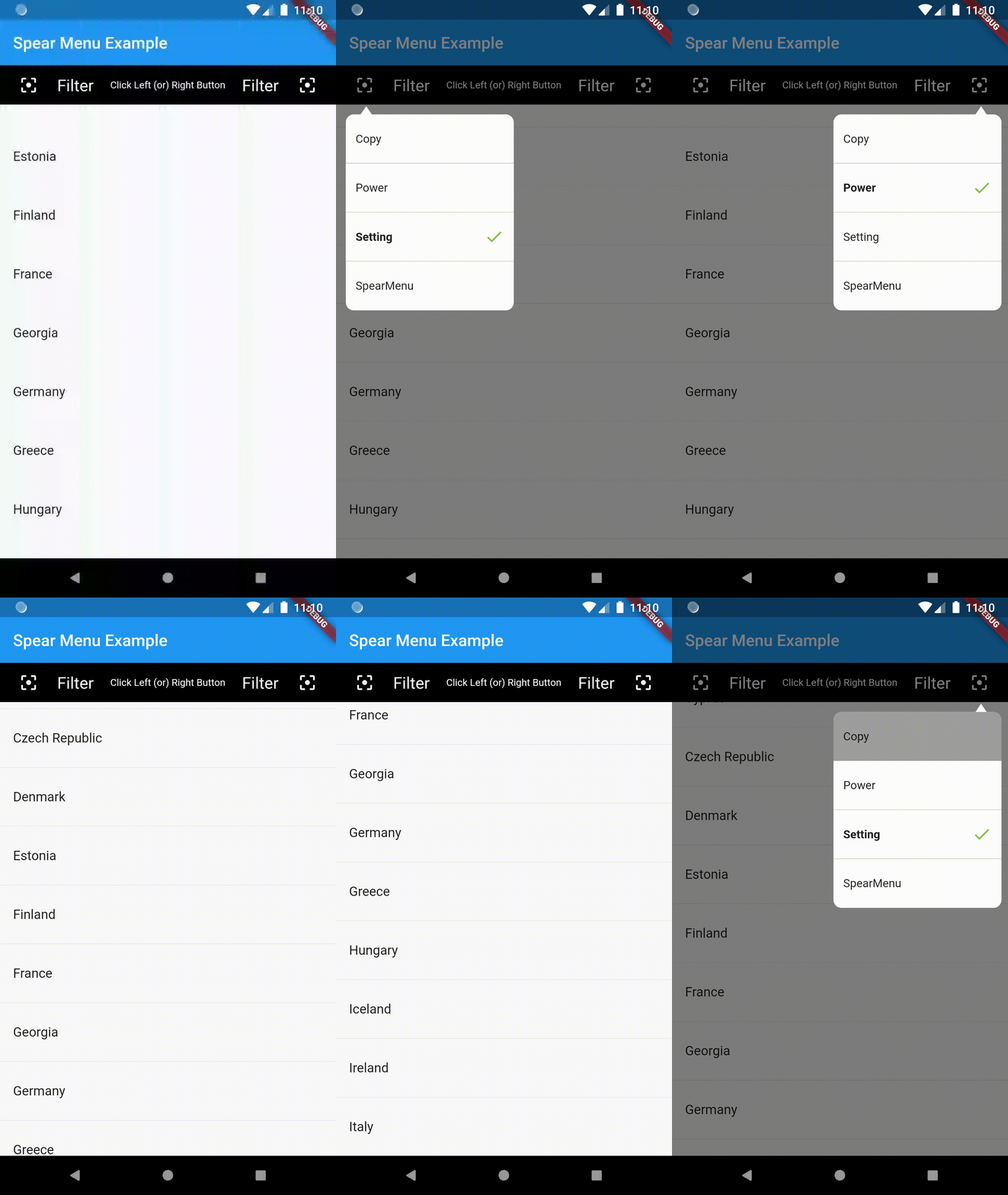
A Flutter spear dropdown menu plugin. supported both iOS and Android.

30-day downloads
12
Likes
38
Pub points
40

Install package

flutter pub add spear_menu

Package Overview

Package selection guidance compiled from public package information, community data, and project usage.

Spear Menu is a Flutter plugin that provides a sleek, customizable dropdown menu with a spear-like animation effect. Designed for both iOS and Android, it enhances user interaction with smooth transitions and modern visuals. The plugin integrates easily into existing Flutter apps, offering developers a visually appealing way to present options. With minimal setup via `flutter pub add spear_menu`, it supports responsive design and can be tailored to fit various UI requirements. Ideal for forms, settings, or any interface needing an elegant selection mechanism.

Use cases

  • Dropdown selection in mobile apps
  • Form input enhancements
  • Settings menus
  • Customizable UI components
  • Interactive navigation elements

Key features

  • Spear-style animation effect
  • Cross-platform support (iOS & Android)
  • Easy integration with Flutter
  • Customizable appearance
  • Responsive design compatibility

Suitable for

  • Mobile app developers
  • UI/UX designers
  • Flutter beginners
  • Apps requiring animated dropdowns
  • Projects with modern visual themes

Considerations

  • Limited to mobile platforms
  • Requires understanding of Flutter layout
  • Animation may impact performance on low-end devices
  • No web or desktop support mentioned
  • Custom styling requires additional code

Original README

Original README snapshot from the linked source repository. Visit the repository for the latest content.

Flutter Spear Menu

Usage

A spear dropdown menu plugin. The Spear Menu widget is built to be below placed in the button or Icon widget, replacing the FloatingActionButton widget. it's possible to set anywhere in scaffold.

alt text

Example Usage (complete with all params):

You can find the demo at the 'example' folder.

First, you should set the context at somewhere in you code. Like below:

PopupMenu.context = context;
import 'package:flutter/material.dart';
import 'package:popup_menu/popup_menu.dart';
import 'CustomData.dart';

void main() => runApp(MyApp());

class MyApp extends StatelessWidget {
  // This widget is the root of your application.
  @override
  Widget build(BuildContext context) {
    return MaterialApp(
      title: 'Flutter Demo',
      home: MyHomePage(title: 'Popup Menu Example'),
    );
  }
}

class MyHomePage extends StatefulWidget {
  MyHomePage({Key key, this.title}) : super(key: key);

  final String title;

  @override
  _MyHomePageState createState() => _MyHomePageState();
}

class _MyHomePageState extends State<MyHomePage> {
  PopupMenu menu;
  GlobalKey btnKey = GlobalKey();
  List<CustomData> menuList = new List<CustomData>();

  @override
  Widget build(BuildContext context) {
    PopupMenu.context = context;

    return Scaffold(
      appBar: AppBar(
        title: Text(widget.title),
      ),
      body: Container(
        alignment: Alignment.topLeft,
        child: Column(
          mainAxisAlignment: MainAxisAlignment.end,
          children: <Widget>[
            Container(
              child: MaterialButton(
                height: 10.0,
                key: btnKey,
                onPressed: menuData,
                child: Icon(Icons.menu,),
              ),
            )
          ],
        ),
      ),
    );
  }

  void menuData() {
    if(menuList.isEmpty){
      menuList.clear();
      menuList.add(CustomData('Copy', false));
      menuList.add(CustomData('Power', false));
      menuList.add(CustomData('Setting', true));
      menuList.add(CustomData('PopupMenu', false));
    }

    List<MenuItemProvider> setData = new List<MenuItemProvider>();
    setData.clear();
    for(var io in menuList){
      print("Result : " + io.name);
      setData.add(MenuItem(title: io.name, isActive: io.isShow));
    }

    PopupMenu menu = PopupMenu(
        //backgroundColor: Colors.teal,
        // lineColor: Colors.tealAccent,
        items: setData,

        onClickMenu: onClickMenu,
        stateChanged: stateChanged,
        onDismiss: onDismiss);
    menu.show(widgetKey: btnKey);
  }

  void onClickMenu(MenuItemProvider item) {
    menuList.map((element) {
      if(item.menuTitle == element.name){
        element.isShow = true;
      }else{
        element.isShow = false;
      }
    }).toList();

    print('Click menu -> ${item.menuTitle}');
  }

  void stateChanged(bool isShow) {
    print('menu is ${isShow ? 'showing' : 'closed'}');
  }

  void onDismiss() {
    print('Menu is dismiss');
  }

}

Issues & Feedback

Please file an issue to send feedback or report a bug. Thank you!

Contributing

Every pull request is welcome.

Categories

Source repository

Projects using this package

No data available yet.