

 v0.2.4
circular_countdown_timer
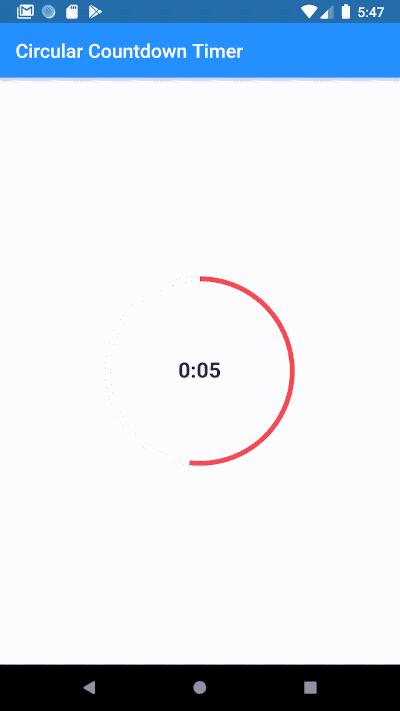
Make an animated circular countdown using Circular Countdown Timer.
617Likes 30.4K30-day downloads140Pub points
AndroidiOSWebmacOSWindowsLinux
Make an animated circular countdown using Circular Countdown Timer

English project snapshot. Visit GitHub for the latest content.
Make an animated circular countdown using Circular Countdown Timer.
To use this plugin, add circular_countdown_timer as a dependency in your pubspec.yaml file.
CircularCountDownTimer(
     duration: 10,
     initialDuration: 0,
     controller: CountDownController(),
     width: MediaQuery.of(context).size.width / 2,
     height: MediaQuery.of(context).size.height / 2,
     ringColor: Colors.grey[300]!,
     ringGradient: null,
     fillColor: Colors.purpleAccent[100]!,
     fillGradient: null,
     backgroundColor: Colors.purple[500],
     backgroundGradient: null,
     strokeWidth: 20.0,
     strokeCap: StrokeCap.round,
     textStyle: TextStyle(
         fontSize: 33.0, color: Colors.white, fontWeight: FontWeight.bold),
     textAlign: TextAlign.center,
     textFormat: CountdownTextFormat.S,
     isReverse: false,
     isReverseAnimation: false,
     isTimerTextShown: true,
     autoStart: false,
     onStart: () {
        debugPrint('Countdown Started');
     },
     onComplete: () {
        debugPrint('Countdown Ended');
     },
     onChange: (String timeStamp) {
        debugPrint('Countdown Changed $timeStamp');
     },
     timeFormatterFunction: (defaultFormatterFunction, duration) {
        if (duration.inSeconds == 0) {
           return "Start";
        } else {
           return Function.apply(defaultFormatterFunction, [duration]);
        }
     },
 );
| Name | Type | Default Value | Description |
|---|---|---|---|
key |
Key |
null | Key for Countdown Timer. |
duration |
int |
null | Countdown duration in Seconds. |
initialDuration |
int |
0 | Countdown initial elapsed Duration in Seconds. |
controller |
CountDownController |
null | Controls (i.e Start, Pause, Resume, Restart) the Countdown Timer. |
width |
double |
null | Width of the Countdown Widget. |
height |
double |
null | Height of the Countdown Widget. |
ringColor |
Color |
null | Ring Color for Countdown Widget. |
ringGradient |
Gradient |
null | Ring Gradient for Countdown Widget. Note that ringColor will not be effective if gradient is provided. |
fillColor |
Color |
null | Filling Color for Countdown Widget. |
fillGradient |
Gradient |
null | Filling Gradient for Countdown Widget. Note that fillColor will not be effective if gradient is provided. |
backgroundColor |
Color |
null | Background Color for Countdown Widget. |
backgroundGradient |
Gradient |
null | Background Gradient for Countdown Widget. Note that backgroundColor will not be effective if gradient is provided. |
strokeWidth |
double |
5.0 | Border Thickness of the Countdown Ring. |
strokeCap |
StrokeCap |
StrokeCap.butt | Begin and end contours with a flat edge and no extension. |
textStyle |
TextStyle |
TextStyle(fontSize: 16.0,color: Colors.black,) | Text Style for Countdown Text. |
textFormat |
String |
null | Format for the Countdown Text. |
isReverse |
bool |
false | Handles Countdown Timer (true for Reverse Countdown (max to 0), false for Forward Countdown (0 to max)). |
isReverseAnimation |
bool |
false | Handles Animation Direction (true for Reverse Animation, false for Forward Animation). |
isTimerTextShown |
bool |
true | Handles visibility of the Countdown Text. |
autoStart |
bool |
true | Handles the timer start. |
onStart |
VoidCallback |
null | This Callback will execute when the Countdown Starts. |
onComplete |
VoidCallback |
null | This Callback will execute when the Countdown Ends. |
onChange |
ValueChanged<String> |
null | This Callback will execute when the Countdown Changes. |
timeFormatterFunction |
Function(Function(Duration duration) defaultFormatterFunction,Duration duration) |
null | This Callback allows you to format the current duration to any String in Countdown Widget. |


Dependency list 3 items
{"sdk":"flutter"}{"sdk":"flutter"}^3.0.0Start with your use case, compare repository activity, and check the original project before adopting it.
“A repository is the most basic element of GitHub.”
GitHub Docs — About repositories ↗