

 v0.3.1
ticket_material
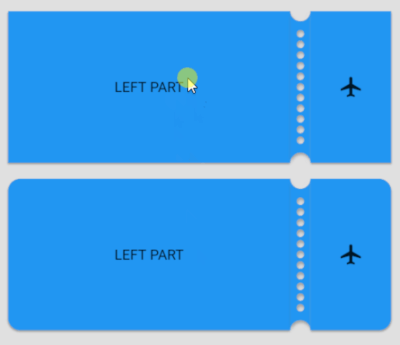
A ticket view widget. Support all platform. There is standard click behavior.
32Likes 43130-day downloads150Pub points
AndroidiOSWebmacOSWindowsLinux
NikitaMasev/flutter_ticket_material open-source repository details.

English project snapshot. Visit GitHub for the latest content.
A ticket view widget.
Plugin was tested on following platforms:
The support of MacOS is not guaranteed, but you can try to build it.
Also on web platform it's does not work.
To use this plugin, add universal_navigation as a dependency in your pubspec.yaml file.
Add dependency into pubspec.yaml.
dependencies:
  ticket_material:
Create a page.
class ExamplePage extends StatefulWidget {
  static final routeName = '/example';

  @override
  _ExamplePageState createState() => _ExamplePageState();
}

class _ExamplePageState extends State<ExamplePage> {
  final colorBg = Colors.grey[300];

  @override
  Widget build(BuildContext context) {
    return Scaffold(
      backgroundColor: colorBg,
      body: SafeArea(
        child: Padding(
          padding: const EdgeInsets.all(16.0),
          child: TicketMaterial(
            height: 150,
            colorBackground: Colors.blue,
            leftChild: _buildLeft(),
            rightChild: _buildRight(),
          ),
        ),
      ),
    );
  }

  Widget _buildLeft() {
    return Container(
      child: Center(
        child: Text('LEFT PART'),
      ),
    );
  }

  Widget _buildRight() {
    return Container(
      child: Center(
        child: Icon(Icons.airplanemode_active),
      ),
    );
  }
}
Result: 
With tap animation:

Full example with ticket_material you can check by this link.
Dependency list 2 items
{"sdk":"flutter"}{"sdk":"flutter"}Start with your use case, compare repository activity, and check the original project before adopting it.
“A repository is the most basic element of GitHub.”
GitHub Docs — About repositories ↗