Search packages, repositories and app categories

ticket_material cover
Package detailsv0.3.1

ticket_material

A ticket view widget. Support all platform. There is standard click behavior.

AndroidiOSWebmacOSWindowsLinux
30-day downloads
431
Likes
32
Pub points
150

Install package

flutter pub add ticket_material

Package Overview

Package selection guidance compiled from public package information, community data, and project usage.

A Flutter widget that creates a ticket-style view with platform-adaptive design, supporting all major platforms including Android, iOS, Web, macOS, Windows, and Linux. It features a standard click interaction for user engagement and includes built-in visual styling to mimic real-world tickets. The package uses custom clipping and decoration techniques to deliver a polished, consistent appearance across devices. Ideal for event tickets, boarding passes, or digital vouchers.

Use cases

  • Digital ticket displays
  • Event pass UIs
  • Boarding pass interfaces
  • Loyalty card designs
  • Promotional voucher layouts

Key features

  • Cross-platform compatibility
  • Built-in click behavior
  • Customizable ticket styling
  • Platform-specific rendering
  • Clipper-based design
  • Responsive layout

Suitable for

  • App developers creating ticket-based UIs
  • Designers needing reusable ticket components
  • Projects requiring consistent ticket visuals across platforms

Considerations

  • Limited customization beyond basic styling
  • Depends on platform-specific rendering behaviors
  • May require additional state management for interactive features

Original README

Original README snapshot from the linked source repository. Visit the repository for the latest content.

ticket_material

A ticket view widget.

Platform compatibility

Plugin was tested on following platforms:

  • Android;
  • IOS;
  • Windows 10 64 bit;
  • Linux (Ubuntu 20.04.1 LTS).

The support of MacOS is not guaranteed, but you can try to build it.

Also on web platform it's does not work.

Usage

To use this plugin, add universal_navigation as a dependency in your pubspec.yaml file.

Getting Started

Add dependency into pubspec.yaml.

dependencies:
  ticket_material:

Create a page.

class ExamplePage extends StatefulWidget {
  static final routeName = '/example';

  @override
  _ExamplePageState createState() => _ExamplePageState();
}

class _ExamplePageState extends State<ExamplePage> {
  final colorBg = Colors.grey[300];

  @override
  Widget build(BuildContext context) {
    return Scaffold(
      backgroundColor: colorBg,
      body: SafeArea(
        child: Padding(
          padding: const EdgeInsets.all(16.0),
          child: TicketMaterial(
            height: 150,
            colorBackground: Colors.blue,
            leftChild: _buildLeft(),
            rightChild: _buildRight(),
          ),
        ),
      ),
    );
  }

  Widget _buildLeft() {
    return Container(
      child: Center(
        child: Text('LEFT PART'),
      ),
    );
  }

  Widget _buildRight() {
    return Container(
      child: Center(
        child: Icon(Icons.airplanemode_active),
      ),
    );
  }
}

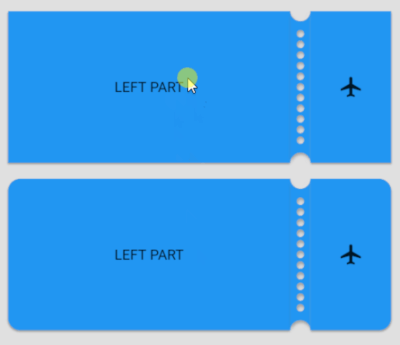
Result: demo

With tap animation: demo_tap

Full example with ticket_material you can check by this link.

Categories

Source repository

Projects using this package

No data available yet.