
v1.0.1
dynamic_theme
Changes the theme during runtime, also presists brightness settings across restarts
136Likes 87530-day downloads40Pub points
Platforms unavailable
Dynamically changing your theme without hassle
English project snapshot. Visit GitHub for the latest content.
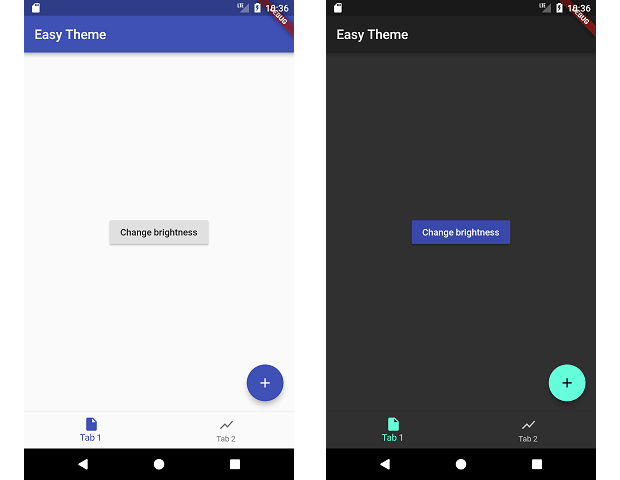
This packages manages changing your theme during runtime and persiting that theme.
dependencies:
  dynamic_theme: ^1.0.1
run packages get and import it
import 'package:dynamic_theme/dynamic_theme.dart';
if you want the dialog:
import 'package:dynamic_theme/theme_switcher_widgets.dart';
Wrap your material app like this:
class MyApp extends StatelessWidget {
  @override
  Widget build(BuildContext context) {
    return new DynamicTheme(
      defaultBrightness: Brightness.light,
      data: (brightness) => new ThemeData(
        primarySwatch: Colors.indigo,
        brightness: brightness,
      ),
      themedWidgetBuilder: (context, theme) {
        return new MaterialApp(
          title: 'Flutter Demo',
          theme: theme,
          home: new MyHomePage(title: 'Flutter Demo Home Page'),
        );
      }
    );
  }
}
Change the theme like this:
  void changeBrightness() {
    DynamicTheme.of(context).setBrightness(Theme.of(context).brightness == Brightness.dark? Brightness.light: Brightness.dark);
  }

  void changeColor() {
    DynamicTheme.of(context).setThemeData(new ThemeData(
        primaryColor: Theme.of(context).primaryColor == Colors.indigo? Colors.red: Colors.indigo
    ));
  }
When changing the brightness with setBrightness, it is additionally stored in the shared preferences.
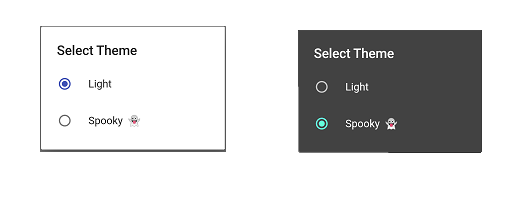
For help getting started with Flutter, view our online documentation.
For help on editing package code, view the documentation.

Dependency list 3 items
{"sdk":"flutter"}^2.0.5{"sdk":"flutter"}Start with your use case, compare repository activity, and check the original project before adopting it.
“A repository is the most basic element of GitHub.”
GitHub Docs — About repositories ↗