
v0.28.0
rxdart
RxDart is an implementation of the popular ReactiveX api for asynchronous programming, leveraging the native Dart Streams api.
2.9KLikes 5.3M30-day downloads135Pub points
AndroidiOSWebmacOSWindowsLinux
A visual editor for Flutter widgets

RxDart is an implementation of the popular ReactiveX api for asynchronous programming, leveraging the native Dart Streams api.
A flutter implementation of React hooks. It adds a new kind of widget with enhanced code reuse.
Opinionated, automatic Dart source code formatter. Provides an API and a CLI tool.
 v1.1.0
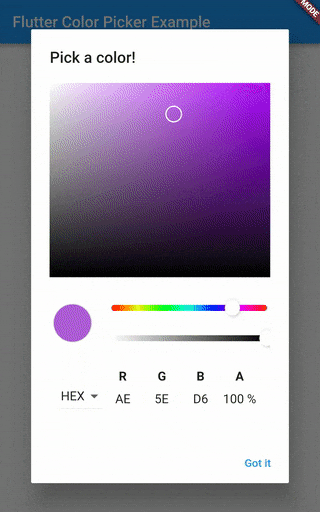
HSV(HSB)/HSL/RGB/Material color picker inspired by all the good design for your amazing flutter apps.
Syntax highlighting widget for Flutter with lots of languages and themes support.
A fluent, builder-based library for generating valid Dart code.
{"sdk":"flutter"}^2.0.1^2.0.1any^3.2.0^1.2.8any{"git":{"url":"https://github.com/Norbert515/file_system_explorer.git"}}{"git":{"url":"https://github.com/Norbert515/flutter_desktop_widgets2.git"}}^0.6.03.4.1^0.7.0{"git":{"url":"https://github.com/Norbert515/mustache.git"}}^0.1.2{"sdk":"flutter"}{"sdk":"flutter"}anyEnglish project snapshot. Visit GitHub for the latest content.
title
The project is currently not maintained by me and the code could probably use a bit of refactoring.
This README is still work in progress.
If anybody is interested in contributing/ forking/ using it as a base for another project - feel free!
title title
This is intended to be run using Flutter Desktop or Flutter web. For Desktop, simply switch to the master channel and run:
flutter run -d [windows|linux|macos]
A few words about the code architecture.
Widget-Elements play a central part in the Widget-Maker as these are actual widgets
you drag around and style.
The Widget-Elements can be found under lib/data/widget_elements.
Widget-Elements form a forth tree (on top of Widgets/RenderObjects and Elements) they include
a lot of meta information.
Widget-Elements only manage the tree, but not the actual rendering, interaction and modification
of the widgets, that is up to the widget which is generated by the generateWidget() method.
Those widgets have to mix in ElementWidgetStateMixin, that class contains code which handles common UX scenarios
like accepting children via drag, or showing a border on selection.
You certainly can make new Widget-Elements by hand, in fact Widget-Elements such as the Scaffold,
Row and more are hand made.
But a lot of widgets are pretty basic, so instead of copy-pasting the same wrapper code over and over again, there is a generator which does that for you.
Take a look at (lib/Data/widget_elements/config.yaml and README.md) to get a sense of the schema.
To generated those widget simply execute the lib/data/widget_elements/scripts/build.dart file.
Be sure to be inside the script folder when running that script because it relies on relative paths!
dart build.dart
The MProperty is the base class for all properties inside the Widget-Maker.
Each Widget-Element has a list of properties. These properties reflect the constructor parameters
of the widgets in code.
Properties are responsible for providing a way of changing themselves and providing meta information.
For more information take a look at lib/data/properties/basic_properties.dart
Not all tests seem to pass as of now.
flutter test
The docs folder contains the source for www.widgetmaker.dev
Feel free to donate a pizza/ coffee :)