Search packages, repositories and app categories

flutter_colorpicker cover
Package detailsv1.1.0

flutter_colorpicker

HSV(HSB)/HSL/RGB/Material color picker inspired by all the good design for your amazing flutter apps.

AndroidiOSWebmacOSWindowsLinux
30-day downloads
651K
Likes
1K
Pub points
150

Install package

flutter pub add flutter_colorpicker

Package Overview

Package selection guidance compiled from public package information, community data, and project usage.

A Flutter package offering HSV(HSB), HSL, RGB, and Material color pickers inspired by modern design principles. It provides intuitive, visually appealing widgets for selecting colors across multiple color models, ideal for apps requiring rich color customization. The picker supports all major platforms including Android, iOS, Web, macOS, Windows, and Linux, ensuring consistent user experiences. Built with Flutter's widget system, it integrates seamlessly into existing projects. The package is actively maintained and open-source, allowing developers to extend or contribute to its features.

Use cases

  • Custom theme creation
  • Color selection in design tools
  • App UI customization
  • Interactive color palettes
  • User preference settings

Key features

  • HSV/HSL/RGB/Material color models
  • Cross-platform compatibility
  • Modern, clean UI design
  • Easy integration with Flutter
  • Open-source and actively maintained

Suitable for

  • UI/UX developers
  • Design-focused applications
  • Color-intensive apps
  • Flutter beginners and experts

Considerations

  • Requires understanding of color models
  • May need additional styling for custom themes
  • Limited to color selection, not full palette management

Original README

Original README snapshot from the linked source repository. Visit the repository for the latest content.

flutter_colorpicker

pub package badge

HSV(HSB)/HSL/RGB/Material color picker inspired by all the good design for your amazing flutter apps.
Adorable color pickers out of the box with highly customized widgets to all developers' needs.

Web Example

Getting Started

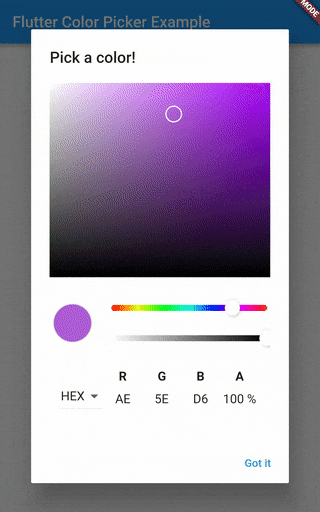
Use it in [showDialog] widget:

// create some values
Color pickerColor = Color(0xff443a49);
Color currentColor = Color(0xff443a49);

// ValueChanged<Color> callback
void changeColor(Color color) {
  setState(() => pickerColor = color);
}

// raise the [showDialog] widget
showDialog(
  context: context,
  child: AlertDialog(
    title: const Text('Pick a color!'),
    content: SingleChildScrollView(
      child: ColorPicker(
        pickerColor: pickerColor,
        onColorChanged: changeColor,
      ),
      // Use Material color picker:
      //
      // child: MaterialPicker(
      //   pickerColor: pickerColor,
      //   onColorChanged: changeColor,
      //   showLabel: true, // only on portrait mode
      // ),
      //
      // Use Block color picker:
      //
      // child: BlockPicker(
      //   pickerColor: currentColor,
      //   onColorChanged: changeColor,
      // ),
      //
      // child: MultipleChoiceBlockPicker(
      //   pickerColors: currentColors,
      //   onColorsChanged: changeColors,
      // ),
    ),
    actions: <Widget>[
      ElevatedButton(
        child: const Text('Got it'),
        onPressed: () {
          setState(() => currentColor = pickerColor);
          Navigator.of(context).pop();
        },
      ),
    ],
  ),
)

preview SlidePicker

Details in example folder.

Categories

Source repository

Projects using this package